

Apple Warns iCloud Users Some Disabled Services Were Accidentally Re-enabled in iOS 10.3 - MacRumorsOpen MenuShow RoundupsShow Forums menuVisit ForumsOpen Sidebar
Skip to Content

Apple Warns iCloud Users Some Disabled Services Were Accidentally Re-enabled in iOS 10.3

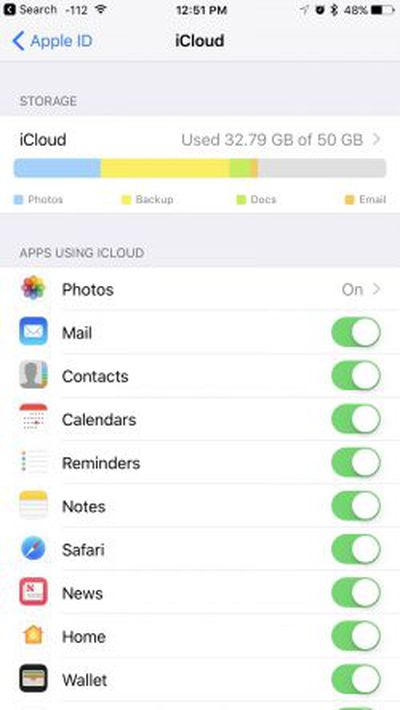
icloudsettingsApple today sent out emails to a small number of iCloud users, warning them that a bug in iOS 10.3 may have caused some iCloud services that had been disabled to be mistakenly re-enabled.

The email asks iCloud users to revisit their iCloud settings to make sure to turn off any service that might have been turned on through the iOS 10.3 update.

It's not entirely clear which iCloud services might have been affected, but MacRumors reader Karl, who sent us the email, said that he typically disables iCloud Mail. Following the update, he found the Mail option turned back on.

We discovered a bug in the recent iOS 10.3 software update that impacted a small number of iCloud users. This may have inadvertently reenabled some iCloud services that you had previously disabled on your device.

We suggest you go to iCloud settings on your iOS device to make sure that only the services you'd like to use are enabled.
Learn more about how to manage your iCloud settings or contact AppleCare with any questions.

The iCloud team

iOS 10.3, released on March 27, introduced a new Apple Filesystem among other major features like Find My AirPods, plus it included an overhauled iCloud storage breakdown, which may explain why some iCloud services were mistakenly turned back on.

To check which iCloud services are enabled on your iOS device, open the Settings app and scroll down to the "iCloud" section. A list of apps and services using iCloud is front and center, and anything that was enabled via iOS 10.3 can be turned off using the toggle buttons.

A wide range of first and third-party apps and services use Apple's iCloud feature, including Photos, Mail, Contacts, Calendars, Reminders, Notes, Safari, News, and more.

Update: According to Apple, iCloud Photo Library, iCloud Keychain, and Find My iPhone were not affected by the issue. The bug has been fixed in the iOS 10.3.1 update, so those who have not yet updated to iOS 10.3 but choose to update to iOS 10.3.1 will not be impacted by the bug. Apple has not shared how many users were affected by the bug but says not everyone who updated to iOS 10.3 will experience it.

Tag: iCloud

Popular Stories

iOS 26

iOS 26.4.1 Includes These Two Changes for iPhones

Wednesday April 8, 2026 7:17 pm PDT by
Apple has released a minor iOS 26.4.1 update for the iPhone 11 and newer. While the release notes for the update only mention unspecified "bug fixes," we have since learned about two specific changes that are included in it. First, 9to5Mac spotted an Apple Developer Forums thread suggesting that iOS 26.4.1 fixes an iOS 26.4 bug that affected iCloud syncing in some apps. Second, an...
iOS 27 on iPhone 17 1

iOS 27 Will Add These New Features to Your iPhone

Saturday May 2, 2026 8:43 am PDT by
Apple is expected to unveil iOS 27 during its WWDC 2026 keynote on June 8, and there are already many rumored features and changes for iPhones. The first developer beta of iOS 27 will likely be available immediately following the keynote, and a public beta typically follows in July. Following beta testing, the software update should be released to all users with a compatible iPhone in...
Apple Event Logo

Apple Just Released a New Accessory

Monday May 4, 2026 8:13 am PDT by
Apple today released a new Pride Edition Sport Loop for the Apple Watch. The band features a rainbow design with 11 colors of woven nylon yarns. The new Pride Edition Sport Loop is available to order now on Apple.com and in the Apple Store app in 40mm, 42mm, and 46mm sizes, and it will be available at Apple Store locations starting later this week. In the U.S., the band costs $49. There...

Top Rated Comments

Apple_Robert Avatar
119 months ago
Good on Apple for being proactive and emailing those who might have been affected.
Score: 12 Votes (Like | Disagree)
radioisotope Avatar
119 months ago
Can we just have one update that fixes more than it breaks?
Score: 11 Votes (Like | Disagree)
myrtlebee Avatar
119 months ago

To check which iCloud services are enabled on your iOS device, open the Settings app and scroll down to the "iCloud" section.
This is no longer the way to do it (at least on my iPhone since 10.3). You have to open the Settings app and then tap your name at the top, then press "iCloud" in that menu. There's no longer an "iCloud" section to select on the main Settings menu.
Score: 10 Votes (Like | Disagree)
mudflap Avatar
119 months ago
For me they removed random albums out of their folders and i had to manually drop them back into their folders. I guess i should be glad the albums werent removed all together this time around!

Never trust Apple with cloud services
More than 300 million iCloud accounts in the wild—can you imagine what would happen if Apple were as bad at cloud computing as some you believe they are?
Score: 8 Votes (Like | Disagree)
itsmilo Avatar
119 months ago
For me they removed random albums out of their folders and i had to manually drop them back into their folders. I guess i should be glad the albums werent removed all together this time around!

Never trust Apple with cloud services
Score: 7 Votes (Like | Disagree)
EM2013 Avatar
119 months ago
They tend to have the silliest bugs despite going through 6-7 betas.
Score: 6 Votes (Like | Disagree)
Related Apple News: Epic Games Vs Apple | Iphone | Ipad | Iphone | Upcoming Apple Products














