

Hands-On With the New Night Shift Mode in macOS Sierra 10.12.4

macOS Sierra 10.12.4, seeded to developers this morning, introduces a major new feature: Night Shift for the Mac.

First introduced for iOS devices in iOS 9.3, Night Shift is designed to gradually shift the display of a device from a blue tint to a more yellow tint during the evening, cutting down on exposure to blue light. A quick overview of how Night Shift works on the Mac can be seen in the video below.


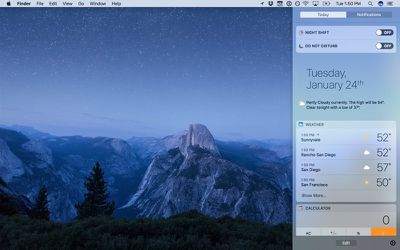
Night Shift can be toggled on and off using the new Night Shift switch located in the Today section of the Notification Center.
nightshiftnotificationcenter
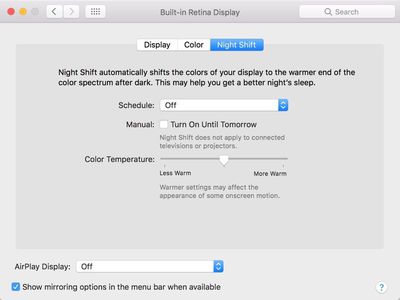
Preferences for Night Shift are available in the Displays section of System Preferences. In this section, users can schedule Night Shift to come on at sunset and turn off at sunrise or set a custom Night Shift schedule. There's also a manual toggle and an option to change the color temperature of the display.
nightshiftoptions
Night Shift-style functionality has previously been available on Macs through the popular and well-known f.lux software, but it will be a built-in feature in macOS Sierra in 10.12.4, eliminating the need for a third-party app. F.lux continues to offer a bit more customization, however, with the option to turn it off on a per-app basis.

macOS Sierra 10.12.4 is only available to developers at the current time, but it should be made available to public beta testers in the near future. It will likely be beta tested for at least a month or two prior to release, so expect to see the update in March or April.


Related Forum: macOS Sierra

Popular Stories

iOS 26

iOS 26.4 and iOS 27 Features Revealed in New Leak

Friday December 12, 2025 10:56 am PST by
Macworld's Filipe Espósito today revealed a handful of features that Apple is allegedly planning for iOS 26.4, iOS 27, and even iOS 28. The report said the features are referenced within the code for a leaked internal build of iOS 26 that is not meant to be seen by the public. However, it appears that Espósito and/or his sources managed to gain access to it, providing us with a sneak peek...
iOS 26

Apple Releases iOS 26.2 With Alarms for Reminders, Lock Screen Changes, Enhanced Safety Alerts and More

Friday December 12, 2025 10:10 am PST by
Apple today released iOS 26.2, the second major update to the iOS 26 operating system that came out in September, iOS 26.2 comes a little over a month after iOS 26.1 launched. ‌iOS 26‌.2 is compatible with the ‌iPhone‌ 11 series and later, as well as the second-generation ‌iPhone‌ SE. The new software can be downloaded on eligible iPhones over-the-air by going to Settings >...
Apple Foldable Thumb

Leak Reveals Foldable iPhone Details

Monday December 15, 2025 9:09 am PST by
The first foldable iPhone will feature a series of design and hardware firsts for Apple, according to details shared by the Weibo leaker known as Digital Chat Station. According to a new post, via machine translation, Apple is developing what the leaker describes as a "wide foldable" device, a term used to refer to a horizontally oriented, book-style foldable with a large internal display....
iOS 26

iOS 26.2 Coming Soon With These 8 New Features on Your iPhone

Thursday December 11, 2025 8:49 am PST by
Apple seeded the second iOS 26.2 Release Candidate to developers earlier this week, meaning the update will be released to the general public very soon. Apple confirmed iOS 26.2 would be released in December, but it did not provide a specific date. We expect the update to be released by early next week. iOS 26.2 includes a handful of new features and changes on the iPhone, such as a new...
macOS Tahoe 26 Thumb

Apple Releases macOS Tahoe 26.2 With Edge Light

Friday December 12, 2025 10:08 am PST by
Apple today released macOS Tahoe 26.2, the second major update to the macOS Tahoe operating system that came out in September. macOS Tahoe 26.2 comes five weeks after Apple released macOS Tahoe 26.1. Mac users can download the macOS Tahoe update by using the Software Update section of System Settings. macOS Tahoe 26.2 includes Edge Light, a feature that illuminates your face with soft...
AirPods Pro Firmware Feature

Apple Releases New Firmware for AirPods Pro 2 and AirPods Pro 3

Thursday December 11, 2025 11:28 am PST by
Apple today released new firmware designed for the AirPods Pro 3 and the prior-generation AirPods Pro 2. The AirPods Pro 3 firmware is 8B30, up from 8B25, while the AirPods Pro 2 firmware is 8B28, up from 8B21. There's no word on what's include in the updated firmware, but the AirPods Pro 2 and AirPods Pro 3 are getting expanded support for Live Translation in the European Union in iOS...
ipados 26 1 slide over

Apple Releases iPadOS 26.2 With Multitasking Improvements

Friday December 12, 2025 10:09 am PST by
Apple today released iPadOS 26.2, the second major update to the iPadOS 26 operating system released in September. iPadOS 26.2 comes a month after iPadOS 26.1. The new software can be downloaded on eligible iPads over-the-air by going to Settings > General > Software Update. iPadOS 26.2 continues with the multitasking improvements that were added with iPadOS 26.1. You can now drag and...
airpods max 2024 colors

AirPods Max 2 Likely to Offer These 10 New Features

Monday December 15, 2025 7:41 am PST by
Apple released the AirPods Max on December 15, 2020, meaning the over-ear headphones launched five years ago today. While the AirPods Max were updated with a USB-C port and new color options last year, followed by support for lossless audio and ultra-low latency audio this year, the headphones lack some of the features that have been introduced for newer generations of the regular AirPods and the ...

Top Rated Comments

Kiwil01 Avatar
116 months ago
They should include an option to include dark mode as a setting when night shift kicks in
Score: 17 Votes (Like | Disagree)
britboyj Avatar
116 months ago
Flux was a bit too finicky for my taste, but I enjoy nightshift on the phone. I'm looking forward to trying this out.
Score: 12 Votes (Like | Disagree)
truthertech Avatar
116 months ago
Night shift is really stupid.
Thank you for that carefully thought out analysis.
Score: 12 Votes (Like | Disagree)
coolbreeze Avatar
116 months ago
The article kind of glosses over this. In short, blue light has been shown to affect our sleeping patterns. The more blue light you're exposed to, the later and worse your quality of sleep. It's become a bigger issue these days with so many people using phones and tablets before bed. Night Shift automatically reduces the blue light emitted from your device at a certain time of the night.
Yep. Use your iPhone/iPad/computer (f.lux for now) in nightshift/night mode. Get used to it for an hour or so.

Then turn it off. The blasting, searing blue light is horrific. You will wonder how you went all this time without night shift.
Score: 11 Votes (Like | Disagree)
The Doctor11 Avatar
116 months ago
I think I'll continue using flux. I like how I can disable flux when I'm in certain apps.
Score: 10 Votes (Like | Disagree)
goobot Avatar
116 months ago
Does it affect the OLED bar too?
Score: 10 Votes (Like | Disagree)
















