

Adobe today announced a new update out now for its Lightroom iOS and Android apps, bringing an all-new photo editing experience to mobile that improves the app's ease of use thanks to a new one-handed interface. To create an improved editing experience Adobe talked to professional and casual photographers, who helped hone Lightroom's new toolset.
First, the company has organized similar tools into relevant categories so it's faster and easier to find tools that are normally used together. The company's biggest priority was to introduce a system that was functional to operate with just one hand. As such, users can now see the entire image while editing it and have access to "often used tools," such as viewing before and after iterations of a photo, without needing a second hand.
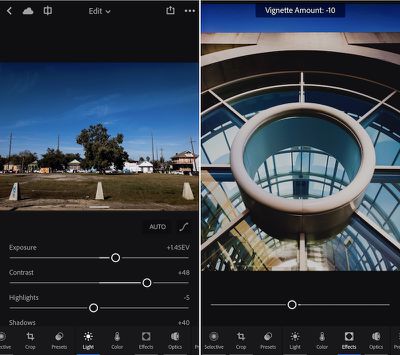
Lightroom mobile 2.6 represents a significant evolution of editing on mobile devices. We wanted to improve the ability to quickly find and access tools and ensure the fastest way to enhance and edit images on a phone. Our design team reached out to photographers of all skill levels to help us figure out how people edit with Lightroom mobile, what’s missing, and how we could make it even better. This update represents our first release taking advantage of this research.
Lightroom for iPhone is also gaining a new info section so users can add in titles, captions, and copyright onto an image. A "professional mode" within the app's capture interface will let users set more granular controls over an image's exposure and focus so it's easier "to capture the shot you want." Lightroom for iPad is getting all of the iPhone app's updates except the new editing and info sections, but the company hopes to update the tablet app with these features "soon."
On the Mac, Lightroom is gaining a "reference view" in the Develop Module that makes it simpler to compare two images side-by-side so you can make them visually consistent with one another. The company said this should help when trying to make a large amount of images from a single event aesthetically similar, or could help with "setting the white balance appropriately in mixed lighting conditions."
Adobe Photoshop Lightroom for iPhone is available to download from the iOS App Store for free [Direct Link]. Users can find the update for Lightroom on the Mac in the Help > Updates section of Adobe's Creative Cloud app.






















Top Rated Comments
and I had to read through 4 paragraphs about iOS improvements and only one about Mac improvements.
How many Lightroom customers actually have iOS as a part of their workflow? Case in point, I have a 256GB iPhone 7 w/ iCloud Photo Library turned on. I export all of my Canon RAW images from the 5DMIII from my Lightroom library to full-size JPEG and upload to iCloud on my Mac (I have the 1TB iCloud plan).
Loading photos on iOS or within Lightroom or Instagram takes 30 seconds just to bring up the photos viewer. To actually retrieve the JPEG to edit / post it takes another 90 seconds on my WiFi connection. I'm a casual amateur photographer. Guys shooting thousands of wedding images, are they even installing Lightroom Mobile? The phone is not powerful enough for a professional's workflow yet.
Something just lost data privileges in Apple Settings.