'TouchSwitcher' and 'Rocket' Apps Let You Switch and Launch Apps From the Touch Bar - MacRumorsOpen MenuShow RoundupsShow Forums menuVisit ForumsOpen Sidebar
Skip to Content

'TouchSwitcher' and 'Rocket' Apps Let You Switch and Launch Apps From the Touch Bar

by

Two free third-party Touch Bar apps have been making the rounds this week that may be of interest to some owners of new MacBook Pros. The apps essentially offer alternative ways of accessing pre-existing macOS functions.

TouchSwitcher adds an icon to the right side of the Touch Bar that when tapped brings up a list of currently running apps for quick app switching, similar to the Command + Tab keyboard shortcut.
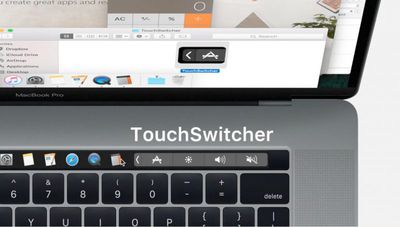
TouchSwitcher
One limitation of the Touch Bar discovered by TouchSwitcher's developer is that only one non-system control can be displayed in the right-hand strip, meaning other Apple apps compete for the same space.

iTunes for example overrides TouchSwitcher when music is played, and the TouchSwitcher app must be restarted to make it re-appear in the control strip. To manually regain access to the default media control button, users can long press on the TouchSwitcher app icon to quit it.
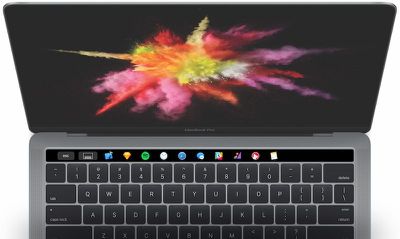
touch-bar-rocket-app
Another new app called Rocket lets users launch apps from the Touch Bar. Rather than live in the system control strip on the right though, Rocket is a standalone app that can be invoked using a keyboard shortcut, whereupon it displays a list of app icons along the left side of the Touch Bar.

TouchSwitcher and Rocket (listed as a beta) can be downloaded for free directly from the developers' websites.


Related Roundup: MacBook Pro
Buyer's Guide: MacBook Pro (Buy Now)
Related Forum: MacBook Pro

Top Rated Comments

Kobayagi Avatar
122 months ago
Again, they're trying to solve a problem that isn't there.
Score: 31 Votes (Like | Disagree)
122 months ago
absolutely pointless....
Score: 20 Votes (Like | Disagree)
Telos101 Avatar
122 months ago
I don't have a problem with offering users alternative ways of achieving the same thing. Apple has always done this. Complainers just don't like that other people prefer other ways of doing stuff.
Score: 15 Votes (Like | Disagree)
122 months ago
I thought we already have this feature, called the Dock?
Score: 15 Votes (Like | Disagree)
ike1707 Avatar
122 months ago
As someone who always disabled the shortcut keys in favor of the function keys, I won't be remotely disappointed if the Touch Bar falls flat on its face.

It's almost comical that this Touch Bar revelation of theirs would come with the "pro" series laptops, because anyone who makes in depth use of adobe apps (and probably loads of other design software) will simply lament the loss of the function keys because countless keystroke shortcuts require them.

I don't think any professionals want to bank their user experience on "Touch Bar support"
Score: 14 Votes (Like | Disagree)
FeBo Avatar
122 months ago
I actually found the touch bar very useful and practical. Again, something you don't think is useful but when you try it you can never go back (What Apple is really good at)!
Score: 11 Votes (Like | Disagree)

Popular Stories

imac video apple feature

Apple Released Yet Another New Product Today

Friday March 20, 2026 2:39 pm PDT by
Apple has unveiled a whopping nine new products so far this March, including an iPhone 17e, iPad Air models with the M4 chip, MacBook Air models with the M5 chip, MacBook Pro models with M5 Pro and M5 Max chips, the all-new MacBook Neo, an updated Studio Display, a higher-end Studio Display XDR, AirPods Max 2, and now the Nike Powerbeats Pro 2. iPhone 17e features the same overall design as...
iPhone 18 Pro Deep Red Feature

iPhone 18 Pro Launching Later This Year With These 12 New Features

Wednesday March 18, 2026 7:39 am PDT by
While the iPhone 18 Pro and iPhone 18 Pro Max are not expected to launch for another six months or so, there are already plenty of rumors about the devices. It was initially reported that the iPhone 18 Pro models would have fully under-screen Face ID, with only a front camera visible in the top-left corner of the screen. However, the latest rumors indicate that only one Face ID component...
ios 26 4 pastel

iOS 26.4: Top 10 New Features Coming to Your iPhone

Friday March 20, 2026 2:44 pm PDT by
iOS 26.4 isn't the major update with new Siri features that we hoped for, but there are some useful quality of life improvements, and a little bit of fun with an AI playlist generator and new emoji characters. Playlist Playground - Apple Music has a Playlist Playground option that lets you generate playlists from text-based descriptions. You can include moods, feelings, activities, or...
Related Apple News: Apple Command Center | Mac | Bloomberg Com | Apple Events | Ipad Pro