

Gboard Update Brings 3D Touch Cursor Tracking and Support for iOS 10 Emojis - MacRumorsOpen MenuShow RoundupsShow Forums menuVisit ForumsOpen Sidebar
Skip to Content

Gboard Update Brings 3D Touch Cursor Tracking and Support for iOS 10 Emojis

by

An update to Google's iOS Gboard app today has introduced 3D Touch into the third-party keyboard, letting users move the cursor by hard pressing and sliding their finger around the keyboard to pinpoint the location they want to land. Gboard's 3D Touch lacks the free-floating cursor of Apple's stock keyboard, however, and simply moves left and right throughout a message, without the ability to track upwards and downwards.

The version 1.2.0 update has also added support for Apple's new iOS 10 emojis, as well as the ability for users to search and share their contacts directly from within the keyboard. Anyone who wants to use the feature must first go to the Gboard app, tap "search settings" and activate "Contacts search," and then they'll be able to access their iPhone contact list directly within Gboard in Messages.
gboard-update-2
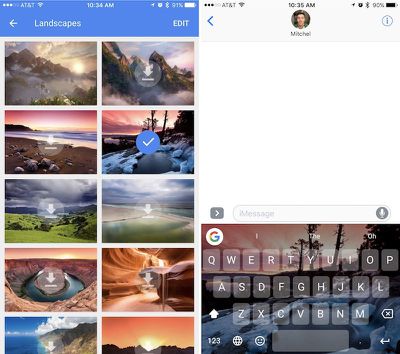
The app has gained new themes as well, including a collection of new "Landscape" images that users can download and add onto Gboard with the tap of a button. When it launched in May, Google touted Gboard's advantageous ability to perform Google searches directly within the keyboard of Messages. Apple has made a big deal out of similar abilities in Messages with its new Messages App Store in iOS 10, where users can install smaller-scale apps to find movies, make dinner reservations, and place stickers.

Gboard can be downloaded from the iOS App Store for free. [Direct Link]

Tags: Gboard, Google

Top Rated Comments

125 months ago
Useless without microphone :confused:
Aside from many who don't use dictation.
Score: 3 Votes (Like | Disagree)
125 months ago
"We won't target ads based on what you type! Promise!"

- Google
Don't allow full access.
Score: 3 Votes (Like | Disagree)
ZacNicholson Avatar
125 months ago
I love gboard. when it came out I switched and haven't looked back.
Score: 2 Votes (Like | Disagree)
miknos Avatar
125 months ago
What an useless feature (backgrounds) to add.

-They should change that emoji icon for an comma.
-Make it easier to switch languages.
-Shortcuts for "?" and "!"
-Resizeable keyboard.


I'm a long-time Swype user. GBoard swiping (called glide) is great and free. Congrats.

Path Input has all the features you could possibly want. Unfortunately the swiping is not precise and you'll end up having to correct the text all the time.
Score: 2 Votes (Like | Disagree)
125 months ago
GBoard already had a nifty cursor placement feature by simply swiping left and right on the spacebar. The 3D touch implementation, in that respect, seems a little redundant...am I missing something?
Score: 1 Votes (Like | Disagree)
125 months ago
Good update. Would be a permanent switch for
me if the 3D touch cursor allowed text selection like the stock keyboard
Score: 1 Votes (Like | Disagree)

Popular Stories

google chrome vertical tabs

Google Brings Vertical Tabs and Improved Reading Mode to Chrome

Tuesday April 7, 2026 1:27 pm PDT by
Google today updated its Chrome browser with support for vertical tabs, which are displayed in a sidebar instead of at the top of the browser. The tab layout can be changed by right clicking on any Chrome window and choosing the "Show Tabs Vertically" option. Sidebar tabs feature full page titles and make it simple to organize tab groups. Google has also added a new full-page interface...
Chrome Feature 22

Gemini in Google Chrome Gets a Skills Library for Saving Custom AI Prompts

Tuesday April 14, 2026 10:00 am PDT by
Chrome has been updated today with a Skills library that's designed to let Chrome users turn AI tasks into repeatable skills that can be used on any website. Useful prompts you create for Gemini in Chrome can be saved as a Skill that can be accessed later with a single click. If you're shopping for skincare and ask Gemini about the ingredients in a product, for example, you can save the...
gemini for mac app google

Google Launches Native Gemini AI App for Mac

Wednesday April 15, 2026 10:46 am PDT by
Google is bringing Gemini to the Mac with a new native macOS app that's available starting today. Gemini for Mac can be activated with a keyboard shortcut, and it has built-in tools for generating images, analyzing what's on your screen, reviewing files, and more. Gemini is the last of the three major AI services to have a dedicated Mac app, because OpenAI and Anthropic have had Mac apps for ...
Related Apple News: Health | Business | Education | Motoring | Politics

















