

Schlage Sense Smart Deadbolt Updated With Compatibility for iOS 10 Home App - MacRumorsOpen MenuShow RoundupsShow Forums menuVisit ForumsOpen Sidebar
Skip to Content

Schlage Sense Smart Deadbolt Updated With Compatibility for iOS 10 Home App

by

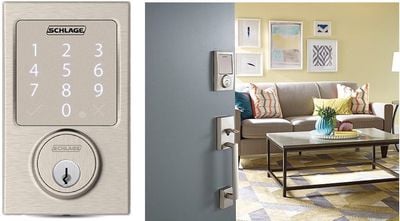
Lock maker Schlage recently updated its iOS app to introduce compatibility between the company's Schlage Sense Smart Deadbolt and Apple's new Home app in iOS 10. Once users update the Schlage Sense app in the iOS App Store, the smart deadbolt can be added into Home, and subsequently controlled via Control Center and voice commands through Siri.
shlage-update
The update also brings push notifications whenever the deadbolt is locked or unlocked, and ultimately makes "it easier for users to keep an even closer eye when their lock is used," according to Schlage. Within the Schlage Sense app, users can manage access codes, change lock settings, view the last 100 times the lock was used, receive installation help, and contact customer service.

An update to the Schlage Sense app is now available in the App Store which allows the Schlage Sense lock to work in tandem with iOS 10’s new Home app. This integration provides users with a centralized platform to access their favorite HomeKit-connected devices alongside their Schlage Sense deadbolt. Through this update, all iOS users (9.3 and above) will also receive push notifications when their deadbolt is locked and unlocked. These updates make it easier for users to keep an even closer eye when their lock is used.

The Schlage Sense Smart Deadbolt also has a touch keypad so anyone with an access code -- with up to 30 storable codes available at a time -- can gain entry into a home without the Schlage or Home app. The system is available on Schlage's website for $229.00, and the Schlage Sense app can be downloaded for free from the App Store. [Direct Link]


Top Rated Comments

dwaltwhit Avatar
124 months ago
I've had this lock a few months and it is a bit pricey, but well worth it. My mom watches my son some days and she can get in with a code, i have a code for our cleaning person that only works a certain day and time, and of course i can tell if i locked my door while im in bed to save me from getting up to check.
Score: 5 Votes (Like | Disagree)
Zorn Avatar
124 months ago
Wow, somebody needs to tell Schlage when it makes sense to use touch and when it makes sense to use buttons.

Also, this is crazy ugly.
Not sure what you mean by this. I have this lock and the keypad works perfectly. I have tried several smart locks and this one is the best by far. The Kwikset Kevo is the most unreliable of the bunch, and a complete piece of trash. The August has a pretty neat auto-unlock feature that is supposed to unlock it when you get close, but it's very flakey. This one is the most flexible, as you can use either a key, a code, the app, Siri, and even auto unlocking when you arrive home via Homekit. Also a good sign that they updated their firmware to support Home so quickly after the iOS 10 release.
Score: 5 Votes (Like | Disagree)
newyorkone Avatar
124 months ago


why a touchpad though? I would put real buttons so that when batteries run out you can still access your door or something.

Schlage specifically used the type of touchpad that they use on the Sense locks for a particular reason. To prevent being able to guess the code when the keypad buttons wear down over time, and shows what keys are being pressed. The touchpad is also fingerprint resistant for the same reason. I had the non-Homekit compatible version of the lock before this one and battery life is amazing. Over a year, and the lock warns you well in advance that the battery is getting low.
Score: 2 Votes (Like | Disagree)
Zorn Avatar
124 months ago
Have you tried, or heard anything, about Kevo v2? I just got one, but am thinking I should maybe get this Schlage instead. I really wanted it to work with my Apple Watch, but apparently Kevo doesn't unlock with the Watch.
It's because the Kevo doesn't support Homekit. There's absolutely no reason to spend that kind of money on a smart lock in 2016 that doesn't support Homekit if you are an iOS user. Exchange it for the Schlage :)
Score: 2 Votes (Like | Disagree)
rhp2424 Avatar
124 months ago
...A keypad with touch is not for outdoor use.
Actually, yes, the keypad with touch is for outdoor use. It works very well from my personal experience with the non Apple version.
Score: 2 Votes (Like | Disagree)
Zorn Avatar
124 months ago
Is it an in door lock? A keypad with touch is not for outdoor use.
It's not a capacitive touch screen if that's what you're thinking. They are actually shallow little buttons that you can press through gloves and such.
Score: 2 Votes (Like | Disagree)

Popular Stories

iPhone 18 Pro Deep Red Feature

iPhone 18 Pro Launching Later This Year With These 12 New Features

Wednesday March 18, 2026 7:39 am PDT by
While the iPhone 18 Pro and iPhone 18 Pro Max are not expected to launch for another six months or so, there are already plenty of rumors about the devices. It was initially reported that the iPhone 18 Pro models would have fully under-screen Face ID, with only a front camera visible in the top-left corner of the screen. However, the latest rumors indicate that only one Face ID component...
imac video apple feature

Apple Released Yet Another New Product Today

Friday March 20, 2026 2:39 pm PDT by
Apple has unveiled a whopping nine new products so far this March, including an iPhone 17e, iPad Air models with the M4 chip, MacBook Air models with the M5 chip, MacBook Pro models with M5 Pro and M5 Max chips, the all-new MacBook Neo, an updated Studio Display, a higher-end Studio Display XDR, AirPods Max 2, and now the Nike Powerbeats Pro 2. iPhone 17e features the same overall design as...
ios 26 4 pastel

iOS 26.4: Top 10 New Features Coming to Your iPhone

Friday March 20, 2026 2:44 pm PDT by
iOS 26.4 isn't the major update with new Siri features that we hoped for, but there are some useful quality of life improvements, and a little bit of fun with an AI playlist generator and new emoji characters. Playlist Playground - Apple Music has a Playlist Playground option that lets you generate playlists from text-based descriptions. You can include moods, feelings, activities, or...
Related Apple News: Use Text Shortcuts On Apple Devices | Make Homepod Alert You To Smoke Alarms | Education | Ipad | The Macrumors Show
















