iOS 10 Tidbits: Individual Read Receipts, Wake Alarm, Music Storage Optimization, and More

Apple today announced iOS 10, the next major version of its iPhone, iPad, and iPod touch software platform. The update is available in beta for Apple developers starting today, allowing early adopters to update and take a closer look at what's new. A public beta will be available in July, followed by an official launch in the fall.

iOS 10 includes a number of changes that Apple neglected to mention in greater detail on stage during its WWDC 2016 keynote, including a new Wake Alarm in the Clock app, individualized read receipts, a new option in the Music app to optimize storage, and many other features outlined below.

Remove Stock Apps
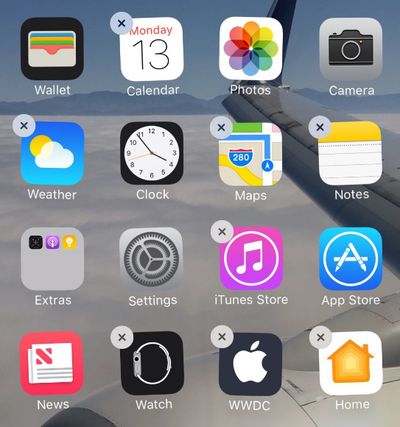
iOS-10-delete-stock-apps
iOS 10 enables users to remove the following built-in apps from the Home screen on iPhone, iPad, or iPod touch:


• Calendar
• Compass
• Contacts
• FaceTime
• Find My Friends
• Home
• iBooks

• iCloud Drive
• iTunes Store
• Mail
• Maps
• Music
• News
• Notes
• Podcasts

• Reminders
• Stocks
• Tips
• Videos
• Voice Memos
• Watch app
• Weather

The apps are now available as standalone downloads on the App Store, meaning that Apple can issue updates for each app independent of iOS updates.

If you have an Apple Watch paired with your iPhone, removing an app from your Home screen also removes that app from your Apple Watch.

Removing apps can unsurprisingly impact related functionalities such as CarPlay and Notification Center widgets.

Wake Alarm
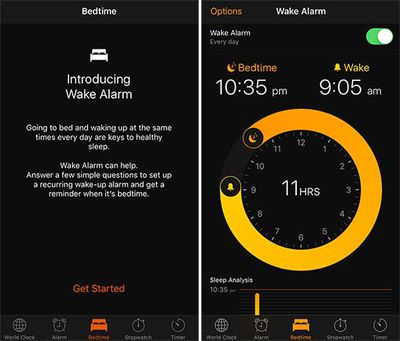
Wake-Alarm-iOS-10
A new Bedtime tab has been added to the Clock app with a Wake Alarm function that can help you go to sleep and wake up at the same time every day. When enabled, the recurring wake-up alarm will remind you when it is time to sleep, track how many hours you slept, and provide detailed sleep analysis.

Individual Read Receipts
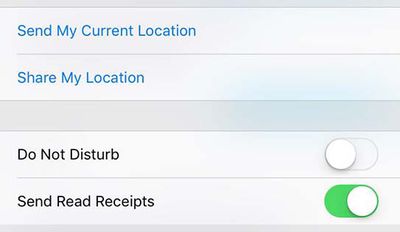
iOS-10-individual-read-receipts
Read receipts can be toggled on a per-person or per-conversation basis on iOS 10, rather than be simply turned on or off entirely.

Music Storage Optimization
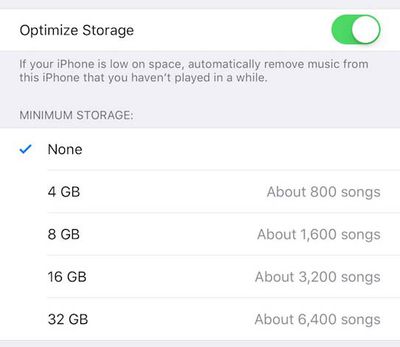
Music-Storage-Optimization-iOS-10
New Keyboard Sound

Other tidbits can be found in our iOS 10: All The Little Things and iOS 10 beta 1 discussion threads.

Related Forum: iOS 10

Popular Stories

Aston Martin CarPlay Ultra Screen

Apple's CarPlay Ultra to Expand to These Vehicle Brands Later This Year

Sunday February 1, 2026 10:08 am PST by
Last year, Apple launched CarPlay Ultra, the long-awaited next-generation version of its CarPlay software system for vehicles. Nearly nine months later, CarPlay Ultra is still limited to Aston Martin's latest luxury vehicles, but that should change fairly soon. In May 2025, Apple said many other vehicle brands planned to offer CarPlay Ultra, including Hyundai, Kia, and Genesis. In his Powe...
Apple Logo Black

Apple Just Made Its Second-Biggest Acquisition Ever After Beats

Thursday January 29, 2026 10:07 am PST by
Apple today confirmed to Reuters that it has acquired Q.ai, an Israeli startup that is working on artificial intelligence technology for audio. Apple paid close to $2 billion for Q.ai, according to sources cited by the Financial Times. That would make this Apple's second-biggest acquisition ever, after it paid $3 billion for the popular headphone and audio brand Beats in 2014. Q.ai has...
Apple Logo Black

Apple's Next Launch is 'Imminent'

Sunday February 1, 2026 12:31 pm PST by
The calendar has turned to February, and a new report indicates that Apple's next product launch is "imminent," in the form of new MacBook Pro models. "All signs point to an imminent launch of next-generation MacBook Pros that retain the current form factor but deliver faster chips," Bloomberg's Mark Gurman said on Sunday. "I'm told the new models — code-named J714 and J716 — are slated...
14 inch MacBook Pro Keyboard

Apple Changes How You Order a Mac

Saturday January 31, 2026 10:51 am PST by
Apple recently updated its online store with a new ordering process for Macs, including the MacBook Air, MacBook Pro, iMac, Mac mini, Mac Studio, and Mac Pro. There used to be a handful of standard configurations available for each Mac, but now you must configure a Mac entirely from scratch on a feature-by-feature basis. In other words, ordering a new Mac now works much like ordering an...
Apple MacBook Pro M4 hero

New MacBook Pros Reportedly Launching Alongside macOS 26.3

Sunday February 1, 2026 5:42 am PST by
Apple is planning to launch new MacBook Pro models with M5 Pro and M5 Max chips alongside macOS 26.3, according to Bloomberg's Mark Gurman. "Apple's faster MacBook Pros are planned for the macOS 26.3 release cycle," wrote Gurman, in his Power On newsletter today. "I'm told the new models — code-named J714 and J716 — are slated for the macOS 26.3 software cycle, which runs from...

Top Rated Comments

Haxley Avatar
126 months ago
Now the flashlight has different intensities


Attachment Image
Score: 44 Votes (Like | Disagree)
ipodlover77 Avatar
126 months ago
YESSSSSSSSSSSSS YOU CAN FINALLY TAKE PHOTOS WITH MUSIC PLAYING. YES YES YES.
Score: 23 Votes (Like | Disagree)
Andres Cantu Avatar
126 months ago
Game Center has been removed!?! Whatever will gamers do now? ;)
Score: 22 Votes (Like | Disagree)
allanfries Avatar
126 months ago
Finally!! we can remove stock apps. Now thats reason to update right there. Celebration time!!
Score: 18 Votes (Like | Disagree)
Haxley Avatar
126 months ago
Sorry if this has already been asked; if you remove the maps app and have Google maps installed, will this essentially make google maps the default mapping app?

If so, will this also let us use Google maps in CarPlay?
Unfortunately, it will still try to open the Apple Maps app and prompt you to re-download it. I'm hoping they'll let you set default apps in the future.


Another note, when I re-downloaded the Apple Maps app from the AppStore, it was instant. This leads me to believe that you don't actually delete the apps, just hide them. It was seriously instant; I tapped the cloud-like download button, and the 'open' button instantly appeared.

UPDATE: I can confirm that the app isn't actually deleted and is instead hidden. You can test this yourself by having the Maps AppStore page open, delete the Maps app, go back to the AppStore page and see the cloud-like download icon, turn on airplane mode, still able to download the app instantly

Attachment Image
Score: 17 Votes (Like | Disagree)
DevNull0 Avatar
126 months ago
So instead of realizing that in 2016 flash memory is insanely cheap, Apple adds a "feature" to automatically delete stuff you haven't used in a while.
Score: 17 Votes (Like | Disagree)