

Wikipedia yesterday released a major update to its iOS app, offering an all-new interface and several new features designed to enhance content discovery.

Wikipedia Mobile 5.0 brings several optimizations to devices running iOS 9, featuring Spotlight Search integration, Handoff support, and 3D Touch enhancements for iPhone 6s and iPhone 6 Plus users.
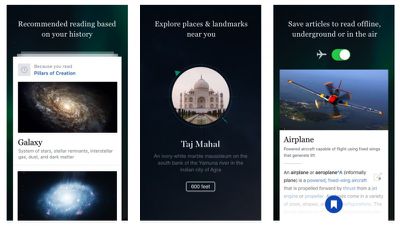
Wikipedia Mobile
Previous updates to the app added features like offline access and mobile editing, but with the latest version Wikipedia has changed tack by aiming to make navigation simpler and developing an interface that's more focused on personalization and tailored content.

The Explore feed now populates based on previous interests, local surroundings, and featured articles and images, with support for navigating using a wider range of multi-touch gestures.

3D Touch support has also been extended to the Wikipedia icon, with Quick Actions like "Random article" and "Nearby articles" accessible from the home screen.

Wikipedia Mobile for iPhone and iPad is a free download from the App Store. [Direct Link]

Top Rated Comments

farewelwilliams Avatar
129 months ago
wonder how annoying it's going to be when they ask for money again.
Score: 3 Votes (Like | Disagree)
SBlue1 Avatar
129 months ago
There is an app for Wikipedia? Why should I use it instead of the website?
Score: 3 Votes (Like | Disagree)
manu chao Avatar
129 months ago
There is an app for Wikipedia? Why should I use it instead of the website?
See it as a way to deal with too many open tabs in Safari (particularly on the iPhone) and a quicker way to get to Wikipedia. With Safari, one would start with:
[LIST=1]
* Tap the Safari icon, then
* Tap the tabs icon (possibly first activate the bottom bar), then
* Tap the + icon, then
* Tap the Wikipedia favourite icon (if one has Wikipedia as one of the first 20 favourite icons)

With a separate Wikipedia app this reduces to one step:
[LIST=1]
* Tap the Wikipedia icon
Score: 2 Votes (Like | Disagree)
l00pback Avatar
129 months ago
There is an app for Wikipedia? Why should I use it instead of the website?
Nobody is saying you should. It's personal preference. Try it out, see for yourself if you like it better than using the website. One advantage the app offers that the website doesn't is the ability to locally save articles to read later. Whether or not that's important to you, well, that's up to you.
Score: 1 Votes (Like | Disagree)
Evan Davis Avatar
129 months ago
Clicking a Wikipedia link in Safari now opens the app
Score: 1 Votes (Like | Disagree)
Jessica Lares Avatar
129 months ago
There's nothing wrong with the website. The benefit of using a client for me is having the list of things I've looked at in the past that is more visual (and lets me save stuff for later so I don't have to pile it with other stuff in my Reading List). That might not be valuable for someone that doesn't use Wikipedia constantly though.

Saying that, I've played with it for 30 minutes now and don't like it in comparison to Curiosity/Inquire (Heard about Viki, but too late now). They waste a lot of space with the cropped images, and most of the pages they're recommending to me aren't relevant at all. IMO, the Saved tab would be better if it was more like the History one too. But that's why we have choice.
Score: 1 Votes (Like | Disagree)

Popular Stories

Aston Martin CarPlay Ultra Screen

Apple's CarPlay Ultra to Expand to These Vehicle Brands Later This Year

Sunday February 1, 2026 10:08 am PST by
Last year, Apple launched CarPlay Ultra, the long-awaited next-generation version of its CarPlay software system for vehicles. Nearly nine months later, CarPlay Ultra is still limited to Aston Martin's latest luxury vehicles, but that should change fairly soon. In May 2025, Apple said many other vehicle brands planned to offer CarPlay Ultra, including Hyundai, Kia, and Genesis. In his Powe...
iOS 26

iOS 26.3 and iOS 26.4 Will Add These New Features to Your iPhone

Tuesday February 3, 2026 7:47 am PST by
We are still waiting for the iOS 26.3 Release Candidate to come out, so the first iOS 26.4 beta is likely still at least a week or two away. Following beta testing, iOS 26.4 will likely be released to the general public in March or April. Below, we have recapped known or rumored iOS 26.3 and iOS 26.4 features so far. iOS 26.3 iPhone to Android Transfer Tool iOS 26.3 makes it easier...
Apple Logo Black

Apple's Next Launch is 'Imminent'

Sunday February 1, 2026 12:31 pm PST by
The calendar has turned to February, and a new report indicates that Apple's next product launch is "imminent," in the form of new MacBook Pro models. "All signs point to an imminent launch of next-generation MacBook Pros that retain the current form factor but deliver faster chips," Bloomberg's Mark Gurman said on Sunday. "I'm told the new models — code-named J714 and J716 — are slated...
Apple MacBook Pro M4 hero

New MacBook Pros Reportedly Launching Alongside macOS 26.3

Sunday February 1, 2026 5:42 am PST by
Apple is planning to launch new MacBook Pro models with M5 Pro and M5 Max chips alongside macOS 26.3, according to Bloomberg's Mark Gurman. "Apple's faster MacBook Pros are planned for the macOS 26.3 release cycle," wrote Gurman, in his Power On newsletter today. "I'm told the new models — code-named J714 and J716 — are slated for the macOS 26.3 software cycle, which runs from...
iOS 26 Home Feature

Apple Gives Final Warning to Home App Users

Tuesday February 3, 2026 8:55 am PST by
In 2022, Apple introduced a new Apple Home architecture that is "more reliable and efficient," and the deadline to upgrade and avoid issues is fast approaching. In an email this week, Apple gave customers a final reminder to upgrade their Home app by February 10, 2026. Apple says users who do not upgrade may experience issues with accessories and automations, or lose access to their smart...

















