

Mobile security company Lookout released an app yesterday that alerts Apple Watch users if they are about to leave their iPhone behind.

The iOS and Apple Watch app uses the Bluetooth connection of an Apple Watch to keep tabs on a user's iPhone location, so that if the wearer steps out of range of their phone, the app automatically buzzes their watch.
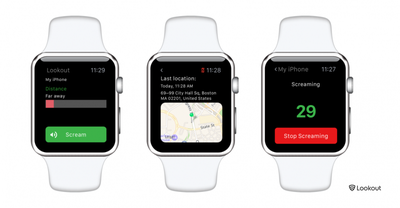
Lookout for Apple Watch
Lookout can also make an iPhone in silent mode emit a loud alarm or "scream" to help the owner find the device, even if it is out of Bluetooth range, by way of a local Wi-Fi connection.

If an iPhone has been misplaced but is within Bluetooth range, the user can consult Lookout's distance meter display that shows how far away they are from the device. As they move around, the bar changes color to indicate if they're getting "warmer" or "colder" in relation to the phone's location.

If an iPhone has been left a greater distance away, the app displays a map showing the device's last known location using its GPS signal (note that continuous use of this feature is likely to significantly impact iPhone battery life). The facility is similar to that found in Apple's Find My iPhone app, although Apple has yet to release an app for Apple Watch from which to use the location service.

Lookout for iPhone is available for free on the App Store. [Direct Link]

Top Rated Comments

ck2875 Avatar
129 months ago
Why not just use the glance that's built into the watch to find your phone?

Just go to the Settings glance and it allows you to play the sonar sound even if the phone is on silent. Or if you press and hold the ping button on the glance it makes the flash pulsate.


How to locate your iPhone with Apple Watch
Step 1: Press the Digital Crown until you’re at the watch face
Step 2: Swipe up from the bottom of the screen to open the glances interface
Step 3: Swipe left or right until you locate the Settings glance
Step 4: Tap the ping button to ping your iPhone and your iPhone should emit a high pitched sound

Make the LED flash light up when pinging your iPhone
You can make your iPhone’s LED flash light up when pinging your iPhone from your Apple Watch. To do this, tap and hold the ping button on the Settings glance instead of just tapping it.
Score: 6 Votes (Like | Disagree)
Jmausmuc Avatar
129 months ago
I can't believe that Apple didn't include this functionality with the watch.
It even has a photos app.

I really hope that Apple will integrate Find My Device in Watch OS3
Score: 3 Votes (Like | Disagree)
bushido Avatar
129 months ago
Or if you press and hold the ping button on the glance it makes the flash pulsate.
wow i had no idea this was even possible. nice
Score: 2 Votes (Like | Disagree)
Phil A. Avatar
129 months ago
It's an interesting idea but from my testing it's a complete waste of time - the meter went from "Right Next to You" to Out Of Range when I walked away from my phone with nothing in between and no alerts.

Why do companies release software that clearly doesn't work as advertised??
Score: 1 Votes (Like | Disagree)
bbotte Avatar
129 months ago
Tried installing this on my watch several times. Will not install. What a joke.
Score: 1 Votes (Like | Disagree)
nicho Avatar
129 months ago
I can't believe that Apple didn't include this functionality with the watch.
It even has a photos app.

I really hope that Apple will integrate Find My Device in Watch OS3
Perhaps the poor reviews of this app are proof of why?

At a guess I'd say the Bluetooth radio inside isn't consistent enough for this sort of function to work well on this watch, hence Apple hasn't added the feature.
Score: 1 Votes (Like | Disagree)

Popular Stories

iOS 26

iOS 26.3 and iOS 26.4 Will Add These New Features to Your iPhone

Tuesday February 3, 2026 7:47 am PST by
We are still waiting for the iOS 26.3 Release Candidate to come out, so the first iOS 26.4 beta is likely still at least a week or two away. Following beta testing, iOS 26.4 will likely be released to the general public in March or April. Below, we have recapped known or rumored iOS 26.3 and iOS 26.4 features so far. iOS 26.3 iPhone to Android Transfer Tool iOS 26.3 makes it easier...
Apple Logo Black

Apple's Next Launch is 'Imminent'

Sunday February 1, 2026 12:31 pm PST by
The calendar has turned to February, and a new report indicates that Apple's next product launch is "imminent," in the form of new MacBook Pro models. "All signs point to an imminent launch of next-generation MacBook Pros that retain the current form factor but deliver faster chips," Bloomberg's Mark Gurman said on Sunday. "I'm told the new models — code-named J714 and J716 — are slated...
iOS 26 Home Feature

Apple Gives Final Warning to Home App Users

Tuesday February 3, 2026 8:55 am PST by
In 2022, Apple introduced a new Apple Home architecture that is "more reliable and efficient," and the deadline to upgrade and avoid issues is fast approaching. In an email this week, Apple gave customers a final reminder to upgrade their Home app by February 10, 2026. Apple says users who do not upgrade may experience issues with accessories and automations, or lose access to their smart...
Aston Martin CarPlay Ultra Screen

Apple's CarPlay Ultra to Expand to These Vehicle Brands Later This Year

Sunday February 1, 2026 10:08 am PST by
Last year, Apple launched CarPlay Ultra, the long-awaited next-generation version of its CarPlay software system for vehicles. Nearly nine months later, CarPlay Ultra is still limited to Aston Martin's latest luxury vehicles, but that should change fairly soon. In May 2025, Apple said many other vehicle brands planned to offer CarPlay Ultra, including Hyundai, Kia, and Genesis. In his Powe...
Apple Foldable Thumb

First Foldable iPhone Design Details Revealed

Monday February 2, 2026 7:19 am PST by
Apple's first foldable iPhone will feature relocated volume buttons, an all-black camera plateau, a smaller Dynamic Island, and more, according to design leaks from a known Weibo leaker. The user known as "Instant Digital" today claimed to share several key details about the design of the foldable iPhone: The volume buttons will be located on the top edge of the device, aligned to the...


















