

Microsoft Office Update Brings Drawing Tools for iPad, 3D Touch for iPhone 6s - MacRumorsOpen MenuShow RoundupsShow Forums menuVisit ForumsOpen Sidebar
Skip to Content

Microsoft Office Update Brings Drawing Tools for iPad, 3D Touch for iPhone 6s

by

Microsoft today updated its suite of Office apps designed for the iPad and the iPhone, adding features to take advantage of the iPad Pro's Apple Pencil and the 3D Touch function in the iPhone 6s and 6s Plus. Word, Excel, and PowerPoint have all been updated with the new tools.

On iPads, there's a new Draw tab that can be found in each of the three apps. The drawing tools in this tab allow iPad owners to use a pen, finger, or Apple Pencil to write, draw, highlight, and annotate various Microsoft Office documents. Hand-drawn shapes can even be transformed into customized shapes. Draw is limited to the iPad and not available on the iPhone at this time.
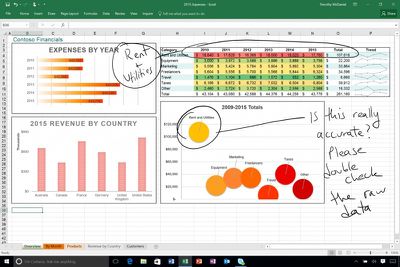
microsoftdrawingtool
On the iPhone 6s and 6s Plus, Word, Excel, and PowerPoint have new 3D Quick Actions that are accessible on the iPhone's Home screen. The Quick Actions let users create new documents or quickly open recently created documents. For all iOS 9 users, Microsoft Office documents will now show up in Spotlight search, making it easy to locate files.

All three apps are also gaining a new cloud font feature, which provides on-demand access to fonts. PowerPoint includes one additional new feature not found in the other updates, a Morph update that allows Morph to be used to move several objects at once.

What's New
- Annotate with Ink: With the tools on the new Draw tab, use your pen, finger, or Apple Pencil to write, draw, and highlight. (iPad only)
- 3D Touch: Use 3D Touch from the home screen to quickly create or open a file. (iPhone 6s or 6s Plus only)
- Fonts from the cloud: Download fonts on demand, when you need them.
- Spotlight search: Quickly find recently opened documents in Spotlight. (iOS 9 required)

All of Microsoft's Office apps can be downloaded from the App Store for free. Documents can be created and edited at no cost on most iOS devices, but unlocking additional tools requires an Office 365 subscription priced at $6.99 per month. Using the Office apps on the iPad Pro requires a subscription.

- Microsoft Word [Direct Link]
- Microsoft Excel [Direct Link]
- Microsoft PowerPoint [Direct Link]

Top Rated Comments

133 months ago
A shiver went down my spine… for a few seconds I started liking a Microsoft product :) Seriously, can Apple's own iWork apps do that? I mean if Microsoft is ahead of the game - and Apple itself - on iPad Pro, what's the world come to?
Score: 3 Votes (Like | Disagree)
Franksan Avatar
133 months ago
Mad respect for Microsoft stepping up their game. Solid update. I love using the iOS Office suite!
Score: 2 Votes (Like | Disagree)
133 months ago
I take it you mean move/resize note containers?

It's possible to move text using cut/paste, but there doesn't appear to be a way to move/resize note containers on the iOS app.
Yes that's what I meant. Damn I wish they would fix that annoying bug already
Score: 1 Votes (Like | Disagree)
Krevnik Avatar
133 months ago
Will annotations drawn on a Word document on ipad be viewable on Word for Mac? Can you manipulate the drawings on a Mac?
Yes, and kinda. It's a shape, so you can use tools that work with shapes (resize, recolor, move, delete, group, etc), but you can't manipulate it in the sense of splitting it or erasing parts of it.
Score: 1 Votes (Like | Disagree)
sza Avatar
133 months ago
I never fit myself to devices. Use productivity apps like iWork/Office are neither ergonomic nor productive on small screens.
Score: 1 Votes (Like | Disagree)
69Mustang Avatar
133 months ago
A shiver went down my spine… for a few seconds I started liking a Microsoft product :) Seriously, can Apple's own iWork apps do that? I mean if Microsoft is ahead of the game - and Apple itself - on iPad Pro, what's the world come to?
Weird ain't it? Usually, I like the bad guy to be clearly defined. This new MS under Nadella is like some sort of anti-hero. Kills for a good reason, but likes it just a little too much.
Score: 1 Votes (Like | Disagree)

Popular Stories

imac video apple feature

Apple Released Yet Another New Product Today

Friday March 20, 2026 2:39 pm PDT by
Apple has unveiled a whopping nine new products so far this March, including an iPhone 17e, iPad Air models with the M4 chip, MacBook Air models with the M5 chip, MacBook Pro models with M5 Pro and M5 Max chips, the all-new MacBook Neo, an updated Studio Display, a higher-end Studio Display XDR, AirPods Max 2, and now the Nike Powerbeats Pro 2. iPhone 17e features the same overall design as...
ios 26 4 pastel

iOS 26.4: Top 10 New Features Coming to Your iPhone

Friday March 20, 2026 2:44 pm PDT by
iOS 26.4 isn't the major update with new Siri features that we hoped for, but there are some useful quality of life improvements, and a little bit of fun with an AI playlist generator and new emoji characters. Playlist Playground - Apple Music has a Playlist Playground option that lets you generate playlists from text-based descriptions. You can include moods, feelings, activities, or...
iPhone 18 Pro Deep Red Feature

iPhone 18 Pro Launching Later This Year With These 12 New Features

Wednesday March 18, 2026 7:39 am PDT by
While the iPhone 18 Pro and iPhone 18 Pro Max are not expected to launch for another six months or so, there are already plenty of rumors about the devices. It was initially reported that the iPhone 18 Pro models would have fully under-screen Face ID, with only a front camera visible in the top-left corner of the screen. However, the latest rumors indicate that only one Face ID component...
Related Apple News: Iphone | Lifestyle | Iphone | Mac | Ipad














