

New 'Vidyo' iOS App Allows Users to Record Their iPhone Screens [Update: Pulled] - MacRumorsOpen MenuShow RoundupsShow Forums menuVisit ForumsOpen Sidebar
Skip to Content

New 'Vidyo' iOS App Allows Users to Record Their iPhone Screens [Update: Pulled]

by

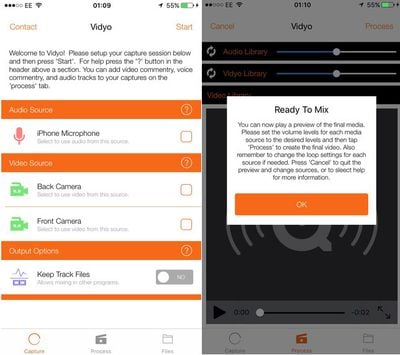
Innovative Developers LTD has launched a new app called "Vidyo!" that allows users to easily capture video of their iPhone screen right on the device. Users can capture their screen within any app and edit or add background music and commentary to their video captures.
vidyo
According to MacStories, the app works by simulating an AirPlay mirroring connection to the app itself. Capturing begins when a user toggles "Device Screen" within the app, exits the app and then chooses Vidyo! as an AirPlay source in Control Center.

While the app is currently in the App Store, it's unclear whether Apple will pull the app as it simulates AirPlay mirroring. Apple doesn't currently provide APIs for iOS devices to act as AirPlay receivers and, according to App Store Review Guideline 2.5, apps can be rejected for using non-public APIs.

Vidyo! is available in the App Store for $4.99. [Direct Link]

Update 1/7 9:30 a.m.: Vidyo has been removed from the App Store and is no longer available for download.


Tag: Vidyo

Top Rated Comments

Seoras Avatar
135 months ago
You can do this for free using your Mac and QuickTime Player.
Plug your iOS device into the Mac, launch QT and select menu File->New Movie Recording
You'll probably see yourself as it defaults to the web cam.
On the right of the red circle record button on the video preview screen is a reversed ^ icon.
Click on it for a drop down menu allowing you to choose the video source.
Score: 20 Votes (Like | Disagree)
135 months ago
Why must Apple approve things and then decide a week later that it goes against their rules. It's kind of annoying. Just review them properly the first time.
That's kind of like asking why do people have to make mistakes in anything and not just do it all right the first time? Basic reality seems to be the answer.
Score: 9 Votes (Like | Disagree)
ArtOfWarfare Avatar
135 months ago
Seems like a privacy risk. What's preventing a malicious app that uses this same technique from recording everything that you are doing?
You need to go to Control Center and set that Air Play should send video to the app. So they can't do it without you knowing - you have to manually turn on Air Play.

Also, the status bar turns blue, so you're aware while its recording.

I had $30 in the App Store that I've had sitting there for 4 years... So I just went ahead and spent $5 on the app. Not sure if I'll ever need it or not, but the $5 wasn't doing me any good just sitting in my iTunes Account.
Score: 7 Votes (Like | Disagree)
135 months ago
You can do this for free using your Mac and QuickTime Player.
Plug your iOS device into the Mac, launch QT and select menu File->New Movie Recording
You'll probably see yourself as it defaults to the web cam.
On the right of the red circle record button on the video preview screen is a reversed ^ icon.
Click on it for a drop down menu allowing you to choose the video source.
Now imagine not having to rely on a Mac in this post-PC era.

Yeah.
[doublepost=1452147219][/doublepost]These are the types of apps I'd like to start seeing more of on the AppStore. iOS is becoming more open and so is the AppStore, but it still feels like they're just scratching the surface.
Score: 6 Votes (Like | Disagree)
LCPepper Avatar
135 months ago
Not sure this is worth buying just in case Apple pulls it...
Score: 6 Votes (Like | Disagree)
MonstaMash Avatar
135 months ago
Seems like a privacy risk. What's preventing a malicious app that uses this same technique from recording everything that you are doing?
Score: 4 Votes (Like | Disagree)

Popular Stories

iOS 27 on iPhone 17 1

iOS 27 Will Add These New Features to Your iPhone

Saturday May 2, 2026 8:43 am PDT by
Apple is expected to unveil iOS 27 during its WWDC 2026 keynote on June 8, and there are already many rumored features and changes for iPhones. The first developer beta of iOS 27 will likely be available immediately following the keynote, and a public beta typically follows in July. Following beta testing, the software update should be released to all users with a compatible iPhone in...
Apple Event Logo

Apple Just Released a New Accessory

Monday May 4, 2026 8:13 am PDT by
Apple today released a new Pride Edition Sport Loop for the Apple Watch. The band features a rainbow design with 11 colors of woven nylon yarns. The new Pride Edition Sport Loop is available to order now on Apple.com and in the Apple Store app in 40mm, 42mm, and 46mm sizes, and it will be available at Apple Store locations starting later this week. In the U.S., the band costs $49. There...
Apple MacBook Pro M4 hero

Why You Might Want to Wait to Buy a MacBook Pro

Friday May 1, 2026 3:43 pm PDT by
Apple refreshed the 14-inch and 16-inch MacBook Pro with M5 Pro and M5 Max models in March 2026, but depending on your needs and interests, you might want to skip this generation because there's something better in the works. The M5 Pro and M5 Max MacBook Pro models have faster chips, but the same design that Apple has used since 2021. An updated design with new display technology and faster ...
Related Apple News: Sport | Reviews | Entertainment | Local News | Technology
















