

Password management app LastPass was today updated to version 4.0, introducing an entirely new design and a range of new features across the company's Mac/PC apps, mobile apps, and browser extensions.
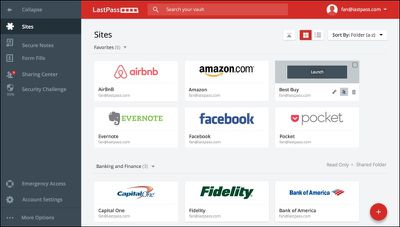
The new LastPass 4.0 update introduces a revamped user interface that focuses on a more intuitive layout and a streamlined look and feel across multiple platforms. There's a redesigned password vault, web vault, and new browser extension menus, all of which include more prominent website icons, improved navigation, and bolder color schemes.
With the new user interface, it's possible to switch between a "Grid" view or a "List view" for managing data, and there's a new "Add" menu for quickly adding new sites, Secue Notes, Form Fill Profiles, or Folders. There are also new hover menus with options for quickly launching, editing, sharing, and deleting items stored in the app. For users who do not care for the new look, LastPass is implementing a toggle option that will let people switch between the old interface and the new design for the next several months.
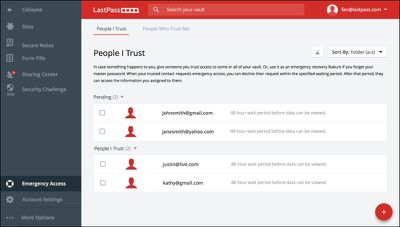
Along with the redesigned interface, LastPass has new sharing features. An Emergency Access feature gives users the ability to give trusted friends or family members access to a password vault in case of emergency. An optional waiting period ensures Emergency Access is only granted to trusted users in the case of a true emergency, with all access requests declinable by the primary user.
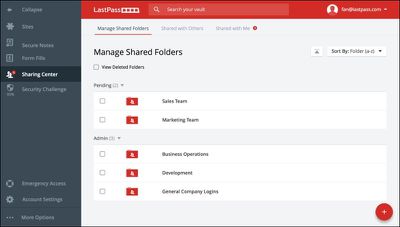
The new LastPass Sharing Center lets users manage and share passwords for accounts in a secure, encrypted way, useful if two or more people need access to the same website via a single account. The Sharing Center allows multiple people to access login and password information, keeping passwords in sync for all users.
"As today's digital consumers are tasked with a growing number of online accounts and passwords, the negative consequences of unsafe password behaviors grow too, from how we create and remember passwords to how we share accounts with colleagues and family," said Joe Siegrist, CEO and co-founder of LastPass. "With LastPass 4.0, we set out to design an intuitive password management experience that could help both first-time users and long-time LastPass customers - personal accounts, teams and entire businesses - to more effortlessly follow and embrace password best practices while maintaining a secure digital identity."
LastPass can be used for free on a single device, including a Mac, iPhone, or iPad, but using LastPass on more than one device with syncing capabilities and family sharing requires a premium subscription, priced at $12 per year. There's also an enterprise option priced at $24 per user per year.
LastPass for iOS can be downloaded from the App Store for free. [Direct Link]
LastPass for Mac can be downloaded from the Mac App Store for free. [Direct Link]






















Top Rated Comments
Two wishes: (1) for the iOS version to autofill credit card information, like the desktop browser extensions do; and (2) easier way to add new sites in the iOS version, without having to manually type in the url and stuff.
The fact that LastPass is also cross-platform is also nice, so I can use it on Mac, Windows, iOS, and Android (all of which I use in my IT guy role).