Apple Releases iOS 9.2 With Safari View Controller Improvements, AT&T NumberSync Support and Bug Fixes

ios_9_iconApple today released iOS 9.2 to the public, marking the second major update to the iOS 9 operating system since its September launch. Prior to being released, iOS 9.2 was in testing since late October after being seeded to developers and public beta testers one week after the launch of iOS 9.1.

Today's iOS 9.2 release is available as an over-the-air update to all iOS 9 users. Though it is the second major update, iOS 9.2 is actually the fourth update to iOS 9 in total, following the launches of iOS 9.0.1, iOS 9.0.2, and iOS 9.1. Xcode 7.2 is also available today.

iOS 9.2 includes a huge list of bug fixes, which we've outlined below.

This update contains improvements and bug fixes including:

- Apple Music improvements
--You can now create a new playlist when adding a song to a playlist
--Your most recently changed playlist is now listed at the top when adding songs to playlists
--Download albums or playlists from your iCloud Music Library by tapping the iCloud download button
--See which songs have been downloaded with the new download indicator next to each song in My Music and Playlists
--See works, composers, and performers while browsing Classical music in the Apple Music catalog
- A new Top Stories section in News so you can stay up to date with the most important news of the day (available in the United States, United Kingdom, and Australia)
- Mail Drop in Mail for sending large attachments
- iBooks now supports 3D Touch to peek and pop pages from the table of contents, your notes and bookmarks, or from search results inside a book
- iBooks now supports listening to an audiobook while you browse your library, read other books, or explore the iBooks Store
- iPhone support for the USB Camera Adapter to import photos and videos
- Improved stability of Safari
- Improved stability of Podcasts
- Fixing an issue that caused mail attachments to be inaccessible for some users with POP email accounts
- Resolving an issue for some users that caused attachments to overlap text in mail
- Fixing an issue where Live Photos could have turned off after restoring from a previous iCloud backup
- Addressing an issue that could cause search in Contacts to display no results
- Resolving an issue that could have prevented Calendar from displaying all seven days in week view
- Fixing an issue where Camera screen on iPad could be black when attempting to capture video
- Addressing an issue that could cause instability in the Activity app when viewing the day of Daylight Savings Time transition
- Fixing an issue that could prevent data from appearing in Health
- Fixing an issue that could prevent Wallet updates and Lock screen alerts from displaying
- Addressing an issue where updating iOS could prevent an alarm from going off
- Fixing an issue where some users were unable to login to Find my iPhone
- Fixing an issue that prevented some manual iCloud Backups from completing
- Addressing an issue where using the iPad keyboard could unintentionally trigger text selection mode
- Improved keyboard responsiveness when using Quick Reply
- Improved punctuation input on the 10-key Chinese (Pinyin & Stroke) keyboards with new expanded view of punctuation symbols and better predictions
- Fixing an issue on Cyrillic keyboards where caps lock would be enabled when typing in URL or email fields
- Siri support for Arabic (Saudi Arabia, United Arab Emirates)
- Accessibility improvements
--Fixing issues with VoiceOver when using Camera face detection
--Adding support for VoiceOver to wake up the screen
--Adding support for VoiceOver to invoke app switcher with 3D Touch gesture
--Fixing an issue with Guided Access when trying to end phone calls
--Improved functionality for Switch Control users when using 3D Touch
--Fixing an issue with speech rate of Speak Screen

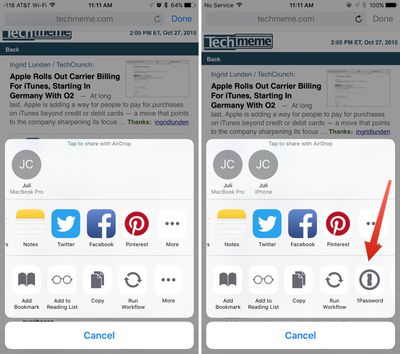
Beyond bug fixes, iOS 9.2's biggest change is a tweak to the way the Safari View Controller works within third-party apps. The Safari View controller is what allows a pop-up Safari window to be used within third-party apps, and with iOS 9.2, the Safari View Controller supports third-party Action Extensions, letting apps like 1Password to be accessed in the Safari view of other apps like Tweetbot.
safariviewcontroller

In the Hipchat app for iOS, clicking a link brings up an in-app browser. In iOS 9.1, seen on the left, there's no option for third-party extensions. In iOS 9.2, seen on the right, there's support for third-party extensions like 1Password.

The Safari View Controller has also been updated with the ability to long tap on the Reload button to reload content without content blockers and it now supports the request desktop site function and an edge swipe to dismiss the Safari window.

iOS 9.2 also includes support for AT&T's NumberSync Wi-Fi calling feature, allowing AT&T users to accept calls on any device even when their phone is not nearby.


Tag: iOS 9.2
Related Forum: iOS 9

Popular Stories

iOS 26

iOS 26.4 and iOS 27 Features Revealed in New Leak

Friday December 12, 2025 10:56 am PST by
Macworld's Filipe Espósito today revealed a handful of features that Apple is allegedly planning for iOS 26.4, iOS 27, and even iOS 28. The report said the features are referenced within the code for a leaked internal build of iOS 26 that is not meant to be seen by the public. However, it appears that Espósito and/or his sources managed to gain access to it, providing us with a sneak peek...
apple beta 26 lineup

Apple Leak Confirms Work on Foldable iPhone, AirTag 2, and Dozens More Devices

Monday December 15, 2025 2:05 pm PST by
Last week, details about unreleased Apple devices and future iOS features were shared by Macworld. This week, we learned where the information came from, plus we have more findings from the leak. As it turns out, an Apple prototype device running an early build of iOS 26 was sold, and the person who bought it shared the software. The OS has a version number of 23A5234w, and the first...
Apple Logo Top Half

Early iOS 26 Software Leak Uncovers Dozens of Upcoming Apple Features

Monday December 15, 2025 3:05 pm PST by
Software from an iPhone prototype running an early build of iOS 26 leaked last week, giving us a glimpse at future Apple devices and iOS features. We recapped device codenames in our prior article, and now we have a list of some of the most notable feature flags that were found in the software code. In some cases, it's obvious what the feature flags are referring to, while some are more...
Apple Foldable Thumb

Leak Reveals Foldable iPhone Details

Monday December 15, 2025 9:09 am PST by
The first foldable iPhone will feature a series of design and hardware firsts for Apple, according to details shared by the Weibo leaker known as Digital Chat Station. According to a new post, via machine translation, Apple is developing what the leaker describes as a "wide foldable" device, a term used to refer to a horizontally oriented, book-style foldable with a large internal display....
iOS 26

iOS 26.3 Beta 1 Features: What's New So Far

Monday December 15, 2025 4:23 pm PST by
Apple is testing iOS 26.3, the next version of iOS 26 that will launch around January. Since iOS 26.3's testing is happening over the holidays, it is a smaller update with fewer features than we've seen in prior betas. We've rounded up what's new so far, and we'll add to our list with subsequent betas if we come across any other features. Transfer to Android Apple is making it simpler...
iOS 26

Apple Releases iOS 26.2 With Alarms for Reminders, Lock Screen Changes, Enhanced Safety Alerts and More

Friday December 12, 2025 10:10 am PST by
Apple today released iOS 26.2, the second major update to the iOS 26 operating system that came out in September, iOS 26.2 comes a little over a month after iOS 26.1 launched. ‌iOS 26‌.2 is compatible with the ‌iPhone‌ 11 series and later, as well as the second-generation ‌iPhone‌ SE. The new software can be downloaded on eligible iPhones over-the-air by going to Settings >...
iOS 26

iOS 26.2 Coming Soon With These 8 New Features on Your iPhone

Thursday December 11, 2025 8:49 am PST by
Apple seeded the second iOS 26.2 Release Candidate to developers earlier this week, meaning the update will be released to the general public very soon. Apple confirmed iOS 26.2 would be released in December, but it did not provide a specific date. We expect the update to be released by early next week. iOS 26.2 includes a handful of new features and changes on the iPhone, such as a new...
airpods max 2024 colors

AirPods Max 2 Likely to Offer These 10 New Features

Monday December 15, 2025 7:41 am PST by
Apple released the AirPods Max on December 15, 2020, meaning the over-ear headphones launched five years ago today. While the AirPods Max were updated with a USB-C port and new color options last year, followed by support for lossless audio and ultra-low latency audio this year, the headphones lack some of the features that have been introduced for newer generations of the regular AirPods and the ...

Top Rated Comments

gpsouza Avatar
131 months ago
Now let's wait for 9.3!!
Score: 13 Votes (Like | Disagree)
Jambalaya Avatar
131 months ago
Please fix the lag and unresponsivness on my 6+... Also the screen glitches.
Thanks to the vagueness of your responce I imagine they'll be onto that immediately
Score: 13 Votes (Like | Disagree)
Goaliegeek Avatar
131 months ago
Please fix the lag and unresponsivness on my 6+... Also the screen glitches.
Score: 7 Votes (Like | Disagree)
jb-net Avatar
131 months ago
I hope they made the podcasts.app fullscreen on iPad.

EDIT: No. Is nobody at Apple watching video podcasts on an iPad? The white bars on the top and bottom are stupid!
Score: 6 Votes (Like | Disagree)
Dephibio Avatar
131 months ago
Build number is the same as the last beta: 13C75.
Score: 6 Votes (Like | Disagree)
avanpelt Avatar
131 months ago
Here's how you turn on AT&T NumberSync. It wasn't readily apparent after updating to 9.2:

- Update to 9.2
- Go to Settings --> General --> About and you will be prompted to install a carrier update. That took my 6 from 23.0 to 23.1.
- After installing the carrier update, go to Settings --> Phone --> Calls on Other Devices
- You'll have the option in there to activate AT&T NumberSync.

I just activated it and I got a pop up on my Mac and iPhone within about 30 seconds of activating it saying it was ready to use. Now on my iPhone under Settings --> Phone, instead of saying "When Nearby" next to Allow Calls on Other Devices, it simply says "On".

Finally, when I went into FaceTime on my Mac, I was asked if I wanted to enable Wi-Fi calling on this Mac. Also, in FaceTime Preferences on the Mac, there is now the option to update the address used for emergency services.

I just tried it and it seems to work flawlessly. Turned my iPhone off, called my cell number from another phone, and my Mac rang. Kudos to AT&T and Apple!
Score: 5 Votes (Like | Disagree)