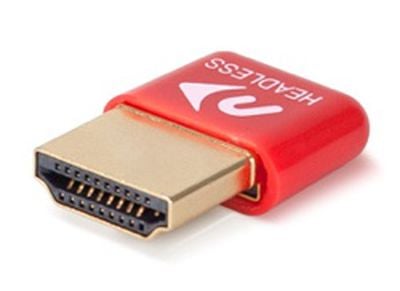
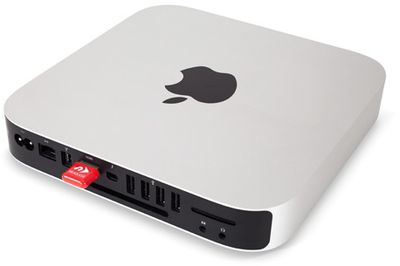
headlessadapterNewerTech today announced the launch of its HDMI Headless Video Accelerator, an adapter that's designed to plug into the Mac mini's HDMI display port to fool it into thinking there's a display attached. With the adapter plugged in, the Mac mini's GPU is activated and video drivers are loaded, resulting in smoother performance.

When the Mac mini is used without a monitor, its GPU isn't used. As a result, the interface lags, resulting in choppy screens and slow video, animation, cursor movements, menu navigation, and typing. Plugging the NewerTech HDMI Headless Video Accelerator into the HDMI port of the Mac mini solves this problem, engaging the GPU so your remote interface works exactly how you'd expect.

Apple's small and portable Mac mini is often used sans display as a storage device or a media server, but without a display, the Mac mini does not take advantage of its GPU. Without an active GPU, certain tasks performed on the Mac mini can be choppy and laggy, such as visiting websites, as described in a Macminicolo blog post on the subject.

This kind of adaptation has been used by Macminicolo on video intensive servers for several years, but as the site says, even simple web browsing benefits from having active video drivers. Macminicolo even recommends a similar dummy dongle product directly on its site.

The NewerTech HDMI Headless Video Accelerator is designed to work with the following Mac mini models: Mac mini Mid 2010 (Macmini4,1), Mac mini Mid 2011 (Macmini5,1 / Macmini5,2 / Macmini5,3), Mac mini Late 2012 (Macmini6,1 / Macmini6,2), Mac mini Late 2014 (Macmini7,1). It works with OS X 10.6.8 and later.
adapterinmac
Mac mini owners interested in purchasing the NewerTech HDMI Headless Video Accelerator can do so from third-party retailers like OWC. The adapter is priced at $19.50.


Related Roundup: Mac mini
Buyer's Guide: Mac Mini (Neutral)
Related Forum: Mac mini

Top Rated Comments

wlossw Avatar
132 months ago
The fact that such a thing is required in order to have a non-sucky remote desktop/vnc session is ridiculous... but it is what it is...
Score: 8 Votes (Like | Disagree)
pgiguere1 Avatar
132 months ago
There's also the DIY way:


http://blog.macminicolo.net/post/33839671756/build-a-dummy-dongle-for-a-headless-mac-mini

A must for VNC access on a headless Mac mini.
Score: 8 Votes (Like | Disagree)
jsviper96 Avatar
132 months ago
Did you even bother to read just a handful of the replies here?
I'm actually impressed with how condescending this sentence actually was. Not even mad.
Score: 7 Votes (Like | Disagree)
Laird Knox Avatar
132 months ago
Use to have to buy headless adapters from Dr. Bott back in the day when Macs wouldn't run without a monitor cable connected.
Haha, I developed the Microcom Advanced Video Terminator to solve that issue. It was a paperclip. :)

Since we did a lot of work with IBM big iron it seemed everything had a four word acronym so the MAVT was born. I even created a document with fancy diagrams to send to our customers.
Score: 6 Votes (Like | Disagree)
critter13 Avatar
132 months ago
sorry, noob here. if you don't have a display attached, why would you care about UI performance. or even know about it for that matter?

Edit: ah remote desktop / vnc
Score: 3 Votes (Like | Disagree)
joueboy Avatar
132 months ago
Why do we have to have this in order for our device to have the optimal performace. Does this mean Apple intentionally crippled the device down so the premium products justifies the pricing. That's s just sad!
Score: 2 Votes (Like | Disagree)

Popular Stories

iOS 26

iOS 26.4 and iOS 27 Features Revealed in New Leak

Friday December 12, 2025 10:56 am PST by
Macworld's Filipe Espósito today revealed a handful of features that Apple is allegedly planning for iOS 26.4, iOS 27, and even iOS 28. The report said the features are referenced within the code for a leaked internal build of iOS 26 that is not meant to be seen by the public. However, it appears that Espósito and/or his sources managed to gain access to it, providing us with a sneak peek...
iOS 26

iOS 26.2 Coming Soon With These 8 New Features on Your iPhone

Thursday December 11, 2025 8:49 am PST by
Apple seeded the second iOS 26.2 Release Candidate to developers earlier this week, meaning the update will be released to the general public very soon. Apple confirmed iOS 26.2 would be released in December, but it did not provide a specific date. We expect the update to be released by early next week. iOS 26.2 includes a handful of new features and changes on the iPhone, such as a new...
iOS 26

Apple Releases iOS 26.2 With Alarms for Reminders, Lock Screen Changes, Enhanced Safety Alerts and More

Friday December 12, 2025 10:10 am PST by
Apple today released iOS 26.2, the second major update to the iOS 26 operating system that came out in September, iOS 26.2 comes a little over a month after iOS 26.1 launched. ‌iOS 26‌.2 is compatible with the ‌iPhone‌ 11 series and later, as well as the second-generation ‌iPhone‌ SE. The new software can be downloaded on eligible iPhones over-the-air by going to Settings >...
AirPods Pro Firmware Feature

Apple Releases New Firmware for AirPods Pro 2 and AirPods Pro 3

Thursday December 11, 2025 11:28 am PST by
Apple today released new firmware designed for the AirPods Pro 3 and the prior-generation AirPods Pro 2. The AirPods Pro 3 firmware is 8B30, up from 8B25, while the AirPods Pro 2 firmware is 8B28, up from 8B21. There's no word on what's include in the updated firmware, but the AirPods Pro 2 and AirPods Pro 3 are getting expanded support for Live Translation in the European Union in iOS...
macOS Tahoe 26 Thumb

Apple Releases macOS Tahoe 26.2 With Edge Light

Friday December 12, 2025 10:08 am PST by
Apple today released macOS Tahoe 26.2, the second major update to the macOS Tahoe operating system that came out in September. macOS Tahoe 26.2 comes five weeks after Apple released macOS Tahoe 26.1. Mac users can download the macOS Tahoe update by using the Software Update section of System Settings. macOS Tahoe 26.2 includes Edge Light, a feature that illuminates your face with soft...
AirTag 2 Mock Feature

Apple AirTag 2: Four New Features Found in iOS 26 Code

Thursday December 11, 2025 10:31 am PST by
The AirTag 2 will include a handful of new features that will improve tracking capabilities, according to a new report from Macworld. The site says that it was able to access an internal build of iOS 26, which includes references to multiple unreleased products. Here's what's supposedly coming: An improved pairing process, though no details were provided. AirTag pairing is already...
ipados 26 1 slide over

Apple Releases iPadOS 26.2 With Multitasking Improvements

Friday December 12, 2025 10:09 am PST by
Apple today released iPadOS 26.2, the second major update to the iPadOS 26 operating system released in September. iPadOS 26.2 comes a month after iPadOS 26.1. The new software can be downloaded on eligible iPads over-the-air by going to Settings > General > Software Update. iPadOS 26.2 continues with the multitasking improvements that were added with iPadOS 26.1. You can now drag and...
bug security vulnerability issue fix larry

Update Now: iOS 26.2 Fixes 20+ Security Vulnerabilities

Friday December 12, 2025 11:11 am PST by
Apple today released iOS 26.2, iPadOS 26.2, and macOS 26.2, all of which introduce new features, bug fixes, and security improvements. Apple says that the updates address over 20 vulnerabilities, including two bugs that are known to have been actively exploited. There are a pair of WebKit vulnerabilities that could allow maliciously crafted web content to execute code or cause memory...