

YouTube iOS App Updated With New Design, In-App Editing Tools - MacRumorsOpen MenuShow RoundupsShow Forums menuVisit ForumsOpen Sidebar
Skip to Content

YouTube iOS App Updated With New Design, In-App Editing Tools

by

After several months of testing and tweaking, YouTube has finally released the redesigned version of its iOS app, taking cues from its Material Design-inspired Android counterpart. The updated app also comes with in-app video editing tools to make videos.
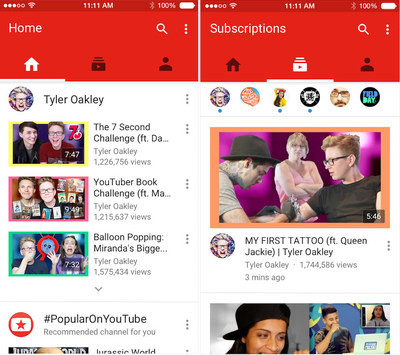
newyoutube

The redesigned YouTube app makes it easier to find what you love. Now your recommended videos, favorite channels, and subscriptions can be accessed by tapping each icon or swiping your screen. You can also create fun videos on the fly with new in-app editing tools.

The new app is divided into three sections: Home, Subscriptions and Account. Home, like the YouTube web homepage, delivers suggestions and features videos from YouTube accounts that a user may have viewed recently. Subscriptions is a stream of videos from YouTube accounts a user may subscribe to and Account allows you to access History, Likes, the Watch later feature and Playlists.

While the app was updated today, it's slowly propagating through the App Store.

YouTube for iOS is available in the App Store for free. [Direct Link]

Top Rated Comments

138 months ago
WHY DO THEY DO THAT!??!!??! THIS IS iOS!!!!!!! NOT ANDROID!!!!!! I hate this!!!!!!!!!!
Score: 18 Votes (Like | Disagree)
Asarien Avatar
138 months ago
Ugh, that obnoxious neon red bar is atrocious.
Score: 18 Votes (Like | Disagree)
adammusic Avatar
138 months ago
Ugh, that obnoxious neon red bar is atrocious.
That red top bar is huge & unnecessary. Still no option to auto open to Subscriptions Tab. Still no swipe to delete option in Watch Later.

Terrible pointless update.
Score: 16 Votes (Like | Disagree)
skwood Avatar
138 months ago
I dislike the design but even putting that aside. No support for PiP, no support for SlideOver/Side-by-Side and burying playlists and favourites even deeper are all sins I cannot forgive.
Score: 15 Votes (Like | Disagree)
TMRJIJ Avatar
138 months ago
They did this ugly redesign but no Picture in Picture support?
Even worse is that I'm Colorblind. All of this crap is brown!!
Score: 15 Votes (Like | Disagree)
Spink10 Avatar
138 months ago
No split view - no PIP. Go home YouTube.
Score: 11 Votes (Like | Disagree)

Popular Stories

iOS 27 on iPhone 17 1

iOS 27 Will Add These New Features to Your iPhone

Saturday May 2, 2026 8:43 am PDT by
Apple is expected to unveil iOS 27 during its WWDC 2026 keynote on June 8, and there are already many rumored features and changes for iPhones. The first developer beta of iOS 27 will likely be available immediately following the keynote, and a public beta typically follows in July. Following beta testing, the software update should be released to all users with a compatible iPhone in...
Apple Event Logo

Apple Just Released a New Accessory

Monday May 4, 2026 8:13 am PDT by
Apple today released a new Pride Edition Sport Loop for the Apple Watch. The band features a rainbow design with 11 colors of woven nylon yarns. The new Pride Edition Sport Loop is available to order now on Apple.com and in the Apple Store app in 40mm, 42mm, and 46mm sizes, and it will be available at Apple Store locations starting later this week. In the U.S., the band costs $49. There...
Apple MacBook Pro M4 hero

Why You Might Want to Wait to Buy a MacBook Pro

Friday May 1, 2026 3:43 pm PDT by
Apple refreshed the 14-inch and 16-inch MacBook Pro with M5 Pro and M5 Max models in March 2026, but depending on your needs and interests, you might want to skip this generation because there's something better in the works. The M5 Pro and M5 Max MacBook Pro models have faster chips, but the same design that Apple has used since 2021. An updated design with new display technology and faster ...
Related Apple News: South Africa | Sport | Education | Lifestyle | Mac

















