

Since the iPhone became available for purchase on September 25, a growing number of former iPhone 5, 5c, and 5s users who transferred their content to their new devices via iCloud are experiencing a display bug that causes certain apps to look zoomed in on the iPhone 6s screen.

Users on both the Apple Support communities and the MacRumors forum have run into this issue, and we've also received a number of emails from customers who are affected. The problem appears to be primarily associated with the Wallet, Weather, Watch, Calculator, and Health apps, causing some data to be cut off at the edges of the screen. It seems to happen when an iPhone 5/5c/5s running iOS 9 is backed up to iCloud and then restored to an iPhone 6s.

I just got my iPhone 6s today and tried loading credit cards into the Wallet app only to find that the view (for lack of a better word) is zoomed-in, essentially cutting the sides off of my cards and passes. While this does not affect the functionality of the credit cards and ApplePay, it does create a problem managing passes. It cuts off the toggle button for each pass, allowing me to delete it.

I've tried restarting and nothing. I don't feel like restoring the software on a phone I just got moments ago. Anyone else seeing this problem?

As can be seen in the screenshots below, credit cards and passes stored in the Wallet app are cut off at the sides, preventing them from being displayed properly. Wallet is one of the apps where the zoom problem is most prevalent because it prevents people from deleting cards.
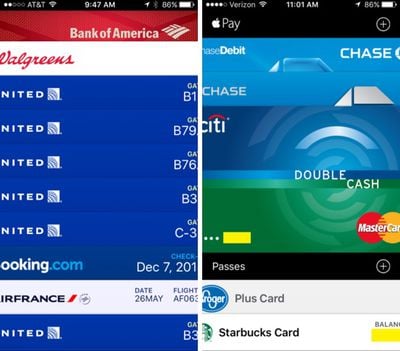
walletdisplayissues
Turning on the Display Zoom feature in the Settings app causes Wallet to appear normal, but it leaves the rest of the iPhone zoomed in. It works as a temporary solution to give users the ability to manage their cards in the app, but it is not a suitable permanent fix. Quitting apps and restarting the iPhone do not appear to solve the problem.

Several users who have contacted Apple have been told that the company is working on a fix, but the problem was not resolved in either iOS 9.0.1 or iOS 9.0.2. One thread from the MacRumors forum suggests this is potentially an iOS 9 bug that has existed since before the operating system was released. Some users running the iOS 9.1 beta 3 update say the problem is fixed, so a solution may be coming with iOS 9.1.

Ahead of a fix, Wallet can be accessed using the Display Zoom feature as outlined above. Apple Store employees appear to be suggesting customers set their iPhones up as new devices as a solution, but users who do not want to have go through the hassle of setting up a new device might want to hold off until iOS 9.1 is released.


Related Forum: iPhone

Top Rated Comments

jpgr15 Avatar
133 months ago

Apple Store employees appear to be suggesting customers set their iPhones up as new devices as a solution
Score: 14 Votes (Like | Disagree)
stevenshizzle Avatar
133 months ago
When you buy a new car, do you transfer the engine oil from your old car?
I would like to down vote this comment.
Score: 12 Votes (Like | Disagree)
Glassed Silver Avatar
133 months ago
Hate it when the Apple Store or even MR members suggest a fresh install as a solution. Apple shouldn't offer a back up and restore option if it can't execute it without carrying bugs. This always seems to be the first "solution" to most problems.
I agree, if your approach involves data loss, it's not a solution.

Once you've set up your phone there is no official way to merge whatever happened on that new phone after setup and what you may have in an old backup.

Say you get 20 messages post new iPhone, but you want to get your old messages back as soon as the issue is fixed somehow.
You end up having to decide between either the old backup or the new messages.

Of course there are unofficial ways to merge this by hand (!), but as long as it isn't something Apple will give you an official approach for, I refuse to accept the statement that they have an intermediate "solution".

Glassed Silver:mac
Score: 7 Votes (Like | Disagree)
Virinprew Avatar
133 months ago
When you buy a new car, do you transfer the engine oil from your old car?
Let me give you another situation.
When you buy a new house, do you move your furniture into the house or just throw it away?
Score: 4 Votes (Like | Disagree)
DoctorKrabs Avatar
133 months ago
When you buy a new car, do you transfer the engine oil from your old car?
When you move to a new home, do you abandon all your possessions?
Score: 3 Votes (Like | Disagree)
nagromme Avatar
133 months ago
Hate it when the Apple Store or even MR members suggest a fresh install as a solution. Apple shouldn't offer a back up and restore option if it can't execute it without carrying bugs. This always seems to be the first "solution" to most problems.
For most of the 6 Plus's lifetime, it had a pretty brutal bug where you couldn't restore a prior backup with hundreds of apps (say, a game collection), or else the phone would bootloop frequently. Therefore I and others had to lose all non-cloud data and start over. This was only fixed a few months ago. Up until then: Geniuses were saying the backup must be corrupt, so throw it out. NOT an answer. I never believed that, and although I did have to throw the backup out and run fewer apps for most of the year, in the end I was right: the bug was fixed and my old backup with all my stuff loaded just fine. (Interestingly, it also kept a lot of non-cloud data from the months I'd spent on a fresh install... not sure how, but I'm not complaining! I didn't end up losing anything I cared about... other than game variety, but luckily my iPad filled in that role.)
Score: 3 Votes (Like | Disagree)

Popular Stories

iOS 26

iOS 26.4 and iOS 27 Features Revealed in New Leak

Friday December 12, 2025 10:56 am PST by
Macworld's Filipe Espósito today revealed a handful of features that Apple is allegedly planning for iOS 26.4, iOS 27, and even iOS 28. The report said the features are referenced within the code for a leaked internal build of iOS 26 that is not meant to be seen by the public. However, it appears that Espósito and/or his sources managed to gain access to it, providing us with a sneak peek...
apple beta 26 lineup

Apple Leak Confirms Work on Foldable iPhone, AirTag 2, and Dozens More Devices

Monday December 15, 2025 2:05 pm PST by
Last week, details about unreleased Apple devices and future iOS features were shared by Macworld. This week, we learned where the information came from, plus we have more findings from the leak. As it turns out, an Apple prototype device running an early build of iOS 26 was sold, and the person who bought it shared the software. The OS has a version number of 23A5234w, and the first...
Apple Foldable Thumb

Leak Reveals Foldable iPhone Details

Monday December 15, 2025 9:09 am PST by
The first foldable iPhone will feature a series of design and hardware firsts for Apple, according to details shared by the Weibo leaker known as Digital Chat Station. According to a new post, via machine translation, Apple is developing what the leaker describes as a "wide foldable" device, a term used to refer to a horizontally oriented, book-style foldable with a large internal display....
Apple Logo Top Half

Early iOS 26 Software Leak Uncovers Dozens of Upcoming Apple Features

Monday December 15, 2025 3:05 pm PST by
Software from an iPhone prototype running an early build of iOS 26 leaked last week, giving us a glimpse at future Apple devices and iOS features. We recapped device codenames in our prior article, and now we have a list of some of the most notable feature flags that were found in the software code. In some cases, it's obvious what the feature flags are referring to, while some are more...
iOS 26

Apple Releases iOS 26.2 With Alarms for Reminders, Lock Screen Changes, Enhanced Safety Alerts and More

Friday December 12, 2025 10:10 am PST by
Apple today released iOS 26.2, the second major update to the iOS 26 operating system that came out in September, iOS 26.2 comes a little over a month after iOS 26.1 launched. ‌iOS 26‌.2 is compatible with the ‌iPhone‌ 11 series and later, as well as the second-generation ‌iPhone‌ SE. The new software can be downloaded on eligible iPhones over-the-air by going to Settings >...
iOS 26

iOS 26.2 Coming Soon With These 8 New Features on Your iPhone

Thursday December 11, 2025 8:49 am PST by
Apple seeded the second iOS 26.2 Release Candidate to developers earlier this week, meaning the update will be released to the general public very soon. Apple confirmed iOS 26.2 would be released in December, but it did not provide a specific date. We expect the update to be released by early next week. iOS 26.2 includes a handful of new features and changes on the iPhone, such as a new...
macOS Tahoe 26 Thumb

Apple Releases macOS Tahoe 26.2 With Edge Light

Friday December 12, 2025 10:08 am PST by
Apple today released macOS Tahoe 26.2, the second major update to the macOS Tahoe operating system that came out in September. macOS Tahoe 26.2 comes five weeks after Apple released macOS Tahoe 26.1. Mac users can download the macOS Tahoe update by using the Software Update section of System Settings. macOS Tahoe 26.2 includes Edge Light, a feature that illuminates your face with soft...
AirPods Pro Firmware Feature

Apple Releases New Firmware for AirPods Pro 2 and AirPods Pro 3

Thursday December 11, 2025 11:28 am PST by
Apple today released new firmware designed for the AirPods Pro 3 and the prior-generation AirPods Pro 2. The AirPods Pro 3 firmware is 8B30, up from 8B25, while the AirPods Pro 2 firmware is 8B28, up from 8B21. There's no word on what's include in the updated firmware, but the AirPods Pro 2 and AirPods Pro 3 are getting expanded support for Live Translation in the European Union in iOS...
















