Apple Pencil Offers High Precision and Low Latency, Gains 30 Minutes of Use From 15-Second Charge

Apple-Pencil-iPad-ProApple co-founder Steve Jobs famously dismissed the need for a stylus when introducing Multi-Touch on the original iPhone over eight years ago, touting the finger as the best pointing device in the world.

"Who wants a stylus? You have to get them, and put them away, and you lose them. Yuck. Nobody wants a stylus. So let’s not use a stylus."

Macworld 2007 was quite awhile ago, however, and Apple on Wednesday ultimately reversed course and introduced the Apple Pencil for iPad Pro, which it refers to as a creative tool for scribbling, sketching, annotating and editing.

Apple Pencil features a pointed tip with highly responsive sensors that allow for precise input down to a single pixel. To achieve this, Apple engineered the Apple Pencil and iPad Pro display to work together to detect position, force and tilt.

For example, as seen in the video below, you can press lightly for a thinner stroke, or press harder for a darker, bolder stroke. Likewise, you can draw with the Apple Pencil on an angle to produce broad, shaded strokes.


The iPad Pro's subsystem scans the Apple Pencil's signal 240 times per second, providing the tablet with twice the data points it would normally collect for a finger. This results in the Apple Pencil being very responsive, with almost indistinguishable latency, as seen in TechCrunch's hands-on video below.


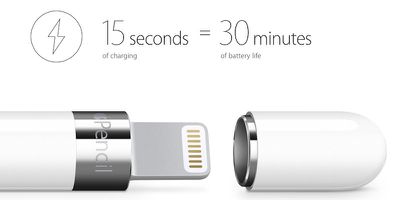
Apple Pencil has a built-in rechargeable battery that lasts up to 12 hours on a single charge, but more interesting is its ability to gain 30 minutes of battery life from just 15 seconds of charging. A magnetic cap hides a male Lightning connector that allows the Apple Pencil to be plugged into the iPad Pro to charge.
Apple-Pencil-Fast-Charge
Apple Pencil will be available in November for $99 alongside the new Smart Keyboard. While the Apple Pencil is officially compatible with the iPad Pro, it remains to be seen if the tool will work with older iPads as a traditional stylus.


Related Forum: iPad Accessories

Popular Stories

iOS 26

iOS 26.4 and iOS 27 Features Revealed in New Leak

Friday December 12, 2025 10:56 am PST by
Macworld's Filipe Espósito today revealed a handful of features that Apple is allegedly planning for iOS 26.4, iOS 27, and even iOS 28. The report said the features are referenced within the code for a leaked internal build of iOS 26 that is not meant to be seen by the public. However, it appears that Espósito and/or his sources managed to gain access to it, providing us with a sneak peek...
iOS 26

iOS 26.2 Coming Soon With These 8 New Features on Your iPhone

Thursday December 11, 2025 8:49 am PST by
Apple seeded the second iOS 26.2 Release Candidate to developers earlier this week, meaning the update will be released to the general public very soon. Apple confirmed iOS 26.2 would be released in December, but it did not provide a specific date. We expect the update to be released by early next week. iOS 26.2 includes a handful of new features and changes on the iPhone, such as a new...
iOS 26

Apple Releases iOS 26.2 With Alarms for Reminders, Lock Screen Changes, Enhanced Safety Alerts and More

Friday December 12, 2025 10:10 am PST by
Apple today released iOS 26.2, the second major update to the iOS 26 operating system that came out in September, iOS 26.2 comes a little over a month after iOS 26.1 launched. ‌iOS 26‌.2 is compatible with the ‌iPhone‌ 11 series and later, as well as the second-generation ‌iPhone‌ SE. The new software can be downloaded on eligible iPhones over-the-air by going to Settings >...
AirPods Pro Firmware Feature

Apple Releases New Firmware for AirPods Pro 2 and AirPods Pro 3

Thursday December 11, 2025 11:28 am PST by
Apple today released new firmware designed for the AirPods Pro 3 and the prior-generation AirPods Pro 2. The AirPods Pro 3 firmware is 8B30, up from 8B25, while the AirPods Pro 2 firmware is 8B28, up from 8B21. There's no word on what's include in the updated firmware, but the AirPods Pro 2 and AirPods Pro 3 are getting expanded support for Live Translation in the European Union in iOS...
macOS Tahoe 26 Thumb

Apple Releases macOS Tahoe 26.2 With Edge Light

Friday December 12, 2025 10:08 am PST by
Apple today released macOS Tahoe 26.2, the second major update to the macOS Tahoe operating system that came out in September. macOS Tahoe 26.2 comes five weeks after Apple released macOS Tahoe 26.1. Mac users can download the macOS Tahoe update by using the Software Update section of System Settings. macOS Tahoe 26.2 includes Edge Light, a feature that illuminates your face with soft...
AirTag 2 Mock Feature

Apple AirTag 2: Four New Features Found in iOS 26 Code

Thursday December 11, 2025 10:31 am PST by
The AirTag 2 will include a handful of new features that will improve tracking capabilities, according to a new report from Macworld. The site says that it was able to access an internal build of iOS 26, which includes references to multiple unreleased products. Here's what's supposedly coming: An improved pairing process, though no details were provided. AirTag pairing is already...
ipados 26 1 slide over

Apple Releases iPadOS 26.2 With Multitasking Improvements

Friday December 12, 2025 10:09 am PST by
Apple today released iPadOS 26.2, the second major update to the iPadOS 26 operating system released in September. iPadOS 26.2 comes a month after iPadOS 26.1. The new software can be downloaded on eligible iPads over-the-air by going to Settings > General > Software Update. iPadOS 26.2 continues with the multitasking improvements that were added with iPadOS 26.1. You can now drag and...
bug security vulnerability issue fix larry

Update Now: iOS 26.2 Fixes 20+ Security Vulnerabilities

Friday December 12, 2025 11:11 am PST by
Apple today released iOS 26.2, iPadOS 26.2, and macOS 26.2, all of which introduce new features, bug fixes, and security improvements. Apple says that the updates address over 20 vulnerabilities, including two bugs that are known to have been actively exploited. There are a pair of WebKit vulnerabilities that could allow maliciously crafted web content to execute code or cause memory...

Top Rated Comments

Glassed Silver Avatar
134 months ago
They never reversed course.
As much as I love to point out Apple's hypocrisies and slacking and whatever else they do wrong, they didn't reverse course.

2007 they presented the iPhone, not the iPad.
The Apple Pencil is for specific applications, not for the general use of the OS.

Glassed Silver:mac
Score: 50 Votes (Like | Disagree)
melendezest Avatar
134 months ago
That is an often misrepresented Steve Jobs quote. He was larger than life, after all.

Now Apple did not reverse course here. The issue is that back then you required the stylus for many devices.

With the Pencil, Apple is introducing an additional form of input primarily suited for specific tasks, like drawing.

But the stylus is NOT required for the operation of the device.

Finally, a lot of folks here are getting what they asked for.

I know my daughter will want the (iPad Pro + Pencil) set, for sure.

Is there anything equivalent in the market for other platforms,like the Surface?
Score: 26 Votes (Like | Disagree)
Gildarts Avatar
134 months ago
Apple on Wednesday ultimately reversed course and introduced the Apple Pencil ('http://www.apple.com/apple-pencil/') for iPad Pro, which it refers to as a creative tool for scribbling, sketching, annotating and editing.
How is it reversing course when the stylus is not the main input mechanism by which you navigate the interface?
Which your finger still is? Speaking to that fact, the stylus is not even included, it's an accessory.

The Jobs reference is totally inaccurate seeing as for both the iPhone and iPad your finger is still the main way for navigating the device (that includes iPad Pro).
Score: 24 Votes (Like | Disagree)
H2SO4 Avatar
134 months ago
Gotta give them nothing but respect if you really can get 30 mins out of 15 seconds from flat. If it works on more than the Pro, I’m in!!
Score: 16 Votes (Like | Disagree)
Zirel Avatar
134 months ago
Android fanboys can shut the hell up about the stylus.

Because there's not a single crappy Android tablet that has a pen that's pressure sensitive AND precise (that tip radius) AND tilt sensitive.

Not one single option out there, for any price, from any manufacturer.

And when they come to imitate Apple, it will be typical Android quality: spec sheet marvels that don't work as intended.

The pencil should be included with the iPad pro. 100 bucks for a stylus is outrages. The replacement pen for the surface isn't even that much.
LOL.

$100 bucks for a pressure sensitive, small radius, and tilt sensitive stylus is what?

It's the cheapest option on the market.

And it's not from a junky manufacturer.
Score: 11 Votes (Like | Disagree)
Agent OrangeZ Avatar
134 months ago
What are the chances of this working with Air 2?
About as equal a chance of Steve Jobs crawling out of his grave to give you his autograph on your iPad screen using the Apple Pencil.
Score: 9 Votes (Like | Disagree)