

Apple Introduces Revamped Two-Factor Authentication for iOS 9 and OS X El Capitan

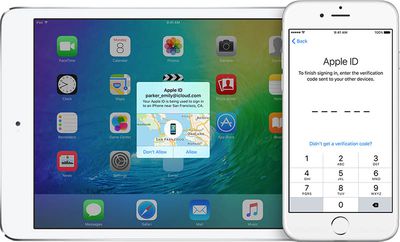
With the third betas of iOS 9 and OS X 10.11 El Capitan, Apple is introducing a revamped two-factor authentication system, according to both the beta release notes and a detailed support FAQ that outlines the changes.

The new two-factor authentication system is different from Apple's existing two-step verification system, using "different methods" to trust devices and deliver verification codes. Apple also says it includes a "more streamlined user experience."

Based on the support document, the new two-factor authentication system works similarly to the existing two-step verification system. Any device that you sign into using two-factor authentication in iOS 9 or El Capitan becomes a trusted device that can be used to verify identify when signing into other devices or services linked to an Apple ID.
appletwostepauth
Apple recommends that iOS 9 and OS X El Capitan beta testers using the new two-factor authentication system update all of their devices to iOS 9 or El Capitan for "the best experience." As outlined in the release notes, customers who use two-factor authentication with older devices may be required to put a six-digit verification code at the end of a password instead of using a dedicated verification field.

If you enable two-factor authentication, iTunes purchases on Mac and Windows will require you to append a 6-digit code to the end of your password on every purchase. The 6-digit code will automatically be sent to your iOS 9 or OS X El Capitan devices.

Older devices are also not able to receive two-factor authentication codes when used with devices running iOS 9 and El Capitan, but customers who stick with the older two-step verification system should not run into any issues as Apple tests the newer two-factor authentication system. Apple does not recommend that customers using two-step verification swap over to two-factor authentication until the feature is available to all.

First introduced in March of 2013, two-factor verification is an opt-in system that increases the security of Apple ID accounts. Since its debut, Apple has been working to expand two-factor authentication to cover several different services like iCloud, iMessage, and FaceTime.

It is not entirely clear what other changes the new two-factor authentication system brings to iOS and Mac devices, but the switch to a new system may allow Apple to further extend the functionality of two-factor authentication in the future.

Update: An Apple spokesperson told Macworld that the troublesome recovery key feature that has caused people to lose their Apple ID accounts in the past has been removed in the new two-factor authentication system.

With the existing two-step verification system, either a recovery key or a trusted device/trusted phone number is required to access an Apple ID account. If both should be lost, such as when a trusted device is stolen, an Apple ID is irretrievable.

With the new authentication system, Apple's customer support team will help users recover their Apple IDs through a recovery process should both trusted devices and phone numbers become inaccessible.

If you can't sign in, reset your password, or receive verification codes, you can regain access to your account by requesting account recovery. Simply provide a verified phone number where you can receive a text message or phone call regarding your account. Apple will review your case and contact you at the number provided when your Apple ID is ready for recovery. The automated message will direct you to iforgot.apple.com to complete the required steps and regain access to your account.

Account recovery will take a few days—or longer—depending on how much information you can provide to verify that you are the account owner. The process is designed to get you back into your account as quickly as possible while denying access to anyone who might be pretending to be you.

As noted by Apple, not all beta testers and developers will have access to the new two-factor authentication system right away, but Apple plans to add additional testers gradually as we get closer to the release of iOS 9 and OS X El Capitan.


Related Forums: iOS 9, OS X El Capitan

Popular Stories

iOS 26

iOS 26.4 and iOS 27 Features Revealed in New Leak

Friday December 12, 2025 10:56 am PST by
Macworld's Filipe Espósito today revealed a handful of features that Apple is allegedly planning for iOS 26.4, iOS 27, and even iOS 28. The report said the features are referenced within the code for a leaked internal build of iOS 26 that is not meant to be seen by the public. However, it appears that Espósito and/or his sources managed to gain access to it, providing us with a sneak peek...
iOS 26

iOS 26.2 Coming Soon With These 8 New Features on Your iPhone

Thursday December 11, 2025 8:49 am PST by
Apple seeded the second iOS 26.2 Release Candidate to developers earlier this week, meaning the update will be released to the general public very soon. Apple confirmed iOS 26.2 would be released in December, but it did not provide a specific date. We expect the update to be released by early next week. iOS 26.2 includes a handful of new features and changes on the iPhone, such as a new...
iOS 26

Apple Releases iOS 26.2 With Alarms for Reminders, Lock Screen Changes, Enhanced Safety Alerts and More

Friday December 12, 2025 10:10 am PST by
Apple today released iOS 26.2, the second major update to the iOS 26 operating system that came out in September, iOS 26.2 comes a little over a month after iOS 26.1 launched. ‌iOS 26‌.2 is compatible with the ‌iPhone‌ 11 series and later, as well as the second-generation ‌iPhone‌ SE. The new software can be downloaded on eligible iPhones over-the-air by going to Settings >...
AirPods Pro Firmware Feature

Apple Releases New Firmware for AirPods Pro 2 and AirPods Pro 3

Thursday December 11, 2025 11:28 am PST by
Apple today released new firmware designed for the AirPods Pro 3 and the prior-generation AirPods Pro 2. The AirPods Pro 3 firmware is 8B30, up from 8B25, while the AirPods Pro 2 firmware is 8B28, up from 8B21. There's no word on what's include in the updated firmware, but the AirPods Pro 2 and AirPods Pro 3 are getting expanded support for Live Translation in the European Union in iOS...
macOS Tahoe 26 Thumb

Apple Releases macOS Tahoe 26.2 With Edge Light

Friday December 12, 2025 10:08 am PST by
Apple today released macOS Tahoe 26.2, the second major update to the macOS Tahoe operating system that came out in September. macOS Tahoe 26.2 comes five weeks after Apple released macOS Tahoe 26.1. Mac users can download the macOS Tahoe update by using the Software Update section of System Settings. macOS Tahoe 26.2 includes Edge Light, a feature that illuminates your face with soft...
AirTag 2 Mock Feature

Apple AirTag 2: Four New Features Found in iOS 26 Code

Thursday December 11, 2025 10:31 am PST by
The AirTag 2 will include a handful of new features that will improve tracking capabilities, according to a new report from Macworld. The site says that it was able to access an internal build of iOS 26, which includes references to multiple unreleased products. Here's what's supposedly coming: An improved pairing process, though no details were provided. AirTag pairing is already...
ipados 26 1 slide over

Apple Releases iPadOS 26.2 With Multitasking Improvements

Friday December 12, 2025 10:09 am PST by
Apple today released iPadOS 26.2, the second major update to the iPadOS 26 operating system released in September. iPadOS 26.2 comes a month after iPadOS 26.1. The new software can be downloaded on eligible iPads over-the-air by going to Settings > General > Software Update. iPadOS 26.2 continues with the multitasking improvements that were added with iPadOS 26.1. You can now drag and...
bug security vulnerability issue fix larry

Update Now: iOS 26.2 Fixes 20+ Security Vulnerabilities

Friday December 12, 2025 11:11 am PST by
Apple today released iOS 26.2, iPadOS 26.2, and macOS 26.2, all of which introduce new features, bug fixes, and security improvements. Apple says that the updates address over 20 vulnerabilities, including two bugs that are known to have been actively exploited. There are a pair of WebKit vulnerabilities that could allow maliciously crafted web content to execute code or cause memory...

Top Rated Comments

christarp Avatar
136 months ago
Good, app specific passwords, two factor authentication, etc as it is right now is just confusing as all hell. It took me like 30 minutes to sign into imessage on my mac because of the app specific password crap. It was a PITA to set up.
Score: 8 Votes (Like | Disagree)
Erukian Avatar
136 months ago
The fact that people are involved isn't what concerns me. What concerns me is that for this to work Aplle must retain the ability to access your account, meaning they can be obliged to access your account by the American government, and people hacking Apple can access your account too. This I bad news. Remember when Apple were promoting the fact that if the NSA asked for access to your account Apple were unable to comply even if they wanted to? Clearly this is no longer the case.
This, a thousand time this. Apple being able to provide access to your account means apple holds the master key to unlock your account. This is a blow to us who rely on Apple for privacy as it's allows open season access for the US Govt or clever social engineers.
Score: 8 Votes (Like | Disagree)
mazz0 Avatar
136 months ago
Idiots!

Why are they involving humans in recovery process yet again???

Did they not learn from the infamous 2012 case???

Leave it 100% to machines!!

Humans can be easily manipulated.
The fact that people are involved isn't what concerns me. What concerns me is that for this to work Aplle must retain the ability to access your account, meaning they can be obliged to access your account by the American government, and people hacking Apple can access your account too. This I bad news. Remember when Apple were promoting the fact that if the NSA asked for access to your account Apple were unable to comply even if they wanted to? Clearly this is no longer the case.
Score: 7 Votes (Like | Disagree)
jkbuster Avatar
136 months ago
Apple still refuses to use my Google Voice # for authentication purposes. Not real enough for Apple, but I use it daily. Ah well.
I'm guessing they take advantage of email -> text addresses provided by phone carriers. Unfortunately, Google has not made this available for Voice. I'd use it in a ton of places as well.

As for having the ability to have them to let you back into your account in case you're locked out, I hope that isn't a requirement for everyone. As someone who operates rather securely, if I screw something up and lock myself out, I want that data to be completely inaccessible. I do not want Apple retaining a secondary backup key to access my information; only I should have the key. Though, not everyone is comfortable with the potential loss of data, which is why it should be an opt-in feature.
Score: 3 Votes (Like | Disagree)
jclo Avatar
136 months ago
Hey Juli Clover,

Did you just post two different articles on macrumors.com that started with the same introduction?!

Recycling at its heights, journalism at its lows.
Those two posts were written simultaneously because they were interrelated and it was at a time when we were doing a million things at once. I didn't mean to word them exactly the same way though, so I apologize for that, and I've changed the beta post.

Sometimes when you write, you skip over whole words and phrases when you read it back to yourself and repetitive bits like that can go entirely under the radar. Sorry for the brain fart there.

By the way, if you see a typo or a title/phrase/word in a post that you have an issue with, you can email us and it'll get our attention faster. It sometimes it takes me awhile to get back to the comments on a post when it's busy. tips at macrumors.com or juli at macrumors.com.
Score: 3 Votes (Like | Disagree)
farewelwilliams Avatar
136 months ago
they need to relax on the rate limiting of attempted verification codes.

i called in on Apple Support, they told me to turn off icloud and turn it on. when turning back on, I needed to send a verification code. verification code never got send to my SMS or my Google Voice, never got pushed to my iPad, and then i tried my iPod touch but the verification process said I was attempting too many codes.
Score: 3 Votes (Like | Disagree)
















