Apple Updates Apple Watch 'Guided Tours' Site With Videos on Phone Calls, Siri, Music, and Maps

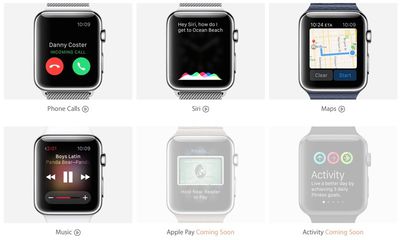
Earlier this month, Apple launched a new "Guided Tours" section on its dedicated Apple Watch website, showcasing several Apple Watch walkthrough videos designed to teach prospective buyers how various features work on the device. As of today, Apple has updated the site with four new videos, covering Phone Calls, Siri, Maps, and Music.
applewatchguidedtours
The first video, on Phone Calls, walks users through how phone calls work on the Apple Watch. It displays options for answering incoming calls and making outgoing calls. There are several options when receiving a phone call -- it can be muted by covering the Apple Watch with a hand or a response message can be sent by scrolling up with the digital crown. Making a call can be done through the "Friends" button on the side, or through Siri.


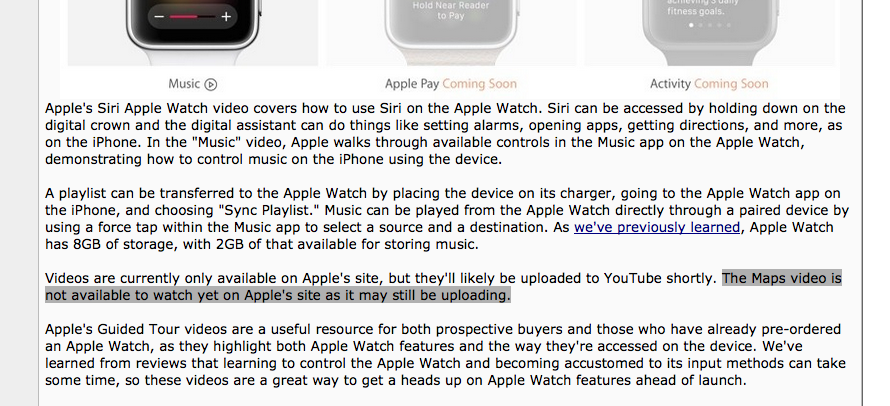
Apple's Siri Apple Watch video covers how to use Siri on the Apple Watch. Siri can be accessed by holding down on the digital crown and the digital assistant can do things like setting alarms, opening apps, getting directions, and more, as on the iPhone. In the "Music" video, Apple walks through available controls in the Music app on the Apple Watch, demonstrating how to control music on the iPhone using the device.


A playlist can be transferred to the Apple Watch by placing the device on its charger, going to the Apple Watch app on the iPhone, and choosing "Sync Playlist." Music can be played from the Apple Watch directly through a paired device by using a force tap within the Music app to select a source and a destination. As we've previously learned, Apple Watch has 8GB of storage, with 2GB of that available for storing music.


The Maps video includes instructions on the different ways to open the Maps app on the Apple Watch: by tapping on an address, accessing it from the home screen, or swiping up on the watch screen to get to the Maps Glance. Choosing a location can be done by a hard press on the screen, which opens up options for a contact's address, recent locations, or address input through dictation.


Apple's Guided Tour videos are a useful resource for both prospective buyers and those who have already pre-ordered an Apple Watch, as they highlight both Apple Watch features and the way they're accessed on the device. We've learned from reviews that learning to control the Apple Watch and becoming accustomed to its input methods can take some time, so these videos are a great way to get a heads up on Apple Watch features ahead of launch.

Apple still has three additional videos that have yet to be uploaded to the page, including "Apple Pay," "Activity," and "Fitness." We'll likely see those added to the site next week, ahead of the device's April 24 ship date.

The Apple Watch can be pre-ordered from the Apple online store, with prices that start at $349. Apple Watch demand has been high, so orders placed today will not ship out until June and beyond, depending on model.


Related Roundup: Apple Watch 11
Buyer's Guide: Apple Watch (Neutral)

Popular Stories

Aston Martin CarPlay Ultra Screen

Apple's CarPlay Ultra to Expand to These Vehicle Brands Later This Year

Sunday February 1, 2026 10:08 am PST by
Last year, Apple launched CarPlay Ultra, the long-awaited next-generation version of its CarPlay software system for vehicles. Nearly nine months later, CarPlay Ultra is still limited to Aston Martin's latest luxury vehicles, but that should change fairly soon. In May 2025, Apple said many other vehicle brands planned to offer CarPlay Ultra, including Hyundai, Kia, and Genesis. In his Powe...
iOS 26

iOS 26.3 and iOS 26.4 Will Add These New Features to Your iPhone

Tuesday February 3, 2026 7:47 am PST by
We are still waiting for the iOS 26.3 Release Candidate to come out, so the first iOS 26.4 beta is likely still at least a week or two away. Following beta testing, iOS 26.4 will likely be released to the general public in March or April. Below, we have recapped known or rumored iOS 26.3 and iOS 26.4 features so far. iOS 26.3 iPhone to Android Transfer Tool iOS 26.3 makes it easier...
Apple Logo Black

Apple's Next Launch is 'Imminent'

Sunday February 1, 2026 12:31 pm PST by
The calendar has turned to February, and a new report indicates that Apple's next product launch is "imminent," in the form of new MacBook Pro models. "All signs point to an imminent launch of next-generation MacBook Pros that retain the current form factor but deliver faster chips," Bloomberg's Mark Gurman said on Sunday. "I'm told the new models — code-named J714 and J716 — are slated...
Apple MacBook Pro M4 hero

New MacBook Pros Reportedly Launching Alongside macOS 26.3

Sunday February 1, 2026 5:42 am PST by
Apple is planning to launch new MacBook Pro models with M5 Pro and M5 Max chips alongside macOS 26.3, according to Bloomberg's Mark Gurman. "Apple's faster MacBook Pros are planned for the macOS 26.3 release cycle," wrote Gurman, in his Power On newsletter today. "I'm told the new models — code-named J714 and J716 — are slated for the macOS 26.3 software cycle, which runs from...
iOS 26 Home Feature

Apple Gives Final Warning to Home App Users

Tuesday February 3, 2026 8:55 am PST by
In 2022, Apple introduced a new Apple Home architecture that is "more reliable and efficient," and the deadline to upgrade and avoid issues is fast approaching. In an email this week, Apple gave customers a final reminder to upgrade their Home app by February 10, 2026. Apple says users who do not upgrade may experience issues with accessories and automations, or lose access to their smart...

Top Rated Comments

sniffies Avatar
141 months ago
So excited!!!!!!!!111

They're like easter eggs, makes me pee a little :o:D
Score: 18 Votes (Like | Disagree)
sulpfiction Avatar
141 months ago
maps video available 4/15 - 4/20
Score: 13 Votes (Like | Disagree)
darkslide29 Avatar
141 months ago
I wonder how this would sound if Jony Ive did it.
"First, we took Apple Maps and started from the ground up. With revolutionary force touch, you now have even more control, more extraordinary menus, with just your finger. And with our most personal device yet, we wanted to make sure you feel your directions. With a tap on your wrist, you will know exactly when to turn, in a truly personal manner. It is the best Apple Maps yet."
Score: 11 Votes (Like | Disagree)
HenryDJP Avatar
141 months ago
Apple has always sucked at stuff like this haven't they?

Actually no, so don't make stuff up.
Score: 8 Votes (Like | Disagree)
SixtyK Avatar
141 months ago
the Map video doesn't play for me.. :(

From the article:

Score: 7 Votes (Like | Disagree)
WilliamLondon Avatar
141 months ago
Have to admit the Maps functionality is pretty cool, especially the wrist taps to indicate turns, I'm always putting my phone back in my pocket to avoid walking down the street looking at it and don't ever seem to remember exactly which streets to turn down, so inevitably have to pull it back out again and again, sigh.

From where I come from...it just gets minutely not so slow. Notice how I don't use the word faster, because nothing in this thing is fast.

Do you ever have a positive thing to say, or is this outlook only limited to Apple and Apple products on an Apple fan site? You're not even limiting your cynicism and negativity to the topic being discussed, you're so filled with it. Perhaps I'm just too simple and plain coming as I do from rural Oregon, but those "opinions" you constantly spread around about Apple and their products are worth about an ounce of pretension, or a pound of manure, whichever way you look at it and from wherever it is you happen to come. :p
Score: 6 Votes (Like | Disagree)