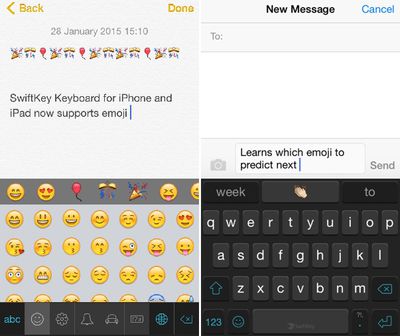
SwiftKey is one of the most popular third-party keyboard options on iOS, and today it received a major update adding a highly requested feature -- emoji. Emoji can be accessed by tapping on the smiley at the bottom of the keyboard, and there's also a new predictive emoji tool that learns the most frequently used emoji and suggests them while typing.
swiftkeykeyboard

We've built emoji right into SwiftKey Keyboard so you can now express yourself when words don't quite cut it. Just as it learns the words and phrases that matter to you, SwiftKey also learns and predicts which emoji you use most often so you can spend less time looking for that perfect smiley (or slice of pizza -- whatever you're into).

Using a lot of emoji in text will cause emoji to pop up more frequently in the word prediction box, making it easier to insert fun characters into text.

Today's update also includes SwiftKey Flow for the iPad, a feature that was previously limited to the iPhone. With SwiftKey Flow, it's possible to type faster via swiping on the screen. Finally, there are also 11 new languages available in SwiftKey, including Bulgarian, Croatian, Greek, Hinglish, Icelandic, Indonesian, Latvian, Russian, Serbian, Slovak, and Turkish.

SwiftKey Keyboard for iOS can be downloaded from the App Store for free. [Direct Link]

Top Rated Comments

CrAkD Avatar
144 months ago
I'm all done with 3rd party keyboards until apple fixes the implementation. I want to smash my 6+ in s million pieces everytime I need to type something and the keyboard doesn't pop out.
Score: 6 Votes (Like | Disagree)
Traverse Avatar
144 months ago
I'ved tried several third party keyboards (my favorite being Flesky), but I always end up back with the default Apple keyboard. 3rd party implementation is still buggy, still poses a privacy concern (albeit mild), and I've honestly never had an issues using the stock keyboard.
Score: 5 Votes (Like | Disagree)
joshuaclinton Avatar
144 months ago
Now just needs dictation and I'll be all set!
Score: 3 Votes (Like | Disagree)
avanpelt Avatar
144 months ago
Apple's implementation of third-party keyboard support has been sloppy, at best.

It's almost like Apple is being passive-aggressive with their users:

"You want third-party keyboards? We told you that we make the best keyboard and now we're going to prove it to you! Want to use dictation with third-party keyboards? Sorry, you can't do that. Want the third-party keyboard to pop up reliably every time you tap a text field? Not gonna happen. Want the text input from the third-party keyboard to be able to reliably fill out web forms? Not a chance in hell. Here, users, are the third-party keyboards you've whined about for years. But guess what? The experience sucks just like we told you it would; but hey, at least you got what you wanted!"

Of course, we didn't get what we wanted. I'm cautiously optimistic that iOS 9 will fix the third-party keyboard issues and finally let us modify which apps are the defaults for certain tasks. We'll see...
Score: 2 Votes (Like | Disagree)
Jessica Lares Avatar
144 months ago
I am enjoying the emoji bar I have in Nintype. Yes, it is crazy complicated to setup, but once you do it, it's a blast to use. I have one bar for numbers, then one bar for my favorite emoji, then another for markdown shortcuts. I'm also using the globe button to automatically insert the date, and have some other shortcuts within the shift key. I moved a lot of my TextExpander shortcuts to be within the letters too. There is a specific bit that you can write so it moves to the next line in a shortcut, but I haven't messed with that yet.

Needless to say, it replaced the majority of the keyboards I was interested in using.

I wish it had iCloud syncing and had a library of little pictures to represent shortcuts though. But that's not really an issue in general.

I have used SwiftKey on Android. I wish the iOS version was more like it. That's why I ended up deleting it when it first came out.
Score: 1 Votes (Like | Disagree)
mattopotamus Avatar
144 months ago
Would prefer SwiftKey over Swype, but SwiftKey doesn't automatically place a space after a comma or period. Heaven knows why not ...

Are you sure it is not in the settings? For android phones it is in the swiftkey settings.
Score: 1 Votes (Like | Disagree)

Popular Stories

Aston Martin CarPlay Ultra Screen

Apple's CarPlay Ultra to Expand to These Vehicle Brands Later This Year

Sunday February 1, 2026 10:08 am PST by
Last year, Apple launched CarPlay Ultra, the long-awaited next-generation version of its CarPlay software system for vehicles. Nearly nine months later, CarPlay Ultra is still limited to Aston Martin's latest luxury vehicles, but that should change fairly soon. In May 2025, Apple said many other vehicle brands planned to offer CarPlay Ultra, including Hyundai, Kia, and Genesis. In his Powe...
Apple Logo Black

Apple Just Made Its Second-Biggest Acquisition Ever After Beats

Thursday January 29, 2026 10:07 am PST by
Apple today confirmed to Reuters that it has acquired Q.ai, an Israeli startup that is working on artificial intelligence technology for audio. Apple paid close to $2 billion for Q.ai, according to sources cited by the Financial Times. That would make this Apple's second-biggest acquisition ever, after it paid $3 billion for the popular headphone and audio brand Beats in 2014. Q.ai has...
Apple Logo Black

Apple's Next Launch is 'Imminent'

Sunday February 1, 2026 12:31 pm PST by
The calendar has turned to February, and a new report indicates that Apple's next product launch is "imminent," in the form of new MacBook Pro models. "All signs point to an imminent launch of next-generation MacBook Pros that retain the current form factor but deliver faster chips," Bloomberg's Mark Gurman said on Sunday. "I'm told the new models — code-named J714 and J716 — are slated...
14 inch MacBook Pro Keyboard

Apple Changes How You Order a Mac

Saturday January 31, 2026 10:51 am PST by
Apple recently updated its online store with a new ordering process for Macs, including the MacBook Air, MacBook Pro, iMac, Mac mini, Mac Studio, and Mac Pro. There used to be a handful of standard configurations available for each Mac, but now you must configure a Mac entirely from scratch on a feature-by-feature basis. In other words, ordering a new Mac now works much like ordering an...
Apple MacBook Pro M4 hero

New MacBook Pros Reportedly Launching Alongside macOS 26.3

Sunday February 1, 2026 5:42 am PST by
Apple is planning to launch new MacBook Pro models with M5 Pro and M5 Max chips alongside macOS 26.3, according to Bloomberg's Mark Gurman. "Apple's faster MacBook Pros are planned for the macOS 26.3 release cycle," wrote Gurman, in his Power On newsletter today. "I'm told the new models — code-named J714 and J716 — are slated for the macOS 26.3 software cycle, which runs from...