

'Alfred Remote' Turns iOS Devices Into Remote Controls for Macs - MacRumorsOpen MenuShow RoundupsShow Forums menuVisit ForumsOpen Sidebar
Skip to Content

'Alfred Remote' Turns iOS Devices Into Remote Controls for Macs

by

Running with Crayons today announced Alfred Remote, an iOS app that turns an iPhone or iPad into a remote control for various tasks on a user's Mac, from controlling a screensaver to launching apps (via The Verge).

Designed with parity of the Alfred app on the Mac App Store in mind, Alfred for iOS also allows users to expand into systemwide interactions with their desktop computers. Users with a Powerpack addition to their Alfred 2 experience, which costs about $25, can then use the Remote to control Powerpack-exclusive features via iOS.
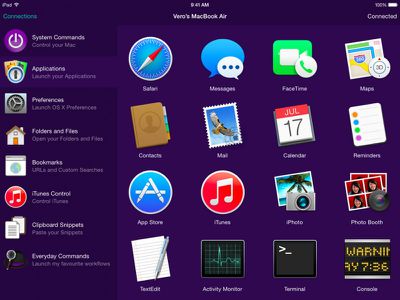
applications
These include iTunes playback, copying and pasting from iOS to OS X, running user-defined scripts, AppleScripts, and terminal commands, and creating and controlling custom Workflows for enhanced productivity. Normal features like opening websites and setting a screensaver are available to all users.

With a single touch on your iOS device, you can control many Alfred 2 actions on your Mac, including:
- Show Alfred 2 on your Mac
- System Commands: Lock, restart, shut down, log out or sleep your Mac, eject all devices, quit all apps and empty trash
- Launch Applications and System Preferences on your Mac
- Open files and folders you've defined on your Mac
- Open websites and bookmarks, or pop up Alfred with a custom search filled in
- Replace hard to remember hotkey combinations and keywords with icons on iOS

To be able to fully use the features of each app, users will need both Alfred 2 for Mac and Alfred Remote for iOS, and have both of them running on the same Wi-Fi connection.

Alfred Remote can be purchased from the App Store for $4.99. [Direct Link]

Alfred 2 for Mac is a free download, with an option to upgrade with the Powerpack options.

Top Rated Comments

steve217 Avatar
147 months ago
This would be really useful for restarting iTunes from the couch when it quits responding.
Score: 4 Votes (Like | Disagree)
147 months ago
chrome

google chrome remote desktop works pretty well and is free.
Score: 3 Votes (Like | Disagree)
extricated Avatar
147 months ago
I don't want to jump on a hater's bandwagon, but I'm not seeing this as particularly useful (to me).
Does anyone have some experience with Alfred or maybe some ideas on ways it could prove useful or timesaving?
Score: 2 Votes (Like | Disagree)
roland.g Avatar
147 months ago
Sorry but this immediately makes me think of this.

Score: 2 Votes (Like | Disagree)
jayducharme Avatar
147 months ago
I'm not sure what the point of this is. Does it replace a trackpad or mouse? If it's just a launcher, I don't see how it saves me much work over simply launching apps the normal way on my Mac. I have a hotkey for Spotlight. I type the first two letters of the app and hit return, and the app launches. That seems quicker than what I can accomplish with Alfred.

As far as iTunes control goes, I have iTunes Match and can access all my media on my iPhone anyway. So controlling iTunes on my Mac would be redundant.
Score: 2 Votes (Like | Disagree)
147 months ago
I haven't used it in a while, but it had a keyboard when I used it last. I think it required selecting the text box with the remote and then the keyboard should pop up automatically (it's one of the benefits of using the app instead of the Apple remote). I'll try it again when I get home tonight.

This is still how it works. Just select the text box, and you'll be able to use your normal iOS keyboard to enter searches. In fact I'd say that's the main benefit of using the Remote app instead of the Apple TV remote, though I find navigating through menus and lists to be quicker using the Remote app as well.
Score: 1 Votes (Like | Disagree)

Popular Stories

iOS 27 on iPhone 17 1

iOS 27 Will Add These New Features to Your iPhone

Saturday May 2, 2026 8:43 am PDT by
Apple is expected to unveil iOS 27 during its WWDC 2026 keynote on June 8, and there are already many rumored features and changes for iPhones. The first developer beta of iOS 27 will likely be available immediately following the keynote, and a public beta typically follows in July. Following beta testing, the software update should be released to all users with a compatible iPhone in...
Apple Event Logo

Apple Just Released a New Accessory

Monday May 4, 2026 8:13 am PDT by
Apple today released a new Pride Edition Sport Loop for the Apple Watch. The band features a rainbow design with 11 colors of woven nylon yarns. The new Pride Edition Sport Loop is available to order now on Apple.com and in the Apple Store app in 40mm, 42mm, and 46mm sizes, and it will be available at Apple Store locations starting later this week. In the U.S., the band costs $49. There...
Apple Announces 2026 Pride Band Watch Face and iPhone Wallpaper Article 2

iOS 26.5 Coming Soon With These New Features

Monday May 4, 2026 8:40 am PDT by
iOS 26.5 is expected to be released next week, following more than a month of beta testing. The update is relatively minor, but there are a couple of new features and changes across the operating system that we have recapped below. iOS 26.5 lays the groundwork for end-to-end encryption for RCS in the Messages app and ads in the Apple Maps app, and it will include a new Pride wallpaper and a...
Related Apple News: Local News | Health | World News | Motoring | South Africa


















