

CES 2015: iDevices Announces HomeKit-Enabled 'Switch' Smart Plug

iDevices today announced its upcoming Switch smart plug, a HomeKit-enabled device that allows users to remotely control a variety of devices around the home. The system takes advantage of the existing iDevices Connected app to give users control over the plug, which plugs into a standard electrical outlet and connects to the home's Wi-Fi network to provide control over a device plugged into Switch.
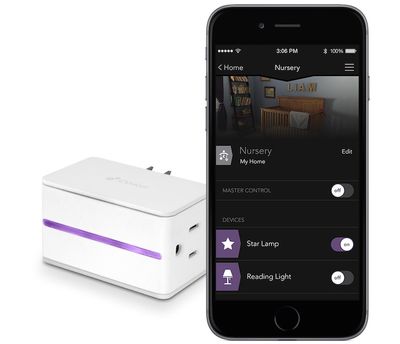
idevices_switch
With HomeKit integration for Switch, users will be able to take advantage of a number of iOS features in the system, including the ability to use Siri to control their devices. Switch requires no dedicated hub device or subscription services, making it simple to set up.

- Siri – Switch’s HomeKit integration provides an easy, secure way to control Switch using Siri on your iPhone, iPad or iPod touch. You can even create your own commands to control multiple home settings. For example, you can automatically turn off lamps connected to your iDevices Switch, lock your doors, close the garage door and set the thermostat to the desired temperature, all with one command.

- Remote Access – iDevices designed a custom IoT cloud for Switch so that users can access their home from wherever they are with no additional hub required.

- Create Custom Events and Schedules – Through the iDevices Connected app, users are able to design custom events (or schedules) that fit their lifestyle. The iDevices Switch has the unique ability to remember events and make sure they happen even when the user is away.


Switch also includes several personalization options including the ability to upload photos from around the home to personalize the control app and make it easier to identify devices, as well as a built-in highlight on the Switch itself with customizable color choices.

Switch launches later in the first half of 2015, and The Verge says the device will cost $49.99.

iHome is also announcing a similar iSP5 SmartPlug smart plug that will launch later this year, but details remain scant at this time. Like iDevices' Switch, iHome's SmartPlug supports HomeKit and is a Wi-Fi enabled plug that allows users to control individual devices without the need for a hub. iHome does tout that multiple SmartPlugs can be grouped together into "scenes" to control various devices together. Pricing and an exact launch timeframe for SmartPlug have yet to be announced.


Popular Stories

Aston Martin CarPlay Ultra Screen

Apple's CarPlay Ultra to Expand to These Vehicle Brands Later This Year

Sunday February 1, 2026 10:08 am PST by
Last year, Apple launched CarPlay Ultra, the long-awaited next-generation version of its CarPlay software system for vehicles. Nearly nine months later, CarPlay Ultra is still limited to Aston Martin's latest luxury vehicles, but that should change fairly soon. In May 2025, Apple said many other vehicle brands planned to offer CarPlay Ultra, including Hyundai, Kia, and Genesis. In his Powe...
Apple Logo Black

Apple's Next Launch is 'Imminent'

Sunday February 1, 2026 12:31 pm PST by
The calendar has turned to February, and a new report indicates that Apple's next product launch is "imminent," in the form of new MacBook Pro models. "All signs point to an imminent launch of next-generation MacBook Pros that retain the current form factor but deliver faster chips," Bloomberg's Mark Gurman said on Sunday. "I'm told the new models — code-named J714 and J716 — are slated...
iOS 26

iOS 26.3 and iOS 26.4 Will Add These New Features to Your iPhone

Tuesday February 3, 2026 7:47 am PST by
We are still waiting for the iOS 26.3 Release Candidate to come out, so the first iOS 26.4 beta is likely still at least a week or two away. Following beta testing, iOS 26.4 will likely be released to the general public in March or April. Below, we have recapped known or rumored iOS 26.3 and iOS 26.4 features so far. iOS 26.3 iPhone to Android Transfer Tool iOS 26.3 makes it easier...
Apple MacBook Pro M4 hero

New MacBook Pros Reportedly Launching Alongside macOS 26.3

Sunday February 1, 2026 5:42 am PST by
Apple is planning to launch new MacBook Pro models with M5 Pro and M5 Max chips alongside macOS 26.3, according to Bloomberg's Mark Gurman. "Apple's faster MacBook Pros are planned for the macOS 26.3 release cycle," wrote Gurman, in his Power On newsletter today. "I'm told the new models — code-named J714 and J716 — are slated for the macOS 26.3 software cycle, which runs from...
iOS 26 Home Feature

Apple Gives Final Warning to Home App Users

Tuesday February 3, 2026 8:55 am PST by
In 2022, Apple introduced a new Apple Home architecture that is "more reliable and efficient," and the deadline to upgrade and avoid issues is fast approaching. In an email this week, Apple gave customers a final reminder to upgrade their Home app by February 10, 2026. Apple says users who do not upgrade may experience issues with accessories and automations, or lose access to their smart...

Top Rated Comments

reden Avatar
145 months ago
$50 to automate my reading light? I'll manually flip the switch, thanks.
Score: 22 Votes (Like | Disagree)
Z400Racer37 Avatar
145 months ago
Yup, better than:

Get your iPhone out of your pocket.
Unlock iPhone.
Look for HomeKit app.
Open Homekit.
Search for the switch.
Switch on/off.

:eek:

"Hey Siri, turn of the lights in my room." :cool:
Score: 17 Votes (Like | Disagree)
BornAgainMac Avatar
145 months ago
I want the dishes and floors and bathroom cleaned. I'll deal with the lights.
Score: 9 Votes (Like | Disagree)
justperry Avatar
145 months ago
$50 to automate my reading light? I'll manually flip the switch, thanks.

Yup, better than:

Get your iPhone out of your pocket.
Unlock iPhone.
Look for HomeKit app.
Open Homekit.
Search for the switch.
Switch on/off.

:eek:
Score: 9 Votes (Like | Disagree)
blackcrayon Avatar
145 months ago
What's all this talk about unlocking your phone opening an app and all that?

Swipe down from the lock screen, press the button on the (hopefully existing) widget that corresponds to the switch. Done.
Score: 8 Votes (Like | Disagree)
bloggerblog Avatar
145 months ago
"Hey Siri, turn of the lights in my room." :cool:

Siri: Sorry, I do not know how to burn oven lights go vroom. Would you like me to search the internet for that? :D
Score: 6 Votes (Like | Disagree)
















