Dashlane Introduces 'Password Changer', Allowing Users to Change Multiple Passwords With One Click - MacRumorsOpen MenuShow RoundupsShow Forums menuVisit ForumsOpen Sidebar
Skip to Content

Dashlane Introduces 'Password Changer', Allowing Users to Change Multiple Passwords With One Click

by

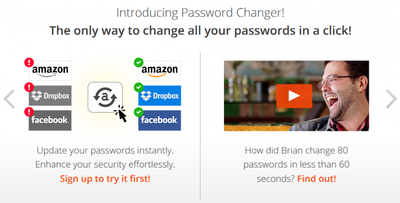
The popular subscription-based password management service Dashlane is today introducing a new feature called Password Changer that will let users change all of their passwords with a single click (via The Verge).

The new feature will work with two-factor authentication enabled accounts and be available to work with over seventy websites at launch. Password Changer is fueled by Dashlane's acquisition of PassOmatic, a New York startup that developed the core technology running the new feature.
Screenshot (25)
Password Changer will be beta-tested by a small audience (with a planned wide release soon) on the desktop versions of Dashlane for PC and Mac, and the company states that it is working on bringing it to mobile.

The update brings a large, green "change all passwords" button that, when clicked, prompts the user through changing all existing passwords with new unique, randomly generated ones. Accounts with two-factor authentication enabled will require the user to input the answer to a security question or a code.


Future updates promise users the ability to set certain accounts to automatically shuffle through new passwords at pre-set intervals. Dashlane hopes the new measures the company is taking to protect users' private information will give their customers ease of mind in the midst of recent hacking scandals over the past year.

Dashlane is free to use on a single device, but syncing and transferring between multiple devices costs $39.99 per year. The app can be downloaded for free from the Mac App Store [Direct Link] and App Store [Direct Link]. Users wanting to access the Password Changer feature ahead of the wide launch can sign up for the Password Changer beta now.


Top Rated Comments

Traverse Avatar
147 months ago
I don't trust these apps, I suppose I'm just paranoid. I don't use iCloud Keychain or 1Password. I like all my passwords in my head and the ones I use infrequently stored in an encrypted file, within an encrypted disk image, on my encrypted hard drive.
Score: 6 Votes (Like | Disagree)
Huracan Avatar
147 months ago
I don't trust these apps, I suppose I'm just paranoid. I don't use iCloud Keychain or 1Password. I like all my passwords in my head and the ones I use infrequently stored in an encrypted file, within an encrypted disk image, on my encrypted hard drive.

You can still use an application like 1Password to keep your passwords just in your local drive, encrypted, but have the convenience of auto password generation and automatic filling of passwords. There has to be a limit to being paranoid, because otherwise, perhaps you could think Apple could be harvesting your passwords from your encrypted file in your encrypted drive, whenever you unencrypt them ;)
Score: 3 Votes (Like | Disagree)
nutmac Avatar
147 months ago
I like my password algorithm because I can still access any site even when 1Password is not available (phone died, whatever) and I'm not vulnerable if a flaw is ever discovered in 1Password's encryption.

I frankly think hacking BOTH 1Password and Dropbox or iCloud (particularly if one uses optional two-factor authentication) is a lot more difficult than hacking basic cypher algorithm. While your algorithm may discourage hacker, even the most amateur hacker can easily hack if they want to.

And if you depend on accessing data anywhere without your phone, you can use Dropbox (you will obviously need to remember its password) and open 1Password.html directly to access all the data.
Score: 2 Votes (Like | Disagree)
IGregory Avatar
147 months ago
I like all my passwords in my head and the ones I use infrequently stored in an encrypted file, within an encrypted disk image, on my encrypted hard drive.

Good luck with that. A password manager is a lot easier.
Score: 2 Votes (Like | Disagree)
nutmac Avatar
147 months ago
This is why I’m a big fan of password algorithms. You memorize an algorithm which produces a unique password for each site. For example (just made up):

[LIST=1]
* ABC (satisfies capital letter requirements)
* Last 4 letters in the site or company name, shifted left 2 keys on the keyboard, wrapping around if necessary, all lowercase
* . (satisfies special character requirements)
* 123 (satisfies number requirements)

So a few passwords would be:

* Apple: ABCiijq.123
* Amazon: ABCknuv.123
* Dropbox: ABCicum.123
* Google: ABCudjq.123
* Yahoo: ABCkfuu.123
Having only 4 characters (at least in your example) per site is very weak for anything but casual websites. All hacker needs is password for two websites.

With apps like 1Password integrating so tightly with iOS and Mac, I frankly don't see any need for doing all that work. On iOS, just summon 1Password from the share sheet, Touch ID to login, click a button or two, and you are logged in.
Score: 2 Votes (Like | Disagree)
147 months ago
Exactly. The idea behind iCloud Keychain or 1Password seems perfect: remember one good password and the app takes care of remembering impossible passwords. Still, the risk that the service is hacked or a glitch causes the data to be lost is just too risky.

I don't even use the cloud for highly sensitive stuff. If I was hacked they'd get some family photos, my school calendar and assignments, and a basic notes journal. We don't live in a highly trustworthy world.

You should probably read up on how 1Password works. Its not really a service, it's just a database manager that stores the passwords in an encrypted file. This is all local. If you choose you can sync over wifi or through Dropbox. Still very secure because Dropbox syncs the encrypted file, even if your Dropbox account was hacked good luck with the encrypted file.
Score: 2 Votes (Like | Disagree)

Popular Stories

iPhone 18 Pro Deep Red Feature

iPhone 18 Pro Launching Later This Year With These 12 New Features

Wednesday March 18, 2026 7:39 am PDT by
While the iPhone 18 Pro and iPhone 18 Pro Max are not expected to launch for another six months or so, there are already plenty of rumors about the devices. It was initially reported that the iPhone 18 Pro models would have fully under-screen Face ID, with only a front camera visible in the top-left corner of the screen. However, the latest rumors indicate that only one Face ID component...
imac video apple feature

Apple Released Yet Another New Product Today

Friday March 20, 2026 2:39 pm PDT by
Apple has unveiled a whopping nine new products so far this March, including an iPhone 17e, iPad Air models with the M4 chip, MacBook Air models with the M5 chip, MacBook Pro models with M5 Pro and M5 Max chips, the all-new MacBook Neo, an updated Studio Display, a higher-end Studio Display XDR, AirPods Max 2, and now the Nike Powerbeats Pro 2. iPhone 17e features the same overall design as...
ios 26 4 yellow

Here Are Apple's Release Notes for iOS 26.4

Wednesday March 18, 2026 11:56 am PDT by
Apple provided developers and public beta testers with the release candidate versions of iOS 26.4 and iPadOS 26.4, which means we're going to see a public launch as soon as next week. The RC versions of the software include Apple's official release notes, giving us final details on what's included in the update. Apple Music - Playlist Playground (beta) generates a playlist from your...
Related Apple News: Iphone | South Africa | Iphone | Ipad | Reviews