iOS 8 Beta 5 Tidbits: SMS Relay, New iCloud Icons, Health App Updates, and More

Apple today released the fifth beta of iOS 8, which brings a number of improvements, tweaks, and bug fixes to the beta software that was first introduced on June 2.

iOS 8 beta 5, like previous betas, includes several minor interface modifications designed to make iOS 8 feel faster and more polished. We've gathered up a comprehensive list of all the enhancements that have been bundled into the new beta release below, and to find out about all of the under-the-radar changes in iOS 8 so far, make sure to check out our iOS 8 Hidden Features Roundup.

Health: According to the beta's release notes, Apple's Health app now collects Spirometry data. Spirometry tests measure lung function, tracking the volume and flow of air when inhaling and exhaling. The app has gained several new icons, the ability to export Health data, and a "Show When Logged" option to display Medical ID on the lock screen. There are also privacy settings for Health in the Settings app.

SMS Relay: iOS 8 users are getting a popup that asks them to use their phone numbers for SMS Relay on their MacBooks, one of the new Continuity features between OS X Yosemite and iOS 8.
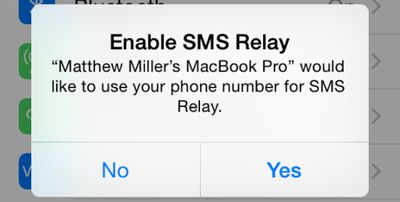
smsrelay
Photos: Photos now displays a "Last Updated" notification to let users know when images were last synced to iCloud. There's also an iCloud Photo Settings option to store full resolution photos solely in iCloud while keeping device-optimized versions available on the iPhone to save storage space.
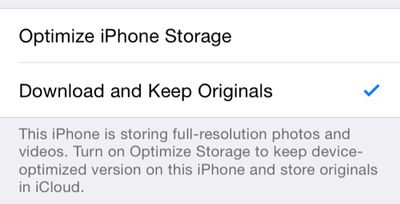
photosoptimize
iCloud icons: iCloud Drive, Backup, and Keychain have new icons in the iCloud section of the Settings app. The overall iCloud icon has also been updated, featuring a white cloud on a field of blue.
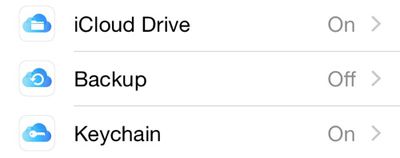
newicloudsettingsicons
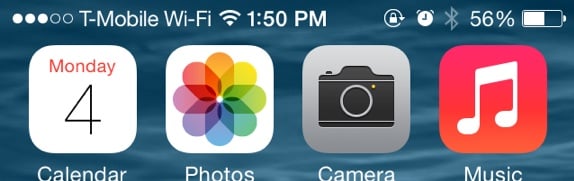
WiFi Calling: When WiFi calling is enabled, it's now labeled T-Mobile WiFi at the top of the iPhone screen.
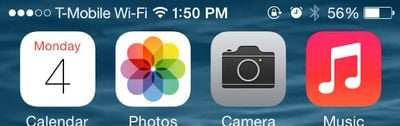
tmobilewifi
Predictive text: There's now an option on the keyboard to toggle on predictive text.
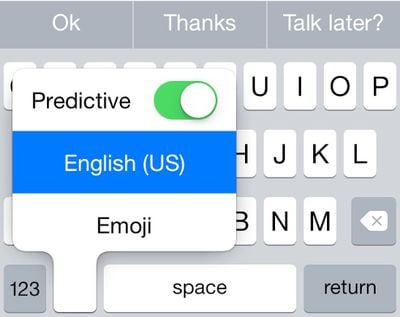
predictive
Wallpaper Settings: The Brightness toggle has been removed from the Wallpaper section of the Settings app. Changing screen brightness can now be done via the Display & Brightness section of the Settings app that was added in a previous iOS 8 beta.

Additional features in iOS 8 beta 5 will be added here as they are discovered. Apple is likely to continue pushing regular updates to iOS 8 at two or three-week intervals to bring minor performance boosts and changes ahead of the operating system's launch. For more information on iOS 8's features, major and minor, make sure to check out our roundups.


Related Forum: iOS 8

Popular Stories

Aston Martin CarPlay Ultra Screen

Apple's CarPlay Ultra to Expand to These Vehicle Brands Later This Year

Sunday February 1, 2026 10:08 am PST by
Last year, Apple launched CarPlay Ultra, the long-awaited next-generation version of its CarPlay software system for vehicles. Nearly nine months later, CarPlay Ultra is still limited to Aston Martin's latest luxury vehicles, but that should change fairly soon. In May 2025, Apple said many other vehicle brands planned to offer CarPlay Ultra, including Hyundai, Kia, and Genesis. In his Powe...
Apple Logo Black

Apple Just Made Its Second-Biggest Acquisition Ever After Beats

Thursday January 29, 2026 10:07 am PST by
Apple today confirmed to Reuters that it has acquired Q.ai, an Israeli startup that is working on artificial intelligence technology for audio. Apple paid close to $2 billion for Q.ai, according to sources cited by the Financial Times. That would make this Apple's second-biggest acquisition ever, after it paid $3 billion for the popular headphone and audio brand Beats in 2014. Q.ai has...
Apple Logo Black

Apple's Next Launch is 'Imminent'

Sunday February 1, 2026 12:31 pm PST by
The calendar has turned to February, and a new report indicates that Apple's next product launch is "imminent," in the form of new MacBook Pro models. "All signs point to an imminent launch of next-generation MacBook Pros that retain the current form factor but deliver faster chips," Bloomberg's Mark Gurman said on Sunday. "I'm told the new models — code-named J714 and J716 — are slated...
14 inch MacBook Pro Keyboard

Apple Changes How You Order a Mac

Saturday January 31, 2026 10:51 am PST by
Apple recently updated its online store with a new ordering process for Macs, including the MacBook Air, MacBook Pro, iMac, Mac mini, Mac Studio, and Mac Pro. There used to be a handful of standard configurations available for each Mac, but now you must configure a Mac entirely from scratch on a feature-by-feature basis. In other words, ordering a new Mac now works much like ordering an...
Apple MacBook Pro M4 hero

New MacBook Pros Reportedly Launching Alongside macOS 26.3

Sunday February 1, 2026 5:42 am PST by
Apple is planning to launch new MacBook Pro models with M5 Pro and M5 Max chips alongside macOS 26.3, according to Bloomberg's Mark Gurman. "Apple's faster MacBook Pros are planned for the macOS 26.3 release cycle," wrote Gurman, in his Power On newsletter today. "I'm told the new models — code-named J714 and J716 — are slated for the macOS 26.3 software cycle, which runs from...

Top Rated Comments

AngerDanger Avatar
150 months ago
It's interesting to think that an actual human designed the menu area here:


I hope Apple innovates a method of consolidating those dots into, say, thin vertical rectangles. They could even be called something like poles… or… bars. :rolleyes:
Score: 21 Votes (Like | Disagree)
iBlazed Avatar
150 months ago
I like the new icloud icons. Actually the whole OS is just great. Beta 5 is already a solid upgrade over iOS 7 and this really puts the final touches on the aesthetics.
Score: 13 Votes (Like | Disagree)
dlewis23 Avatar
150 months ago
The T-Moible Wi-Fi is a little big for the status bar.

I'm trying to understand? Is this so messages can relay ALL types of messages not just iMessage or is this something different?
It means it will forward SMS messages (the green ones) to your iPad or mac.
Score: 10 Votes (Like | Disagree)
w00master Avatar
150 months ago
It's interesting to think that an actual human designed the menu area here:

Image (https://cdn.macrumors.com/article-new/2014/08/tmobilewifi.jpg)

I hope Apple innovates a method of consolidating those dots into, say, thin vertical rectangles. They could even be called something like poles… or… bars. :rolleyes:
Agreed with this. Btw... why does the carrier name need to even appear on the top? Makes no sense to me. As an example, my work Android phone does not have this at all, so I know it can't be a "carrier mandated" thing.

Apple, please get rid of the carrier name in the menu bar. It's totally unnecessary and redundant. The user *already knows* what carrier he/she belongs to!

w00master
Score: 5 Votes (Like | Disagree)
dav465 Avatar
150 months ago
I really like the idea of icloud drive but 5GB is stingy. With all of the other major companies offering around 15gb for free, do you think Apple may change their minds and offer 15gb as well? Let alone flickr give 1TB for free storage and auto upload!
Granted their prices for extra storage aren't extortionate but 5GB really is a bit mean IMO.
Score: 3 Votes (Like | Disagree)
Dan70 Avatar
150 months ago
I've just seen another update, the AirDrop icon when selecting pictures has been re-done to fit in with the buttons at the button. Not a big change but looks nicer I think.
Score: 3 Votes (Like | Disagree)