

Apple's EFI Firmware 2.9 Update for 2011 MacBook Airs Appears Buggy, Some Users Unable to Install - MacRumorsOpen MenuShow RoundupsShow Forums menuVisit ForumsOpen Sidebar
Skip to Content

Apple's EFI Firmware 2.9 Update for 2011 MacBook Airs Appears Buggy, Some Users Unable to Install

by

Apple's recent EFI Firmware 2.9 update for 2011 MacBook Air models appears to be causing trouble for several MacBook Air users, according to a thread on the Apple Support Communities.

Released on July 15 to fix sleep/wake issues and a bug that caused fans to run at full speed after waking from sleep, the EFI update has caused some MacBook Air machines to shut down completely for several hours and on other machines, the update is still listed in the App Store after being installed.
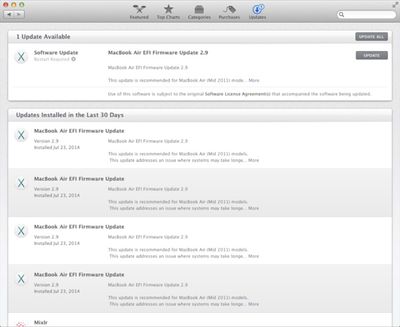
efiupdatetroubles
Multiple users have said their machines turned off and did not reboot for several hours after attempting to install the update, while others have been unable to install the update at all. Some users have also reported completely bricked machines even after several hours.

One user attempted to install the update multiple times with no luck, while another user took his machine to the Apple Store where employees were also unable to get the update to install.

I had the same issue. The machine simply shuts off and doesn't restart so the firmware update is never applied. The power button stopped working and the machine would not turn on at all. So I took it the the Apple Store and they cracked it open to do a physical SMC reset.

It booted up fine after that. We tried the install again and no dice. Same thing happened. This time the guy at the Genius Bar did some kind of "soft" SMC reset. He pressed SHIFT+FN+CONTROL+POWER at the same time (the first 3 keys are in the lower left corner) ... held it for a few seconds and let them go. When he pressed the Power button after that the machine booted up fine. Still didn't apply the firmware update though. The guy at the Genius Bar said he would report this issue to Engineering to alert them to the problem with the update.

It is not clear if the issue is widespread or limited to just a 2011 MacBook Air users, but as none of the affected users in the thread have discovered a solution, those who have not yet attempted to install the 2.9 update might wait to wait for an official fix from Apple.


Top Rated Comments

154 months ago
you're...installing it wrong?
Score: 4 Votes (Like | Disagree)
smithrh Avatar
154 months ago
For cripes sake:

Bugged != Buggy

Title implies that installing this EFI firmware will bug your MBA.
Score: 3 Votes (Like | Disagree)
gavroche Avatar
154 months ago
My install took a very long time to restart after reboot. Thought it was bricked. Was in process of researching the issue on the iPad when it finally rebooted. My points of note:
1) Definitely starts from sleep more rapidly now. Love this.
2) Having issues with wi-fi now. Specifically, after waking the computer from sleep, nearly every single time the wifi network is no longer chosen and active. I have to wait for it to scan for available networks, and select correct one to join. Annoying.
Score: 1 Votes (Like | Disagree)
154 months ago
BoyRacer, your update did not install. The current version MBA41.0077.B0F was the previous version we were all running on. For a short time yesterday after the update was released, Apple's firmware page was updated to reflect MBA41.0077.B11F as being the current version - they have since, having realized this was a bad/erroneous update, canceled the software update & revised that page to show MBA41.0077B0F as being the current version.
From everything I'm reading, it's pretty apparent that the new EFI didn't actually install for anyone.
Score: 1 Votes (Like | Disagree)
154 months ago
For cripes sake:

Bugged != Buggy

Title implies that installing this EFI firmware will bug your MBA.

*may* bug your MBA. ;)
Score: 1 Votes (Like | Disagree)
Exotic-Car Man Avatar
154 months ago
Reminds me of the June 2012 Thunderbolt update (https://www.macrumors.com/2012/06/12/thunderbolt-software-update-1-2-causing-boot-failures-for-some-users/) boot failures. That one caused my iMac to kernel panic. Luckily, I had a backup. The lesson to be learned is: always backup before installing an update that requires a reboot!
Score: 1 Votes (Like | Disagree)

Popular Stories

iOS 27 on iPhone 17 1

iOS 27 Will Add These New Features to Your iPhone

Saturday May 2, 2026 8:43 am PDT by
Apple is expected to unveil iOS 27 during its WWDC 2026 keynote on June 8, and there are already many rumored features and changes for iPhones. The first developer beta of iOS 27 will likely be available immediately following the keynote, and a public beta typically follows in July. Following beta testing, the software update should be released to all users with a compatible iPhone in...
Apple Event Logo

Apple Just Released a New Accessory

Monday May 4, 2026 8:13 am PDT by
Apple today released a new Pride Edition Sport Loop for the Apple Watch. The band features a rainbow design with 11 colors of woven nylon yarns. The new Pride Edition Sport Loop is available to order now on Apple.com and in the Apple Store app in 40mm, 42mm, and 46mm sizes, and it will be available at Apple Store locations starting later this week. In the U.S., the band costs $49. There...
Apple MacBook Pro M4 hero

Why You Might Want to Wait to Buy a MacBook Pro

Friday May 1, 2026 3:43 pm PDT by
Apple refreshed the 14-inch and 16-inch MacBook Pro with M5 Pro and M5 Max models in March 2026, but depending on your needs and interests, you might want to skip this generation because there's something better in the works. The M5 Pro and M5 Max MacBook Pro models have faster chips, but the same design that Apple has used since 2021. An updated design with new display technology and faster ...
Related Apple News: Iphone | News | Ipad | Reviews | World News
















