iOS 8 Beta 4 Tidbits: Tips App, Control Center Redesign, New Display Options

Apple today released the fourth beta of iOS 8, which brings a number of improvements, changes, and bug fixes to the beta software that was first introduced on June 2.

iOS 8 beta 4 includes several minor interface tweaks and modifications that make the beta feel both faster and more polished. We've gathered up a comprehensive list of the enhancements that have been bundled into the release below, and to find out about all of the under-the-radar tweaks in iOS 8 so far, make sure to check out our iOS 8 Hidden Features Roundup.

Tips: The Tips app that was first hinted at during WWDC has surfaced in iOS 8 beta 4, giving users tips on how to use iOS 8 on a weekly basis. For example, there are directions on using quick notification responses, sending voice messages, using notifications for Mail responses, activating Siri hands-free, and more. The Tips app is a default iOS app and cannot be uninstalled.
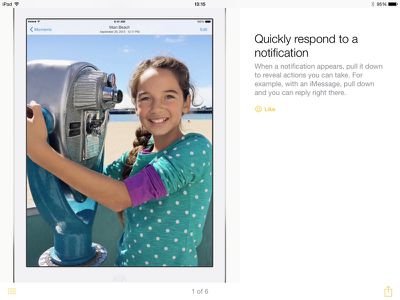
tipsappios8
Control Center: The Control Center has seen a redesign that removes the black borders around the icons on the top and bottom and turns icons white when activated.
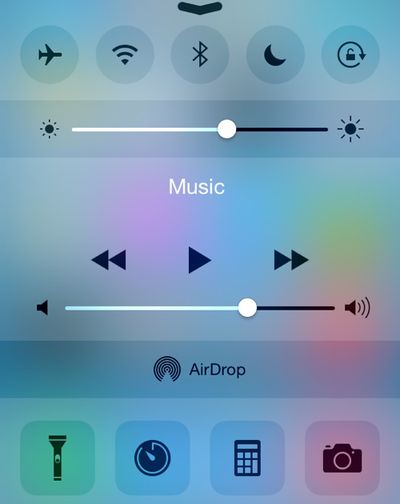
controlcenter
Display Settings: There's a new Display & Brightness section that's been unbundled from Wallpaper, with options to adjust screen brightness, text size, and activate bold text.

HomeKit: The Privacy section of the Settings app has gained a new Home Data icon.

Messages: The Messages section of the Settings app has new options for Message storage that includes separate expiration options for Audio and Video Messages. The Talk-to-Type option in Messages now displays spoken text in real time rather than waiting for an entire message to be complete before displaying text.


Bug Reporter: The Bug Reporter app that came installed by default in previous betas has been removed.

Handoff and Suggested Apps: There are new options in the Setting app to toggle Handoff on and off, but it does not appear to be present on the iPhone 4s. There's also a new section that allows users to toggle on Suggested Apps, which offer app suggestions relevant to location. This setting can be used to show only installed apps, or both installed apps and App Store apps.
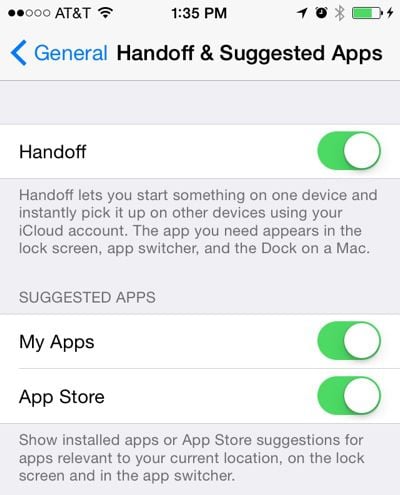
handoffsuggestedapps
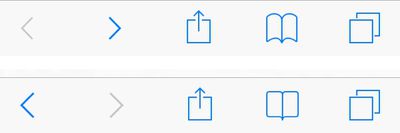
Safari Bookmarks: The icon for Bookmarks within Safari has been tweaked slightly. In the image below, the new version is on the top and the old version is on the bottom.
bookmark
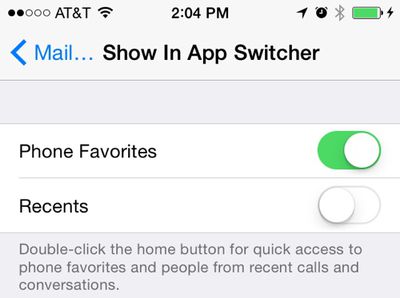
Contacts: Under the Mail, Contacts, and Calendars heading in the Settings app, there's a new option to toggle off Favorites and Recents for Contacts within the App Switcher.
appswitchercontacts
Keyboard Settings: The option to toggle on the QuickType keyboard within the Keyboard section of the Settings app is now labeled as "Predictive" instead of "QuickType."

Spotlight Search: There are new options to remove Voice Memos and Bing Web Results from Spotlight Search in the Settings app.

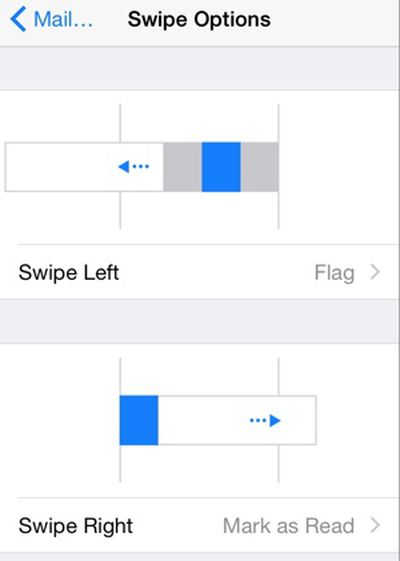
Mail: Swipe left and swipe right gestures in the Mail app can be assigned to different functions in the Mail, Contacts, and Calendars section of the Settings app.
mailswipeoptions
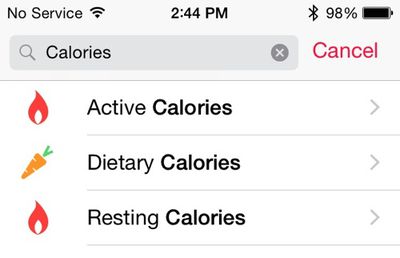
Health: The Calories section of the Health app has been split into Active, Dietary, and Resting calories.
calorieshealth
Emoji Keyboard Icon: The icon for Emoji on the keyboard has been updated with a happier smiley face.

emojikeyboard
iCloud Photo Library: It's now possible to select a length of time when pausing iCloud Photo Library in the iCloud section of the Settings app.

Additional features in iOS 8 beta 4 will be added here as they are discovered. Apple is likely to continue pushing regular updates to iOS 8 at two or three-week intervals to bring minor performance boosts and changes ahead of the operating system's launch. iOS 8 is expected to be released to the public in the fall. For more information on iOS 8's features, major and minor, make sure to check out our roundups.


Related Forum: iOS 8

Popular Stories

Aston Martin CarPlay Ultra Screen

Apple's CarPlay Ultra to Expand to These Vehicle Brands Later This Year

Sunday February 1, 2026 10:08 am PST by
Last year, Apple launched CarPlay Ultra, the long-awaited next-generation version of its CarPlay software system for vehicles. Nearly nine months later, CarPlay Ultra is still limited to Aston Martin's latest luxury vehicles, but that should change fairly soon. In May 2025, Apple said many other vehicle brands planned to offer CarPlay Ultra, including Hyundai, Kia, and Genesis. In his Powe...
Apple Logo Black

Apple Just Made Its Second-Biggest Acquisition Ever After Beats

Thursday January 29, 2026 10:07 am PST by
Apple today confirmed to Reuters that it has acquired Q.ai, an Israeli startup that is working on artificial intelligence technology for audio. Apple paid close to $2 billion for Q.ai, according to sources cited by the Financial Times. That would make this Apple's second-biggest acquisition ever, after it paid $3 billion for the popular headphone and audio brand Beats in 2014. Q.ai has...
Apple Logo Black

Apple's Next Launch is 'Imminent'

Sunday February 1, 2026 12:31 pm PST by
The calendar has turned to February, and a new report indicates that Apple's next product launch is "imminent," in the form of new MacBook Pro models. "All signs point to an imminent launch of next-generation MacBook Pros that retain the current form factor but deliver faster chips," Bloomberg's Mark Gurman said on Sunday. "I'm told the new models — code-named J714 and J716 — are slated...
14 inch MacBook Pro Keyboard

Apple Changes How You Order a Mac

Saturday January 31, 2026 10:51 am PST by
Apple recently updated its online store with a new ordering process for Macs, including the MacBook Air, MacBook Pro, iMac, Mac mini, Mac Studio, and Mac Pro. There used to be a handful of standard configurations available for each Mac, but now you must configure a Mac entirely from scratch on a feature-by-feature basis. In other words, ordering a new Mac now works much like ordering an...
Apple MacBook Pro M4 hero

New MacBook Pros Reportedly Launching Alongside macOS 26.3

Sunday February 1, 2026 5:42 am PST by
Apple is planning to launch new MacBook Pro models with M5 Pro and M5 Max chips alongside macOS 26.3, according to Bloomberg's Mark Gurman. "Apple's faster MacBook Pros are planned for the macOS 26.3 release cycle," wrote Gurman, in his Power On newsletter today. "I'm told the new models — code-named J714 and J716 — are slated for the macOS 26.3 software cycle, which runs from...

Top Rated Comments

shanson27 Avatar
151 months ago
Google is so much better at flat design....

Sad, but true. Apple is confused...

The new control center looks really nice
Score: 31 Votes (Like | Disagree)
BornAgainApple Avatar
151 months ago
Apple, I'm begging you, please make Control Center customizable. I NEVER use the orientation lock, but I do frequently turn cell data and personal hotspot on and off. Thank you.
Score: 29 Votes (Like | Disagree)
Paradoxally Avatar
151 months ago
That CC looks way better than iOS 7's.
Score: 27 Votes (Like | Disagree)
KeegM480 Avatar
151 months ago
That Control Center is really ugly..
Score: 22 Votes (Like | Disagree)
iHack13 Avatar
151 months ago
Google is so much better at flat design....

Sad, but true. Apple is confused...
Score: 21 Votes (Like | Disagree)
macduke Avatar
151 months ago
Removing the strokes from Control Center makes it look less cluttered and clearly breaks up the space into sections. It's a far better design choice.
Score: 18 Votes (Like | Disagree)