

'Air Stylus' Turns Your iPad Into a Drawing Tablet for Your Mac - MacRumorsOpen MenuShow RoundupsShow Forums menuVisit ForumsOpen Sidebar
Skip to Content

'Air Stylus' Turns Your iPad Into a Drawing Tablet for Your Mac

by

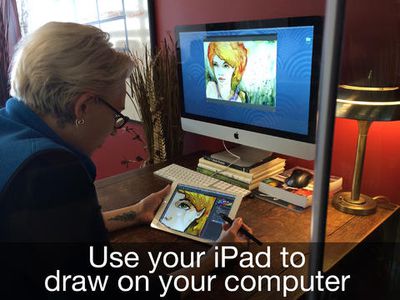
Air Display developer Avatron Software today launched Air Stylus, an app that allows users to utilize the iPad as a pressure-sensitive, wireless drawing surface for over 30 graphics programs on the Mac.
air_stylus_1
The app is compatible with a number of pressure sensitive styli, including the Wacom Intuos Creative Stylus and the Adonit Jot Touch 4, and works with popular programs such as Adobe Photoshop and Pixelmator. Air Stylus also includes support for pinch-to-zoom and two finger gestures while drawing, and features the ability to toggle palm rejection on and off.

- Make Your Mark - With palm rejection and multi-touch support, Air Stylus lets you draw naturally and makes your stylus do all the work.
- Quick On The Draw - Air Stylus creates a fast, reliable wireless link so you can immerse yourself in your art without distraction.
- Draw The Line - Pen-based pressure sensitivity means your lines are accurate, whether they’re paintbrush bold or feather light.
- Best Of All - Compatible with 30+ graphics apps so you can incorporate your iPad into your existing workflow (support for Windows and Android imminent!)


Air Stylus can be purchased from the App Store for $19.99 and is available now. [Direct Link]

Top Rated Comments

NightFox Avatar
155 months ago
iWatch will make this a relic of the past. Just pick up any object and draw with it. iWatch translates to screen. Job done, game over by :apple:

But when I draw or paint most of my detailed movement is in the hand or fingers - my wrist hardly moves at all
Score: 4 Votes (Like | Disagree)
155 months ago
For those poo-pooing the ideal of a stylus for art on a iPad, I beg to differ. From a person who actually DRAWS on an iPad (and has since 2011), bluetooth stylii have come a LONG WAY from the crummy rubber tipped ones introduced back since 2010. Of course, it's no way as elegant as a Cintiq, the trade offs are becoming less of a nuisance. I draw with procreate and a Jot Touch 4 from time to time (my Cintiq 13HD is my primary tool for digital art) and it's quite a blast for drawing.

I'm eager to hear from people who have actually used Air Stylus and are not talking out of their ass about bluetooth limitations and lag.
Score: 3 Votes (Like | Disagree)
155 months ago
brush. lag.

Brush. lag. brush lag. brush lag. brush lag. brush lag.

You get my point.

Unusable as a daily tool. Even the promotional video can't hide that (and they try). But, perhaps it would be worth it for quick retouches and and fixes that require a brush or pen.

Let's be serious, drawing on the iPad is already a challenge. I've tried all styli and apps and no matter what (yes even with advanced bluetooth versions) there are palm rejection issues and most importantly a lag when using any type of fast gesture with a pen or brush. Very annoying unless you are this snail-like artist in the video.

Add the additional lag from iPad to Mac and, boom, instant drawing hell.

I read the one review on the app store claiming it "draws smooth and updates quickly". There is no way with the technology involved that this isn't anything more than a fun novelty app that would lose it's appeal once you try to be productive as an artist.

Let's wait and see when the real reviews start rolling in. I don't wish bad things for Avatron, I just don't know how this can actually work in the real world.
Score: 3 Votes (Like | Disagree)
ArtOfWarfare Avatar
155 months ago
no palm rest = fatigue --> death
Well that excalated quickly.

Score: 3 Votes (Like | Disagree)
robertosh Avatar
155 months ago
no palm rest = fatigue.

no palm rest = fatigue --> death
Score: 3 Votes (Like | Disagree)
Pakaku Avatar
155 months ago
iWatch will make this a relic of the past. Just pick up any object and draw with it. iWatch translates to screen. Job done, game over by :apple:
Maybe if you hold your hand absolutely rigid... Otherwise no, I can't see that working at all, speaking as an artist and tech enthusiast.
Score: 2 Votes (Like | Disagree)

Popular Stories

iOS 27 on iPhone 17 1

iOS 27 Will Add These New Features to Your iPhone

Saturday May 2, 2026 8:43 am PDT by
Apple is expected to unveil iOS 27 during its WWDC 2026 keynote on June 8, and there are already many rumored features and changes for iPhones. The first developer beta of iOS 27 will likely be available immediately following the keynote, and a public beta typically follows in July. Following beta testing, the software update should be released to all users with a compatible iPhone in...
Apple Event Logo

Apple Just Released a New Accessory

Monday May 4, 2026 8:13 am PDT by
Apple today released a new Pride Edition Sport Loop for the Apple Watch. The band features a rainbow design with 11 colors of woven nylon yarns. The new Pride Edition Sport Loop is available to order now on Apple.com and in the Apple Store app in 40mm, 42mm, and 46mm sizes, and it will be available at Apple Store locations starting later this week. In the U.S., the band costs $49. There...
Apple Announces 2026 Pride Band Watch Face and iPhone Wallpaper Article 2

iOS 26.5 Coming Soon With These New Features

Monday May 4, 2026 8:40 am PDT by
iOS 26.5 is expected to be released next week, following more than a month of beta testing. The update is relatively minor, but there are a couple of new features and changes across the operating system that we have recapped below. iOS 26.5 lays the groundwork for end-to-end encryption for RCS in the Messages app and ads in the Apple Maps app, and it will include a new Pride wallpaper and a...
Related Apple News: News | Motoring | Sport | Politics | Technology

















