

Longtime GPS navigation leader Garmin is expanding its app portfolio with its newly-announced navigation title, Viago. The maps company hopes to compete with free navigation apps such as Apple Maps by offering Viago with an affordable price tag and a robust set of core navigation features.
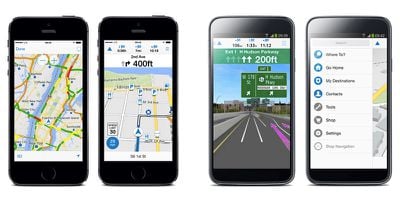
Viago sets itself apart from the competition with a set of standard navigation features that are not usually available in free apps, such as lane assist, speed limit display, weather information, photo-realistic junction views and more. Customers who want more than these base features can opt to purchase advanced options a la carte via in-app purchases. Additional paid features include real-time traffic with automatic rerouting, urban navigation with public transportation, downloadable maps and more.
“Garmin víago offers the best navigation technology available from Garmin, helping drivers to reduce stress and save time on the road,” said Joern Watzke, vice president world-wide mobile business at Garmin Wuerzburg GmbH. ”The comprehensive feature set goes far beyond simple turn-by-turn directions and assists drivers like no other navigation app. Premium in app purchase options allow users to fully customize their navigation experience and only choose the features they want.“
The app also features Garmin Real Directions (in-app purchase), which allows the driver to receive descriptive driving directions that include notable landmarks, traffic signs and traffic light status that make it easier to drive an unfamiliar route. Viago also is compatible with Garmin HUD, a standalone Bluetooth device that projects driving directions into the driver's line of sight using a transparent film on the car windshield or an attached reflector lens.
Garmin Viago [Direct Link] is available now at a launch price of $0.99 (normally $1.99) until July 13, 2014. In-app purchase packages range from $4.99 to $19.99 with Maps to Go and Traffic Live now discounted 50 percent during this promotional period.






















Top Rated Comments
Navigon (owned by Garmin) does show the speed. Free isn't always the best, and for a nominal amount of money sometimes you get a much better experience.
Thanks for the link. The fact that they had to create a site to explain to people what the various IAP options give the end-user tells me that Garmin doesn't understand the psychology of how IAPs should work for the end-user.
They need another lesson on the KISS principle, it seems. If I have to visit a website in order to understand why I should consider giving them more money via IAP, it is extremely unlikely that I am going to be giving them more money via IAP.
I went to a local grocery store in my area using the app; Here are some thoughts, where I compare it to Waze and Google Maps, without buying any in-app options:
1) Searching for a place to go is just like the Garmin Nuvi, you have to either have a specific address, or find it in the point of interest; I prefer Google/Waze's way of just searching the closest thing you mean; this means playing around with the different categories to find the place you're looking for by name.
2) Waze is pretty nice when you're in a parking lot, it can route you intelligently out of a parking lot, the garmin was okay once i was on a major roadway.
3) The voice directions were not satisfactory; it just says turn left, or turn right, keep right; without stating the street name; Waze at least says the street name or sign post info. Looks like you have to spend 20 bucks to get "Maps on the Go" and "Real directions".
4) Speed limit indicator is nice but like on the Nuvi I used, usually wrong by 5mph; but that's okay; it's helpful when there are no speed limit signs
5) Nice iOS 7 design in the app; feels intuitive to use.
6) The lane symbols are nice in Viago; Waze doesn't have this.
7) Options are similar to a Nuvi, so you can customize the display; it's a nice touch
8) You can plan routes, which I really like if you want to go through an unconventional path or plan multiple destinations.
This is my initial impression so far. I may checkout the in app stuff later.
All in all this looks nice and the company is well known and respected. However, I think I will stick to my iMaps for now.