Apple Details Expanded 4K Display Support Included in OS X 10.9.3 - MacRumorsOpen MenuShow RoundupsShow Forums menuVisit ForumsOpen Sidebar
Skip to Content

Apple Details Expanded 4K Display Support Included in OS X 10.9.3

Apple today updated its 4K display support page following the OS X 10.9.3 update, detailing the enhancements that have been made to 4K display support.

Running OS X 10.9.3, the 2013 Mac Pro and the 2013 Retina MacBook Pro now support several new 4K displays, including the Sharp PN-K321, ASUS PQ321Q, Dell UP2414Q, Dell UP3214Q, and the Panasonic TC-L65WT600. Previously, only the Sharp and ASUS displays were officially supported.

There's a new section on display adjustments and Retina scaling, introduced to allow the resolution of 4K displays to be adjusted much like the display of the Retina MacBook Pro, improving the size and readability of text and other on-screen elements.
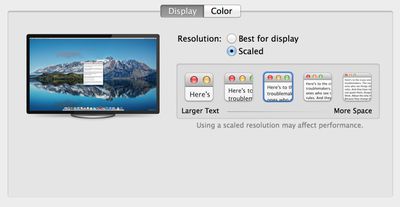
screenresolutions4k
The revamped support page also notes that both the Mac Pro and the Retina MacBook Pro are now able to support 60 Hz 4K output for the five supported displays, using multi-stream transport, a feature previously limited to the Mac Pro. With the higher refresh rates, response times for tasks like game playing and video editing will be improved. Detailed instructions are given for enabling the option:

MacBook Pro (Retina, Late 2013) or Mac Pro (Late 2013) also support 60 Hz displays using multi-stream transport (MST). These displays need to be manually configured to use MST. Follow the steps below to use the display's built-in controls to enable this feature.

- Sharp PN-K321: Choose Menu > Setup > DisplayPort STREAM > MST > SET
- ASUS PQ321Q: Choose OSD menu > Setup > DisplayPort Stream
- Dell UP2414Q and UP3214Q: Choose Menu > Display Setting > DisplayPort 1.2 > Enable
- Panasonic TC-L65WT600: Choose Menu > Display Port Settings > Steam Setting > Auto

Your Mac will automatically detect an MST-enabled display. However, your display may require a firmware update to support 60Hz operation. Please contact your display vendor for details. If your specific DisplayPort display is not listed above, check with the display's manufacturer for compatibility information.

First released yesterday, OS X 10.9.3 with enhanced support for 4K displays can be downloaded via the software update tool in the Mac App Store.


Popular Stories

iOS 27 on iPhone 17 1

iOS 27 Will Add These New Features to Your iPhone

Saturday May 2, 2026 8:43 am PDT by
Apple is expected to unveil iOS 27 during its WWDC 2026 keynote on June 8, and there are already many rumored features and changes for iPhones. The first developer beta of iOS 27 will likely be available immediately following the keynote, and a public beta typically follows in July. Following beta testing, the software update should be released to all users with a compatible iPhone in...
Apple MacBook Pro M4 hero

Why You Might Want to Wait to Buy a MacBook Pro

Friday May 1, 2026 3:43 pm PDT by
Apple refreshed the 14-inch and 16-inch MacBook Pro with M5 Pro and M5 Max models in March 2026, but depending on your needs and interests, you might want to skip this generation because there's something better in the works. The M5 Pro and M5 Max MacBook Pro models have faster chips, but the same design that Apple has used since 2021. An updated design with new display technology and faster ...
Apple Event Logo

Apple Just Released a New Accessory

Monday May 4, 2026 8:13 am PDT by
Apple today released a new Pride Edition Sport Loop for the Apple Watch. The band features a rainbow design with 11 colors of woven nylon yarns. The new Pride Edition Sport Loop is available to order now on Apple.com and in the Apple Store app in 40mm, 42mm, and 46mm sizes, and it will be available at Apple Store locations starting later this week. In the U.S., the band costs $49. There...

Top Rated Comments

brock2621 Avatar
156 months ago
C'mon apple, 4k display already!
Score: 14 Votes (Like | Disagree)
MagnusVonMagnum Avatar
156 months ago
No official Samsung U28D590D support? Arguably the most popular based on its price.

WTF does Apple need to "officially support" every stinking monitor being manufactured? That could get really ugly really fast trying to depend on Apple to release new drivers all the time when they cannot even keep their regular video drivers and 3D system up-to-date in a timely fashion. There should be a STANDARD that all 4k monitors support and Apple should then just support that standard, not this piece meal one-at-a-time approach.
Score: 8 Votes (Like | Disagree)
156 months ago
Just don't try more than 2 monitors!

Lots of issues supporting more than 2 monitors (of ANY resolution)

10.9.3 broke support for more than 2 monitors for Many people.
Score: 5 Votes (Like | Disagree)
156 months ago
I like the wallpaper they posted? Anyone know where I can download it?

Here it is in 7025 x 4008 :D

http://i.images.cdn.fotopedia.com/flickr-8133635853-original/Photography_Techniques/Image_editing/High_dynamic_range_imaging/The_road_to_Glenorchy_is_epic.jpg
Score: 4 Votes (Like | Disagree)
156 months ago
If I remember correctly they did the same thing with the MBP. Retina came to 13" first then 15".
You remember incorrectly. The first Retina MBP was 15". A 13" rMBP came out 4 months later.
Score: 3 Votes (Like | Disagree)
156 months ago
Ok now I'm confused. Previously, Macrumors reported that 60hz support in 10.9.3 would only apply to the 15" Retina Macbook Pro. Now its just saying "Retina Macbook Pro". So does this apply to the latest 13" model or is some information being left off?
Score: 2 Votes (Like | Disagree)
Related Apple News: Business | Mac | News | Ipad | Travel