Apple Releases OS X 10.9.3 With Enhanced Support for 4K Displays, Syncing Improvements

Apple today released OS X 10.9.3, after two months of developer testing. The last 10.9.3 developer beta, build 13D61, was released just over a week ago.

The update, which is recommended for all Mavericks users, improves 4K display support on the late 2013 Mac Pro and 15-inch MacBook Pro with Retina display. According to the release notes, it also re-adds the ability to sync contacts and calendars between Macs and iOS devices using a USB connection and it improves the reliability of VPN connections using IPSec.

Today's update also includes Safari 7.0.3, and Apple has released iTunes 11.2 as well.
mavericks

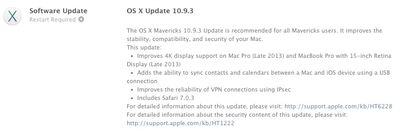
The OS X Mavericks 10.9.3 Update is recommended for all Mavericks users. It improves the stability, compatibility, and security of your Mac.
This update:

- Improves 4K display support on Mac Pro (Late 2013) and MacBook Pro with 15-inch Retina Display (Late 2013)
- Adds the ability to sync contacts and calendars between a Mac and iOS device using a USB connection
- Improves the reliability of VPN connections using IPsec
- Includes Safari 7.0.3

For detailed information about this update, please visit: http://support.apple.com/kb/HT6228
For detailed information about the security content of this update, please visit: http://support.apple.com/kb/HT1222

First outlined after the initial 10.9.3 beta, the improved 4K support enables HiDPI Retina scaling on 4K displays for the 2013 Mac Pro and Retina MacBook Pro with DisplayPort 1.2, which improves the size and readability of text and other on-screen elements. 10.9.3 also includes 60Hz 4K output for the 2013 Retina Macbook Pros and the higher refresh rates will improve response times for smoother game playing, video editing, and more.

OS X 10.9.3 can be downloaded through the software update function in the Mac App Store or through the following links:

- OS X Mavericks Update v10.9.3 (461.7 MB)
- OS X Mavericks Update v10.9.3 (Combo) (947.2 MB)

Related Forum: OS X Mavericks

Popular Stories

iOS 26

iOS 26.4 and iOS 27 Features Revealed in New Leak

Friday December 12, 2025 10:56 am PST by
Macworld's Filipe Espósito today revealed a handful of features that Apple is allegedly planning for iOS 26.4, iOS 27, and even iOS 28. The report said the features are referenced within the code for a leaked internal build of iOS 26 that is not meant to be seen by the public. However, it appears that Espósito and/or his sources managed to gain access to it, providing us with a sneak peek...
apple beta 26 lineup

Apple Leak Confirms Work on Foldable iPhone, AirTag 2, and Dozens More Devices

Monday December 15, 2025 2:05 pm PST by
Last week, details about unreleased Apple devices and future iOS features were shared by Macworld. This week, we learned where the information came from, plus we have more findings from the leak. As it turns out, an Apple prototype device running an early build of iOS 26 was sold, and the person who bought it shared the software. The OS has a version number of 23A5234w, and the first...
Apple Logo Top Half

Early iOS 26 Software Leak Uncovers Dozens of Upcoming Apple Features

Monday December 15, 2025 3:05 pm PST by
Software from an iPhone prototype running an early build of iOS 26 leaked last week, giving us a glimpse at future Apple devices and iOS features. We recapped device codenames in our prior article, and now we have a list of some of the most notable feature flags that were found in the software code. In some cases, it's obvious what the feature flags are referring to, while some are more...
Apple Foldable Thumb

Leak Reveals Foldable iPhone Details

Monday December 15, 2025 9:09 am PST by
The first foldable iPhone will feature a series of design and hardware firsts for Apple, according to details shared by the Weibo leaker known as Digital Chat Station. According to a new post, via machine translation, Apple is developing what the leaker describes as a "wide foldable" device, a term used to refer to a horizontally oriented, book-style foldable with a large internal display....
iOS 26

Apple Releases iOS 26.2 With Alarms for Reminders, Lock Screen Changes, Enhanced Safety Alerts and More

Friday December 12, 2025 10:10 am PST by
Apple today released iOS 26.2, the second major update to the iOS 26 operating system that came out in September, iOS 26.2 comes a little over a month after iOS 26.1 launched. ‌iOS 26‌.2 is compatible with the ‌iPhone‌ 11 series and later, as well as the second-generation ‌iPhone‌ SE. The new software can be downloaded on eligible iPhones over-the-air by going to Settings >...
iOS 26

iOS 26.2 Coming Soon With These 8 New Features on Your iPhone

Thursday December 11, 2025 8:49 am PST by
Apple seeded the second iOS 26.2 Release Candidate to developers earlier this week, meaning the update will be released to the general public very soon. Apple confirmed iOS 26.2 would be released in December, but it did not provide a specific date. We expect the update to be released by early next week. iOS 26.2 includes a handful of new features and changes on the iPhone, such as a new...
macOS Tahoe 26 Thumb

Apple Releases macOS Tahoe 26.2 With Edge Light

Friday December 12, 2025 10:08 am PST by
Apple today released macOS Tahoe 26.2, the second major update to the macOS Tahoe operating system that came out in September. macOS Tahoe 26.2 comes five weeks after Apple released macOS Tahoe 26.1. Mac users can download the macOS Tahoe update by using the Software Update section of System Settings. macOS Tahoe 26.2 includes Edge Light, a feature that illuminates your face with soft...
airpods max 2024 colors

AirPods Max 2 Likely to Offer These 10 New Features

Monday December 15, 2025 7:41 am PST by
Apple released the AirPods Max on December 15, 2020, meaning the over-ear headphones launched five years ago today. While the AirPods Max were updated with a USB-C port and new color options last year, followed by support for lossless audio and ultra-low latency audio this year, the headphones lack some of the features that have been introduced for newer generations of the regular AirPods and the ...

Top Rated Comments

iPhone7s Avatar
151 months ago
This is new
Score: 24 Votes (Like | Disagree)
coolfactor Avatar
151 months ago
It really breaks my heart to see Apple getting lax on their own UI guidelines.


Yes/No buttons are so Windows. Yuck!
Score: 22 Votes (Like | Disagree)
coolfactor Avatar
151 months ago
And in which way exactly should they have put it?
According to Apple's own User Interface Guidelines, buttons should have verb names, action-oriented names. They buttons themselves should be enough to decide what to do. Instead, when using Yes/No buttons, the user is forced to read the entire dialog text and then make a decision about whether they need to click Yes or No.

From their guidelines:
Using a more focused button name, such as Erase, Convert, Clear, or Delete, helps make sure that users understand the action they’re taking.
In the example dialog that I provided in my original post, the buttons could've been named "Keep Episodes" and "Delete After Played".
Score: 17 Votes (Like | Disagree)
iPhone7s Avatar
151 months ago
461mb on 2011 MBP, hope it finally adds the retina display!
Score: 15 Votes (Like | Disagree)
DonutHands Avatar
151 months ago
Images of iPhone 6 3D printed mockups render snappier on 10.9.3
Score: 14 Votes (Like | Disagree)
DTphonehome Avatar
151 months ago
Safari is much snippier. Seriously, it's in an awful mood and very curt with me.
Score: 13 Votes (Like | Disagree)