'SwiftKey Note' Brings Contextual Word Suggestions and Autocorrect to iOS with Evernote Integration - MacRumorsOpen MenuShow RoundupsShow Forums menuVisit ForumsOpen Sidebar
Skip to Content

'SwiftKey Note' Brings Contextual Word Suggestions and Autocorrect to iOS with Evernote Integration

Last week, an image was posted on Twitter by noted leaker @evleaks appearing to show a "SwiftKey Note" app for iOS from the company behind the popular alternative Android keyboard that ranked as the top-selling paid app on Google Play last year.

SwiftKey Note is indeed real and it launches today as a note-taking app that optionally integrates with Evernote's popular suite of apps. The app offers several features to allow for faster and easier note-taking, including automatic word suggestions based on context and personalized auto-correction. SwiftKey's suggestion and autocorrect features learn over time based on context from previous text entries, and can tap directly into a user's Evernote archive to assist with predictions.


SwiftKey's Chief Marketing Officer Joe Braidwood told MacRumors that his firm was approached by Evernote early last year about the possibility of developing a SwiftKey app to integrate with Evernote, and the two companies have worked closely together and with Apple to bring that vision to reality.

The new SwiftKey Note app supports seamless backup and two-way syncing, both with other instances of SwiftKey Note and with Evernote, allowing for easy note entry and editing in the app while notes propagate to other instances of Evernote. While SwiftKey Note does support some text formatting through easy swipe access to a toolbar, it does not support syncing of more sophisticated Evernote features such as advanced text formatting and embedded images.

With Apple so far refusing to allow developers to create systemwide alternative keyboards for iOS, SwiftKey is limited to bringing its keyboard functionality to its own apps and releasing tools to allow other developers to offer it in their own apps on a case-by-case basis. As such, SwiftKey Note also serves as an example and marketing tool as the company looks to partner with select third-party developers going forward before opening up broader access through an open SDK.
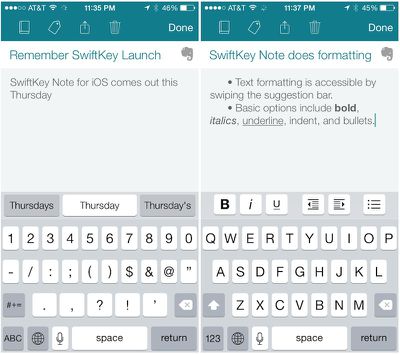
swiftkey_note_screenshots
Apple's prohibition of alternative systemwide keyboards has also contributed to SwiftKey's decision to not include support for the gesture-based typing found in its Android keyboard. For the time being, SwiftKey Note includes only the standard iOS keyboard to ensure familiarity for users, augmented with word suggestions appearing by default in a narrow bar above the keyboard, although the "tap to dismiss" interface familiar to iOS autocorrect users is also an option. Gesture input may, however, also be added in the future depending on user feedback.

One final key feature of SwiftKey Note is multilingual support, with the app able to offer contextual word suggestions in up to three languages simultaneously. Initial language support includes English (US and UK), German, Spanish (Spain and US), French (France and Canada), and Italian.

Unlike the SwiftKey Keyboard app for Android, SwiftKey Note for iOS arrives as a free app for iPhone, iPad, and iPod touch, giving the company the opportunity to test the waters of iOS with a useful but still lightweight app accessible to all users. The app requires a minimum of iOS 6, although text formatting is currently only supported on iOS 7. [Direct Link]


Popular Stories

iPhone 18 Pro Deep Red Feature

iPhone 18 Pro Launching Later This Year With These 12 New Features

Wednesday March 18, 2026 7:39 am PDT by
While the iPhone 18 Pro and iPhone 18 Pro Max are not expected to launch for another six months or so, there are already plenty of rumors about the devices. It was initially reported that the iPhone 18 Pro models would have fully under-screen Face ID, with only a front camera visible in the top-left corner of the screen. However, the latest rumors indicate that only one Face ID component...
imac video apple feature

Apple Released Yet Another New Product Today

Friday March 20, 2026 2:39 pm PDT by
Apple has unveiled a whopping nine new products so far this March, including an iPhone 17e, iPad Air models with the M4 chip, MacBook Air models with the M5 chip, MacBook Pro models with M5 Pro and M5 Max chips, the all-new MacBook Neo, an updated Studio Display, a higher-end Studio Display XDR, AirPods Max 2, and now the Nike Powerbeats Pro 2. iPhone 17e features the same overall design as...
ios 26 4 pastel

iOS 26.4: Top 10 New Features Coming to Your iPhone

Friday March 20, 2026 2:44 pm PDT by
iOS 26.4 isn't the major update with new Siri features that we hoped for, but there are some useful quality of life improvements, and a little bit of fun with an AI playlist generator and new emoji characters. Playlist Playground - Apple Music has a Playlist Playground option that lets you generate playlists from text-based descriptions. You can include moods, feelings, activities, or...

Top Rated Comments

158 months ago
Apple needs to get their **** together and let us use this system wide.

The principle of "we know best, you don't need to change anything" doesn't really work when their solutions are dated and and kind of crappy.
Score: 19 Votes (Like | Disagree)
158 months ago
This is the only thing which I really misses from my android experience. After months of use swiftkey learned my typing style in several languages and was absolutely amazing.
Apple should just buy the company and implement it :-)
Score: 7 Votes (Like | Disagree)
stiligFox Avatar
158 months ago
That formatting bar makes so much sense; it truly puts Apples current system of tap + hold + cycle through contextual menus to shame!
Score: 7 Votes (Like | Disagree)
CChrisG Avatar
158 months ago
This girl in the video is really beautiful!
Score: 6 Votes (Like | Disagree)
Patriks7 Avatar
158 months ago
I've used these kinds of keyboards a couple of times before, but never seemed to get the hang of it. Is it really that much better?
Score: 5 Votes (Like | Disagree)
158 months ago
just downloaded it and wrote down some thoughts. i gotta admit, its pretty awesome. (used it in german)

unfortunately i don't really use note-taking apps - don't know what for. except creating wordlists (e.g. grocery lists) and it doesn't really make any sense to use SwiftKey just for that kind of lists...


i'd love to see a jailbreak tweak working with that keyboard, though. - i mean, if thats even possible. :)
Score: 3 Votes (Like | Disagree)
Related Apple News: Entertainment | Reviews | South Africa | Culture | Opinion