

Flickr for iOS Updated with Auto Upload Capability and Straightening Tool - MacRumorsOpen MenuShow RoundupsShow Forums menuVisit ForumsOpen Sidebar
Skip to Content

Flickr for iOS Updated with Auto Upload Capability and Straightening Tool

by

Yahoo's image and video hosting website Flickr has released an update to its iOS app, which contains a new "Auto Upload" feature that saves images in their original resolution and uploads them directly to the service. Auto Upload can also be toggled to save images only when connected to a Wi-Fi network or enabled on both Wi-Fi and cellular connections, and all saved images are marked as private by default. The update also contains a new auto-straighten tool and fixes for users signing in with Google.
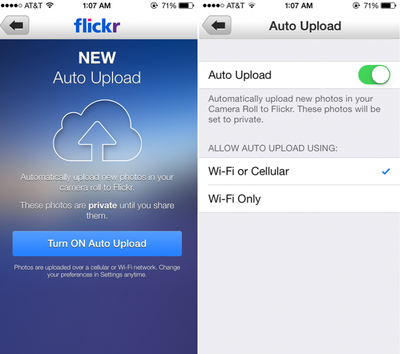
flickr_autoupload
Flickr received attention earlier this year when it began offering 1 TB of free photo storage space and underwent a major design overhaul. As previously speculated, Flickr is also now integrated within iOS 7, as users can choose to share photos directly to Flickr from the Photos app or various third-party apps with the functionality.

The last major update to Flickr for iOS came in August, when live filters and professional editing capabilities were added to the app. Flickr is a free download on the App Store. [Direct Link]


Top Rated Comments

ArtOfWarfare Avatar
164 months ago
Still looks like iOS 6. Not going on my phone.

Ew, iOS 6; that's so 5 weeks ago.
Score: 2 Votes (Like | Disagree)
164 months ago
So if I do burst mode, does it upload the full burst or just the "best of the bunch"?
Score: 1 Votes (Like | Disagree)
164 months ago
Why is there no iPad app? I'd love to just grab my iPad, open flickr and show people my photos. Is that really too much to ask?

Best I can do is load up flickr in the iOS version of Chrome, which fails to load properly.
Score: 1 Votes (Like | Disagree)
164 months ago
Can't see a way to upload existing stuff on Camera Roll.
Doesn't seem there's such an option at the moment, would be handy though.

Other than that it's a nice way to back everything up, especially if you take lots of pics and in a possession with a 16GB device only.
If you click on the camera icon in the middle of the bottom toolbar you should be able to go to your existing photos (and Camera Roll) by selecting the photo thumbnail on the bottom left of the camera screen, and from there you should be able to select photos to upload.

Or, as one of the in-app tips mentions, simply double tap the camera icon in the middle of the bottom toolbar and that should take you directly to Camera Roll to select photos to upload.
Score: 1 Votes (Like | Disagree)
164 months ago
Still no universal app? :-(
Score: 1 Votes (Like | Disagree)

Popular Stories

iOS 27 on iPhone 17 1

iOS 27 Will Add These New Features to Your iPhone

Saturday May 2, 2026 8:43 am PDT by
Apple is expected to unveil iOS 27 during its WWDC 2026 keynote on June 8, and there are already many rumored features and changes for iPhones. The first developer beta of iOS 27 will likely be available immediately following the keynote, and a public beta typically follows in July. Following beta testing, the software update should be released to all users with a compatible iPhone in...
Apple Event Logo

Apple Just Released a New Accessory

Monday May 4, 2026 8:13 am PDT by
Apple today released a new Pride Edition Sport Loop for the Apple Watch. The band features a rainbow design with 11 colors of woven nylon yarns. The new Pride Edition Sport Loop is available to order now on Apple.com and in the Apple Store app in 40mm, 42mm, and 46mm sizes, and it will be available at Apple Store locations starting later this week. In the U.S., the band costs $49. There...
Apple Announces 2026 Pride Band Watch Face and iPhone Wallpaper Article 2

iOS 26.5 Coming Soon With These New Features

Monday May 4, 2026 8:40 am PDT by
iOS 26.5 is expected to be released next week, following more than a month of beta testing. The update is relatively minor, but there are a couple of new features and changes across the operating system that we have recapped below. iOS 26.5 lays the groundwork for end-to-end encryption for RCS in the Messages app and ads in the Apple Maps app, and it will include a new Pride wallpaper and a...
Related Apple News: Reviews | Education | Buyers Guide | Sport | Culture
















