iOS 7 Beta 4 Tidbits: Lockscreen Redesign, Notification Center Improvements and New Search Options - MacRumorsOpen MenuShow RoundupsShow Forums menuVisit ForumsOpen Sidebar
Skip to Content

iOS 7 Beta 4 Tidbits: Lockscreen Redesign, Notification Center Improvements and New Search Options

Apple today released the fourth beta of iOS 7, which begins a number of improvements, changes, and bug fixes to the operating system, including a designed lockscreen, Notification Center improvements, an updated look for Safari’s bookmark menu, and more.

iOS 7 beta 4 also brings a slew of minor interface tweaks and improvements that make the fourth version of the beta feel both faster and more polished. Our forum members have noted multiple enhancements that have been bundled into the release:

Lockscreen - Slide to Unlock has been updated with a shifting highlight color and an arrow that draw attention to the area on the lockscreen. The arrow that denoted the Notification Center is now a line shape.
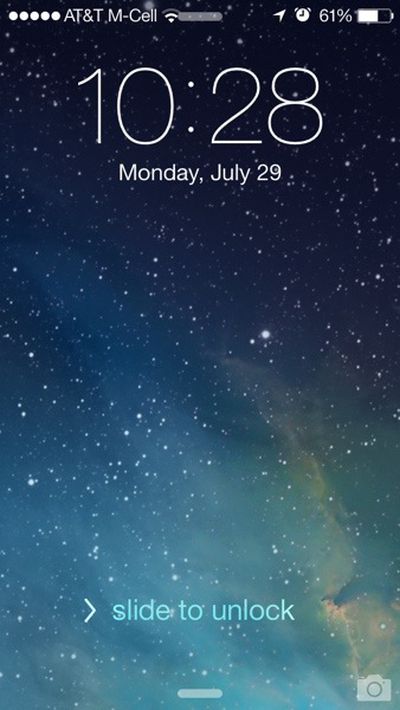
slidetounlock
Mail - Swiping to delete inbox messages from the Mail app is quicker thanks to a smoother delete animation that eliminates slight lag.

Notification Center - The different sections of the Notification Center can now be switched between by swiping left and right. There is also a new notification for completed uploads.

AirPlay - There are new AirPlay icons.

Siri - Siri’s help menu now includes suggestions for question and answer queries.

sirioptions
Apps - The camera includes a relocated HDR button and the Reminders app now offers Search functionality.

Icons - Safari and Mail appear to have slightly tweaked gradient designs.
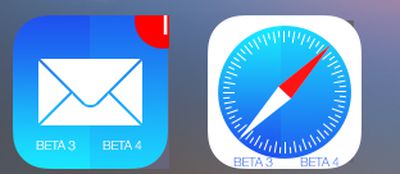
gradient
Folders - The fade animation for folders located in the dock has been updated to function properly.

Phone - The Call button has been slightly altered to take up less of the phone’s screen and the Answer/Decline buttons have also been updated.
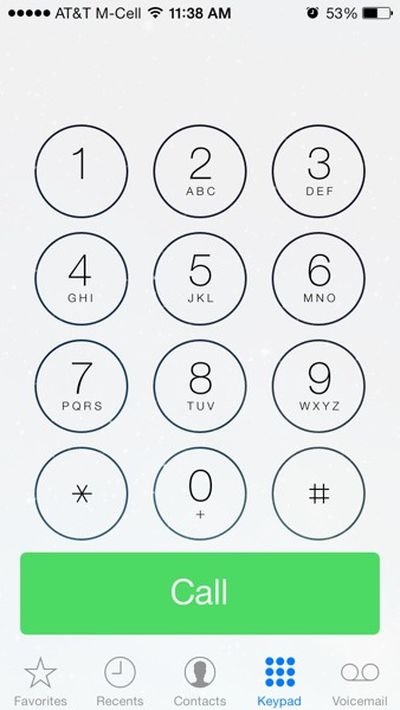
call
Messages - Messages app now uses the first name and last initial of a contact in a chat conversation rather than the full name.

Search - The iPhone’s search functionality (initiated with a downward swipe on the screen) now includes a "Cancel" option.
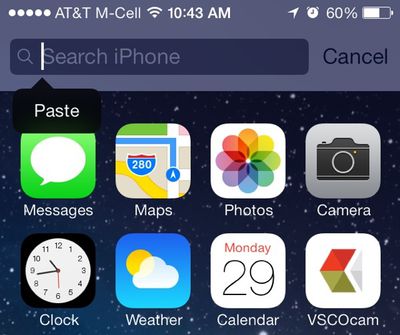
searchoption
Safari - Buttons for Bookmarks, Shared Links, and Reading List have been redesigned with icons rather than labels.

Screenshot API - As noted by 9to5Mac, iOS 7 Beta 4 includes a new screenshot detection API that solves an issue preventing Snapchat from detecting screenshots.

screenshotnotification
Apple TV - iOS 7 includes a feature that allows an Apple TV to be automatically set up using an iPhone or iPad via Bluetooth. (Thanks, Ethan!)
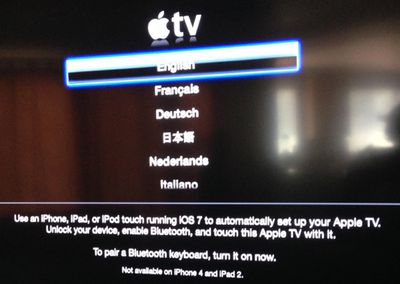
appletvios7
Additional features in iOS 7 beta 4 will be added here as they are discovered. Apple is likely to continue pushing regular updates for iOS 7, bringing minor performance boosts and changes ahead of the operating system’s public release, which is expected to come in the fall.


Related Forum: iOS 7

Popular Stories

iPhone 18 Pro Deep Red Feature

iPhone 18 Pro Launching Later This Year With These 12 New Features

Wednesday March 18, 2026 7:39 am PDT by
While the iPhone 18 Pro and iPhone 18 Pro Max are not expected to launch for another six months or so, there are already plenty of rumors about the devices. It was initially reported that the iPhone 18 Pro models would have fully under-screen Face ID, with only a front camera visible in the top-left corner of the screen. However, the latest rumors indicate that only one Face ID component...
imac video apple feature

Apple Released Yet Another New Product Today

Friday March 20, 2026 2:39 pm PDT by
Apple has unveiled a whopping nine new products so far this March, including an iPhone 17e, iPad Air models with the M4 chip, MacBook Air models with the M5 chip, MacBook Pro models with M5 Pro and M5 Max chips, the all-new MacBook Neo, an updated Studio Display, a higher-end Studio Display XDR, AirPods Max 2, and now the Nike Powerbeats Pro 2. iPhone 17e features the same overall design as...
ios 26 4 pastel

iOS 26.4: Top 10 New Features Coming to Your iPhone

Friday March 20, 2026 2:44 pm PDT by
iOS 26.4 isn't the major update with new Siri features that we hoped for, but there are some useful quality of life improvements, and a little bit of fun with an AI playlist generator and new emoji characters. Playlist Playground - Apple Music has a Playlist Playground option that lets you generate playlists from text-based descriptions. You can include moods, feelings, activities, or...

Top Rated Comments

AngerDanger Avatar
165 months ago
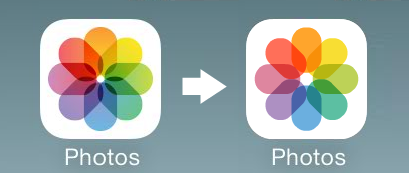
I still wish they changed the Photos icon to the one on the right. :(

Score: 27 Votes (Like | Disagree)
Cod3rror Avatar
165 months ago
The update to the messages app show the first name and the first initial of the last name.

In my contacts, I have:
Eric Wood
Eric Williams

If the messages app reduces the name of both to "Eric W" how am I supposed to tell who I am talking to easily. I think this update needs to be reverted, like "NOW" because that is going to cause a lot of issues. :mad: :eek:

You should just stop being friends with one of the guys and delete them from your contacts.

Get rid of Eric, I never liked him.
Score: 12 Votes (Like | Disagree)
165 months ago
Aaaaaand the photos icon…

Image (http://i.imgur.com/ZpFVm6L.png)

…doesn't look any different. :(

You don't see the difference? Really?
Score: 12 Votes (Like | Disagree)
165 months ago
Also added back is the option to shuffle all songs of a certain artist. For example, we can now shuffle all Led Zeppelin songs. Before we were limited to playing certain albums shuffled. Bothered me.
Score: 11 Votes (Like | Disagree)
840quadra Avatar
165 months ago
Honestly not a fan of the Screenshot API fix. I don't use Snapchat, but IMO it's none of anyone's business if I take a screenshot on my device.

As far as the other updates are concerned, be curious to hear feedback from the Dev community on the continued improvements, or any new bugs. Really hoping for speed, stability, and battery life improvements.
Score: 11 Votes (Like | Disagree)
Kariya Avatar
165 months ago
My goodness but that is some seriously ugly screenage.

Very Microsoft-like.

Swiping away notifications is "new" for iOS? Good grief...

Oh brother...:rolleyes:
Score: 10 Votes (Like | Disagree)
Related Apple News: Buyers Guide | Lifestyle | World News | Reviews | Motoring