iOS 7 Beta 2 Tidbits: New Welcome Screen, Updated Siri Voices, iCloud Fixes, Voice Memos App

Apple seeded iOS 7 beta 2 to developers today, adding a number of new and improved features to the operating system including support for the iPad, improved Siri integration, and the missing Voice Memos app.

iOS 7 beta 2 also brings a slew of minor interface tweaks that make the second version of the beta feel far more polished. Here are some of the more significant changes that can be found in the update:

Welcome Screen: iOS 7 beta 2 introduced a new Welcome Screen that asks for an iCloud password, allows users to turn on iMessages and choose associated email addresses, and set up a passcode on the device.

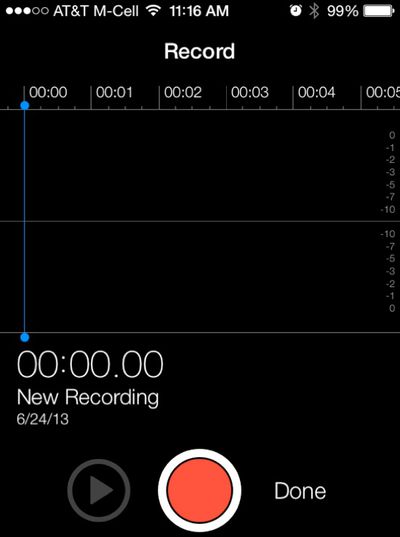
Voice Memos: The Voice Memos app was missing from the first iOS 7 beta, but with beta 2, the app has returned and is now fully functional.
recording

Find My iPhone: The Find My iPhone setting in iCloud now offers up new language that specifies that the app will help users "remotely locate, lock, erase, and prevent re-activation" of a lost iPhone.

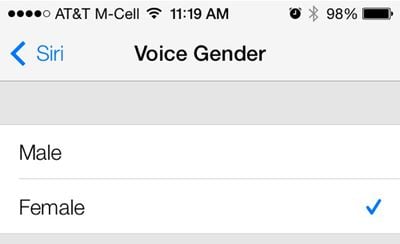
Siri: Siri requests seem to load much faster with the new iteration of iOS 7 and there are also male and female voice options available. These can be accessed in the General Settings under the Siri heading, which offers a new Voice Gender option. While male and female voices have been available in other languages, this is the first time English male/female voices can be activated.
siri
Control Center: Parts of the Control Center have had a slight redesign, with a new clock icon. The icon, which was previously dark, is now a simple clock outline.

Notifications: Some iOS 7 users were having issues with double notifications, which users report has been fixed in beta 2. Apple's release notes, however, state that some apps "may receive duplicate push notifications or no notification at all."

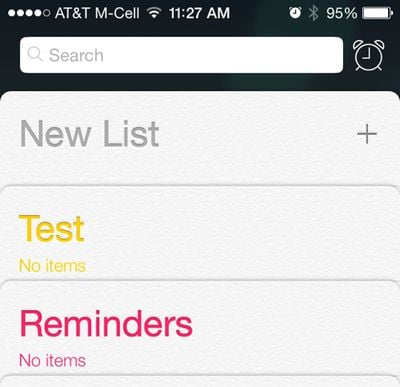
Reminders: Reminders has had a slight redesign with a new list layout that is more compact than the previous layout, and a new clock icon next to the search bar will allow users to locate scheduled reminders.
reminders
iCloud: iCloud Backups are now available once again. The first iOS 7 beta did not support automatic backups.

Spotlight: Searching via Spotlight is much quicker, with results being displayed almost instantaneously with far less of the lag that was present in the first beta.

Messages: The Messages "Send" button is bold and turns green or blue when text is typed. There's also a new bubble animation shown when messages are sent. Swiping to the left on a message will display time stamps. Group chats in Messages also display contact photos next to texts.

Music: The music app has seen a number of bug fixes to correct interface errors and other issues. Lock screen album art has also been repaired for the iPhone 4/4S.

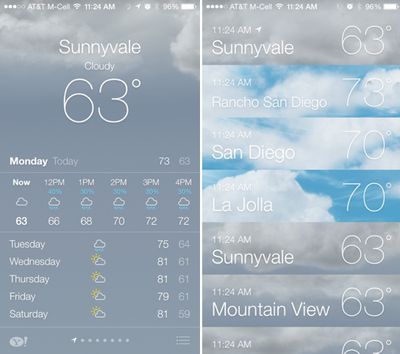
Weather: In the weather app, a new icon on the bottom right of the screen brings up a listing of the weather in all of the cities tracked in the app.
weather
Multitasking: Swiping up to close out apps works much more smoothly on the iPhone 5 following the update to beta 2.

iPad Camera: As noted by 9to5Mac, iOS 7 adds an HDR option to the camera on the iPad.

Apple is likely to maintain a regular update schedule for iOS 7, bringing minor performance boosts and changes ahead of the operating system's public release, which is expected to come in the fall.


Related Forum: iOS 7

Popular Stories

Aston Martin CarPlay Ultra Screen

Apple's CarPlay Ultra to Expand to These Vehicle Brands Later This Year

Sunday February 1, 2026 10:08 am PST by
Last year, Apple launched CarPlay Ultra, the long-awaited next-generation version of its CarPlay software system for vehicles. Nearly nine months later, CarPlay Ultra is still limited to Aston Martin's latest luxury vehicles, but that should change fairly soon. In May 2025, Apple said many other vehicle brands planned to offer CarPlay Ultra, including Hyundai, Kia, and Genesis. In his Powe...
Apple Logo Black

Apple's Next Launch is 'Imminent'

Sunday February 1, 2026 12:31 pm PST by
The calendar has turned to February, and a new report indicates that Apple's next product launch is "imminent," in the form of new MacBook Pro models. "All signs point to an imminent launch of next-generation MacBook Pros that retain the current form factor but deliver faster chips," Bloomberg's Mark Gurman said on Sunday. "I'm told the new models — code-named J714 and J716 — are slated...
Apple MacBook Pro M4 hero

New MacBook Pros Reportedly Launching Alongside macOS 26.3

Sunday February 1, 2026 5:42 am PST by
Apple is planning to launch new MacBook Pro models with M5 Pro and M5 Max chips alongside macOS 26.3, according to Bloomberg's Mark Gurman. "Apple's faster MacBook Pros are planned for the macOS 26.3 release cycle," wrote Gurman, in his Power On newsletter today. "I'm told the new models — code-named J714 and J716 — are slated for the macOS 26.3 software cycle, which runs from...
iOS 26

iOS 26.3 and iOS 26.4 Will Add These New Features to Your iPhone

Tuesday February 3, 2026 7:47 am PST by
We are still waiting for the iOS 26.3 Release Candidate to come out, so the first iOS 26.4 beta is likely still at least a week or two away. Following beta testing, iOS 26.4 will likely be released to the general public in March or April. Below, we have recapped known or rumored iOS 26.3 and iOS 26.4 features so far. iOS 26.3 iPhone to Android Transfer Tool iOS 26.3 makes it easier...
14 inch MacBook Pro Keyboard

Apple Changes How You Order a Mac

Saturday January 31, 2026 10:51 am PST by
Apple recently updated its online store with a new ordering process for Macs, including the MacBook Air, MacBook Pro, iMac, Mac mini, Mac Studio, and Mac Pro. There used to be a handful of standard configurations available for each Mac, but now you must configure a Mac entirely from scratch on a feature-by-feature basis. In other words, ordering a new Mac now works much like ordering an...

Top Rated Comments

Sky Blue Avatar
165 months ago
change them icons please
Score: 34 Votes (Like | Disagree)
adildacoolset Avatar
165 months ago

They designed the current lot in 5 minutes, 2 weeks is a lifetime.

What a pathetic reply.
Score: 32 Votes (Like | Disagree)
Trius Avatar
165 months ago
change them icons please

I hope they make the icons hot pink just to bring some sort of relevance to these complaints
Score: 30 Votes (Like | Disagree)
Klae17 Avatar
165 months ago
They sure hammered out a lot of bugs in two weeks! Much more stable.
Score: 21 Votes (Like | Disagree)
Sky Blue Avatar
165 months ago
Get life please.

Get 'a' please
Score: 19 Votes (Like | Disagree)
Steve J0bs Avatar
165 months ago
For someone like me who has very poor eyesight, the extensive use of the "thin" font may make iOS7 a deal-breaker. I love the iPhone, but I can barely read that weather screen, for starters. Fortunately, iOS6 should be adequate for at least a couple more years.

It's disappointing, though. Apple has always been a leader in the universal accessibility arena. This redesign seems to undo so much of what has been accomplished.

Settings-> general-> accessibility -> turn on bold text or increase the size of font with large dynamic font
Score: 17 Votes (Like | Disagree)