


'Find My iPhone' App Updated With Driving Directions to Device Location - MacRumorsOpen MenuShow RoundupsShow Forums menuVisit ForumsOpen Sidebar
Skip to Content

'Find My iPhone' App Updated With Driving Directions to Device Location

by

FindmyiphonelogoApple has updated its Find My iPhone iOS app with the ability to display driving directions to the lost device's location.

Find My iPhone is a free service built into iCloud. It allows users to lock, find, or erase a lost or stolen iPhone, iPad, iPod touch, or Mac.

If you misplace your iPhone, iPad, iPod touch, or Mac, the Find My iPhone app will let you use another iOS device to find it and protect your data. Simply install this free app on another iOS device, open it, and sign in with your Apple ID. Find My iPhone will help you locate your missing device on a map, play a sound, display a message, remotely lock your device, or erase all the data on it.

If the iPhone, iPad, or iPod touch you want to locate is running iOS 6, Find My iPhone also includes Lost Mode. Lost Mode locks your missing device with a 4-digit passcode and can display a contact phone number right on the lock screen. And while in Lost Mode, your device will keep track of where it has been and display its recent location history when you check in with the Find My iPhone app.

Please note that Find My iPhone must be enabled in the iCloud settings on your device for you to locate it with this app.
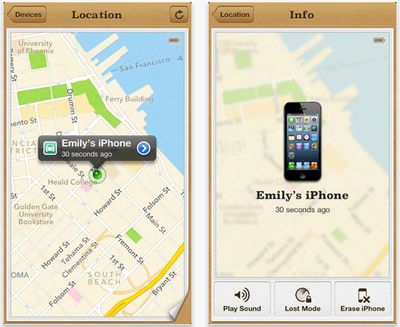
Findmyiphonescreenshot
Find My iPhone is a free download from the App Store. [Direct Link]

Top Rated Comments

RoelJuun Avatar
175 months ago
...so you'll get yourself misplaced too.
Score: 22 Votes (Like | Disagree)
175 months ago
Just hope it's not in Mildura, Australia.
Score: 18 Votes (Like | Disagree)
175 months ago
YOU: "Siri, give me the directions to my stolen iPhone!"

SIRI: "Ok, here are the directions to the nearest store that sells iPhones."
Score: 10 Votes (Like | Disagree)
MasterHowl Avatar
175 months ago
But, you'll never get to the thief's house following Maps D:
Score: 10 Votes (Like | Disagree)
175 months ago
Drive directly to the thieves. Exciting.
Score: 9 Votes (Like | Disagree)
snorkelman Avatar
175 months ago
when setting off on a trip you first post your phone to the desired destination, then you just use find my iphone to guide you to there :p
Score: 4 Votes (Like | Disagree)

Popular Stories

iOS 27 on iPhone 17 1

iOS 27 Will Add These New Features to Your iPhone

Saturday May 2, 2026 8:43 am PDT by
Apple is expected to unveil iOS 27 during its WWDC 2026 keynote on June 8, and there are already many rumored features and changes for iPhones. The first developer beta of iOS 27 will likely be available immediately following the keynote, and a public beta typically follows in July. Following beta testing, the software update should be released to all users with a compatible iPhone in...
Apple Event Logo

Apple Just Released a New Accessory

Monday May 4, 2026 8:13 am PDT by
Apple today released a new Pride Edition Sport Loop for the Apple Watch. The band features a rainbow design with 11 colors of woven nylon yarns. The new Pride Edition Sport Loop is available to order now on Apple.com and in the Apple Store app in 40mm, 42mm, and 46mm sizes, and it will be available at Apple Store locations starting later this week. In the U.S., the band costs $49. There...
Apple Announces 2026 Pride Band Watch Face and iPhone Wallpaper Article 2

iOS 26.5 Coming Soon With These New Features

Monday May 4, 2026 8:40 am PDT by
iOS 26.5 is expected to be released next week, following more than a month of beta testing. The update is relatively minor, but there are a couple of new features and changes across the operating system that we have recapped below. iOS 26.5 lays the groundwork for end-to-end encryption for RCS in the Messages app and ads in the Apple Maps app, and it will include a new Pride wallpaper and a...
Related Apple News: Lifestyle | Iphone | Ipad | Travel | Entertainment

















