

gfxCardStatus allows users to control which graphics card is enabled -- integrated or discrete -- on MacBook Pro models with multiple graphics cards. By more precisely controlling when each graphics card is enabled, users can improve system performance or battery life. gfxCardStatus is a menu bar application for OS X that allows MacBook Pro owners to view which GPU is in use at a glance, and switch between them on-demand.
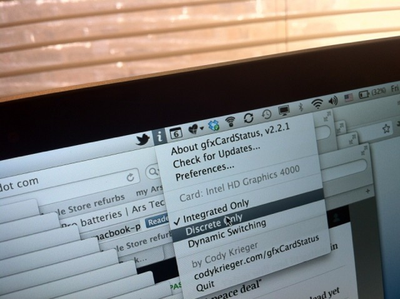
NewImage
Ars Technica has much more, including the fact that the Retina MacBook Pro can be pushed to nearly 10 hours of battery life with some minor battery saving techniques:

I was consistently able to get between 8 and 8.5 hours of continuous use from the Retina MacBook Pro when running integrated graphics only. Turning down screen brightness to just two "dots," a technique I often use to maximize battery life when using a MacBook Air during conferences, caused OS X to report potential battery life as high as 10 hours. I simply didn't have the stamina to test that claim, but I did make one nine-hour run with OS X reporting a nine percent remaining battery capacity.

gfxCardStatus is a free download from creator Cody Krieger's website.

Top Rated Comments

yetanotherdave Avatar
175 months ago
I'll try this out on my mid 2009 mbp, where you have to log out, back in to switch cards... not hoping for much, but it'd be very nice!

edit: Wow! It works! Or at least claims to, will have to do some testing. Why can't apple make it work this easy??????
Score: 4 Votes (Like | Disagree)
toke lahti Avatar
175 months ago
Why can't apple make it work this easy??????
Because switching-on-the-fly was the main new feature of the next model...
Score: 3 Votes (Like | Disagree)
alphaod Avatar
175 months ago

Makes sense too, as if your at a desk your likely to be plugged in to the mains so why does it matter the dGPU is running or not?

Because most of the time the dGPU runs hotter than the integrated GPU hence my computer spends more time sounding like a jet engine.
Score: 2 Votes (Like | Disagree)
kockgunner Avatar
175 months ago
This app saved me when by 2010 MBP with the 330GT graphics card's display kept turning black only solved by a reboot. The problem didn't appear on the Intel chip so I used this program to keep it on Intel until I had the chance to go to the Apple store to replace the logic board.
Score: 2 Votes (Like | Disagree)
Skika Avatar
175 months ago
I have been using this for a while now on my early 2011 MBP. It works good, i only wish it could somehow force the integrated HD3000 when connected to an external display. Because now it always goes to the discrete with an external display.
Score: 2 Votes (Like | Disagree)
AriX Avatar
175 months ago
For YEARS?
How many people have multiple graphics cards?
Haha... well, now that you mention it, I guess it's only been about 2 years :)
Most 15"/17" MacBook Pros sold since 2009, if I remember correctly, have 2 graphics cards - one discrete card that is very powerful, but somewhat power-hungry, and an integrated one that is much less powerful but draws less power.

Mac OS X automatically switches between the available graphics cards. When you connect an external display, load something up in Flash, start a game, etc. the OS will switch to the better graphics card, and when you're done, it will switch back to save power. But it's not perfect, and a lot of apps will inadvertently force the system to use the better graphics card. For example, Google Chrome and Skype, among many others. gfxCardStatus provides a lot of control over which card is in use at any given time, and can also just notify you when the system decides that you should be using a different graphics card, and shows you why exactly the switch was made (under "dependencies"). It's a great utility.
Score: 1 Votes (Like | Disagree)

Popular Stories

iOS 26

iOS 26.4 and iOS 27 Features Revealed in New Leak

Friday December 12, 2025 10:56 am PST by
Macworld's Filipe Espósito today revealed a handful of features that Apple is allegedly planning for iOS 26.4, iOS 27, and even iOS 28. The report said the features are referenced within the code for a leaked internal build of iOS 26 that is not meant to be seen by the public. However, it appears that Espósito and/or his sources managed to gain access to it, providing us with a sneak peek...
apple beta 26 lineup

Apple Leak Confirms Work on Foldable iPhone, AirTag 2, and Dozens More Devices

Monday December 15, 2025 2:05 pm PST by
Last week, details about unreleased Apple devices and future iOS features were shared by Macworld. This week, we learned where the information came from, plus we have more findings from the leak. As it turns out, an Apple prototype device running an early build of iOS 26 was sold, and the person who bought it shared the software. The OS has a version number of 23A5234w, and the first...
Apple Foldable Thumb

Leak Reveals Foldable iPhone Details

Monday December 15, 2025 9:09 am PST by
The first foldable iPhone will feature a series of design and hardware firsts for Apple, according to details shared by the Weibo leaker known as Digital Chat Station. According to a new post, via machine translation, Apple is developing what the leaker describes as a "wide foldable" device, a term used to refer to a horizontally oriented, book-style foldable with a large internal display....
iOS 26

Apple Releases iOS 26.2 With Alarms for Reminders, Lock Screen Changes, Enhanced Safety Alerts and More

Friday December 12, 2025 10:10 am PST by
Apple today released iOS 26.2, the second major update to the iOS 26 operating system that came out in September, iOS 26.2 comes a little over a month after iOS 26.1 launched. ‌iOS 26‌.2 is compatible with the ‌iPhone‌ 11 series and later, as well as the second-generation ‌iPhone‌ SE. The new software can be downloaded on eligible iPhones over-the-air by going to Settings >...
Apple Logo Top Half

Early iOS 26 Software Leak Uncovers Dozens of Upcoming Apple Features

Monday December 15, 2025 3:05 pm PST by
Software from an iPhone prototype running an early build of iOS 26 leaked last week, giving us a glimpse at future Apple devices and iOS features. We recapped device codenames in our prior article, and now we have a list of some of the most notable feature flags that were found in the software code. In some cases, it's obvious what the feature flags are referring to, while some are more...
iOS 26

iOS 26.2 Coming Soon With These 8 New Features on Your iPhone

Thursday December 11, 2025 8:49 am PST by
Apple seeded the second iOS 26.2 Release Candidate to developers earlier this week, meaning the update will be released to the general public very soon. Apple confirmed iOS 26.2 would be released in December, but it did not provide a specific date. We expect the update to be released by early next week. iOS 26.2 includes a handful of new features and changes on the iPhone, such as a new...
macOS Tahoe 26 Thumb

Apple Releases macOS Tahoe 26.2 With Edge Light

Friday December 12, 2025 10:08 am PST by
Apple today released macOS Tahoe 26.2, the second major update to the macOS Tahoe operating system that came out in September. macOS Tahoe 26.2 comes five weeks after Apple released macOS Tahoe 26.1. Mac users can download the macOS Tahoe update by using the Software Update section of System Settings. macOS Tahoe 26.2 includes Edge Light, a feature that illuminates your face with soft...
AirPods Pro Firmware Feature

Apple Releases New Firmware for AirPods Pro 2 and AirPods Pro 3

Thursday December 11, 2025 11:28 am PST by
Apple today released new firmware designed for the AirPods Pro 3 and the prior-generation AirPods Pro 2. The AirPods Pro 3 firmware is 8B30, up from 8B25, while the AirPods Pro 2 firmware is 8B28, up from 8B21. There's no word on what's include in the updated firmware, but the AirPods Pro 2 and AirPods Pro 3 are getting expanded support for Live Translation in the European Union in iOS...

















