iOS 6's Smaller Changes: Custom Email Alerts, 'Find My Friends' Geofencing and More

As is typical when previewing a new operating system, on Monday Apple's Scott Forstall showed off 10 main features of iOS 6 including improvements to Siri, Facebook Integration, a new Maps app, and a Do Not Disturb mode.

However, there is a lot more to the next iPhone operating system than that. A slide shown at the end of Monday's keynote displayed a number of new features that didn't warrant full keynote coverage but are still worth mention to iOS users:
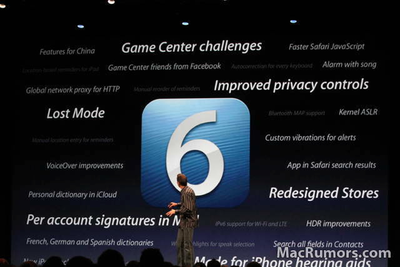
NewImage
- Users can now set custom email alerts for any of their VIP contacts.

- Turning Bluetooth on and off is much quicker than it was in iOS 5. Bluetooth controls are now located in first page of System Preferences, next to the Wi-Fi and Airplane Mode controls.

- The iPad gains a native Clock app with similar function to the iPhone version.

- Users no longer need to enter their password to update apps -- only when purchasing an app for the first time. Additionally, users aren't kicked to the home screen when buying or updating an app in the App Store.

- Newly downloaded apps gain a temporary 'New' banner on the icon to make them easier to pick them out.

- Geofencing alerts have been added to Find My Friends. One possible use, suggested by Macworld: "If you’re one of the many workers who carpools, you can set up a geofence on the driver to let you know when they leave their house."

- In iOS 5, the color of the menu bar would change depending on what was happening in the background -- green for a phone call or blue for Personal Hotspot. In iOS 6 those colors still exist, but the menu bar changes color to better complement the app. MaxThemes.com has more on how Apple color-matches the menu bar.


- One of the most unnecessary additions to iOS 6 is also one of the most telling. Apple has made the metallic volume slider in the iPod app and elsewhere change its reflection as the iPhone is tilted -- as if it were actually reflecting light. While some may say it's a waste of engineering resources, this shows Apple's incredible attention to detail.


Popular Stories

Aston Martin CarPlay Ultra Screen

Apple's CarPlay Ultra to Expand to These Vehicle Brands Later This Year

Sunday February 1, 2026 10:08 am PST by
Last year, Apple launched CarPlay Ultra, the long-awaited next-generation version of its CarPlay software system for vehicles. Nearly nine months later, CarPlay Ultra is still limited to Aston Martin's latest luxury vehicles, but that should change fairly soon. In May 2025, Apple said many other vehicle brands planned to offer CarPlay Ultra, including Hyundai, Kia, and Genesis. In his Powe...
Apple Logo Black

Apple's Next Launch is 'Imminent'

Sunday February 1, 2026 12:31 pm PST by
The calendar has turned to February, and a new report indicates that Apple's next product launch is "imminent," in the form of new MacBook Pro models. "All signs point to an imminent launch of next-generation MacBook Pros that retain the current form factor but deliver faster chips," Bloomberg's Mark Gurman said on Sunday. "I'm told the new models — code-named J714 and J716 — are slated...
iOS 26

iOS 26.3 and iOS 26.4 Will Add These New Features to Your iPhone

Tuesday February 3, 2026 7:47 am PST by
We are still waiting for the iOS 26.3 Release Candidate to come out, so the first iOS 26.4 beta is likely still at least a week or two away. Following beta testing, iOS 26.4 will likely be released to the general public in March or April. Below, we have recapped known or rumored iOS 26.3 and iOS 26.4 features so far. iOS 26.3 iPhone to Android Transfer Tool iOS 26.3 makes it easier...
Apple MacBook Pro M4 hero

New MacBook Pros Reportedly Launching Alongside macOS 26.3

Sunday February 1, 2026 5:42 am PST by
Apple is planning to launch new MacBook Pro models with M5 Pro and M5 Max chips alongside macOS 26.3, according to Bloomberg's Mark Gurman. "Apple's faster MacBook Pros are planned for the macOS 26.3 release cycle," wrote Gurman, in his Power On newsletter today. "I'm told the new models — code-named J714 and J716 — are slated for the macOS 26.3 software cycle, which runs from...
iOS 26 Home Feature

Apple Gives Final Warning to Home App Users

Tuesday February 3, 2026 8:55 am PST by
In 2022, Apple introduced a new Apple Home architecture that is "more reliable and efficient," and the deadline to upgrade and avoid issues is fast approaching. In an email this week, Apple gave customers a final reminder to upgrade their Home app by February 10, 2026. Apple says users who do not upgrade may experience issues with accessories and automations, or lose access to their smart...

Top Rated Comments

Mike Oxard Avatar
178 months ago
Staying in the App store after making a purchase, yaaaay!!!!
Score: 58 Votes (Like | Disagree)
urbanj Avatar
178 months ago
I would love the ability to double tap the home button and swipe past the music, swipe past the volume and get to a brightness slider. It would also be better to have a toggle for wifi and bluetooth in that swipe tray as well.

oh well.....
Score: 37 Votes (Like | Disagree)
MOKHAN Avatar
178 months ago
It's little things like the metallic slider that fuel the iPhone's unmatched success.
Score: 31 Votes (Like | Disagree)
lmddawson Avatar
178 months ago
such a tiny feature, but that metallic slider sure is pretty damn clever :p
Score: 29 Votes (Like | Disagree)
Zmmyt Avatar
178 months ago
guest account?

i'm not in the market for an iPad at the moment, but if i ever get one i would love to have the presence of a guest account.

the iPad sure would be left on the coffee table for everyone else to be used, but i wouldn't want anyone to have access to my personal stuff like pictures and messages and such.
Score: 18 Votes (Like | Disagree)
a.jfred Avatar
178 months ago


... Additionally, users aren't kicked to the home screen when buying or updating an app in the App Store.


That alone makes me happy. It's always been a bit of an annoyance to me.
Score: 18 Votes (Like | Disagree)