As we noted on Monday, Apple's new MacBook Air and Retina MacBook Pro use a new MagSafe 2 charging standard that is thinner and wider than the previous MagSafe. In order to assist people using the new machines with older equipment like chargers and displays, Apple released a small MagSafe to MagSafe 2 Converter for $9.99 to ensure continued compatibility.
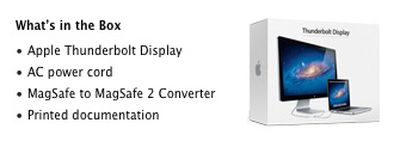
Apple has not updated its Apple Thunderbolt Display with the new MagSafe 2 standard, but as mentioned on its online store page, the company is now including a free MagSafe to MagSafe 2 Converter with newly-purchased displays.
It certainly is not a tremendous cost for Apple to include a $9.99 adapter (which actually costs Apple significantly less) with a $999 purchase, but it is a convenient inclusion for new purchasers who otherwise might not realize that they need a converter. Those who are aware of the new MagSafe 2 standard should also be aware that they do not need to purchase a separate converter if they wish to purchase an Apple Thunderbolt Display.
The Studio Display XDR's medical image calibration feature received FDA clearance, which means radiologists are now able to use the display for viewing medical images.
Apple marketing chief Greg Joswiak confirmed today that U.S. radiologists can connect the Studio Display XDR to a Mac running macOS 26.4 to use DICOM medical imaging presets.
The Studio Display XDR supports DICOM and has a...
Wednesday April 8, 2026 6:40 pm PDT by Joe Rossignol
Launched in 2022, Apple's self-service repair program provides customers with access to genuine parts, tools, and manuals to repair select iPhones, iPads, Macs, Studio Displays, and Beats Pill speakers. Apple says the program is "intended for individuals who are experienced with the complexities of repairing electronic devices."
Apple today started selling parts and tools for seven new...
Apple is expected to unveil iOS 27 during its WWDC 2026 keynote on June 8, and there are already many rumored features and changes for iPhones.
The first developer beta of iOS 27 will likely be available immediately following the keynote, and a public beta typically follows in July. Following beta testing, the software update should be released to all users with a compatible iPhone in...
The converter should have been included in the box with all RMBPs.
Apple looks to the future, not the past. The Retina MacBook Pro works as intended out of the box without the converter, and it would be unnecessary for a significant number of people who wouldn't be using it with a display or an older power adapter. So to Apple it would mainly serve to clutter up the clean presentation inside the box. :)
Bundling it with the Thunderbolt Display will likely see a greater proportion of people needing to use it, and even many of those who don't need it yet will likely need it in the future when they buy new machines.
the factory seal on both of the tb display boxes i received this afternoon was cut and retaped over with a duplicate seal, presumably to drop in the card insert with the adapter.
They should include all necessary adapters with the products.
For the new MBP, "necessary adapters" could mean all, some or fewer of:
* Thunderbolt/MiniDisplayPort to VGA
* Thunderbolt/MiniDisplayPort to DVI
* Thunderbolt/MiniDisplayPort to Dual-Link DVI
* Thunderbolt/MiniDisplayPort to full DisplayPort
* Thunderbolt/MiniDisplayPort to HDMI (maybe you want 2 HDMI monitors?)
* TOSLink to 3.5mm optical (digital audio)
* HDMI to DVI (maybe you want both TB ports for discs)
* Thunderbolt to Ethernet
* Thunderbolt to FireWire
...all of which will be essential to someone and completely useless to others.
The last two are pretty non-trivial bits of electronics, and $30 for the TB-to-Ethernet is actually cheaper than a TB-to-TB cable. I'm pretty sure some of the MiniDisplayPort-to-X adapters are active (i.e. they've got electronics in them) rather than just plug adapters.
I just don't understand why they didn't make the Thunderbolt spec capable of carrying enough power for a laptop in the first place
Generally, the computer is the power source for the Thunderbolt bus. What happens if someone daisy-chains a disc drive between computer and monitor?
Also, more power means thicker cables, bigger pins on the connector.
The fact that Thunderbolt was initially planned as an optical interface may also have had an effect - and remember, Thunderbolt isn't just Apple's toy - its a standard. Maybe having the computer powered by the monitor wasn't on other stakeholders' agendas?
More interestingly, I wonder why they didn't develop this idea - adding data lines to the magsafe connector:
https://www.macrumors.com/2011/02/17/apple-tech-watch-oled-displays-magsafe-power-data-connector-live-device-configuration/
...possibly worried about introducing non-standard connectors to Thunderbolt, or being compelled to license MagSafe to other Thunderbolt customers?
Calling this "generous" is ridiculous. It's essential; or how would you explain to a customer who bought the high-end display and the high-end laptop that they can't use them together without an additional adapter?
I think the TB display is really due for an update. The internals seem kludgy and unnecessarily complex and expensive (there's more stuff than in a MBP).


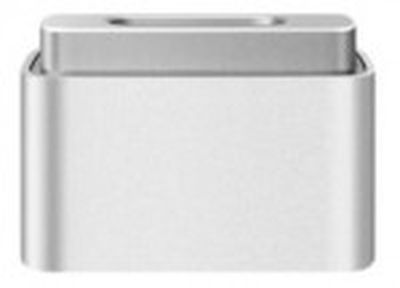 As we noted on Monday, Apple's new MacBook Air and Retina MacBook Pro use a new MagSafe 2 charging standard that is thinner and wider than the previous MagSafe. In order to assist people using the new machines with older equipment like chargers and displays, Apple released a small MagSafe to MagSafe 2 Converter for $9.99 to ensure continued compatibility.