

Apple Releases OS X 10.7.4 with Fix for FileVault Password Security Issue - MacRumorsOpen MenuShow RoundupsShow Forums menuVisit ForumsOpen Sidebar
Skip to Content

Apple Releases OS X 10.7.4 with Fix for FileVault Password Security Issue

10 7 4
Apple today released OS X 10.7.4, the fourth maintenance update to OS X Lion. The update is currently available via Software Update and should appear on Apple's download pages soon.

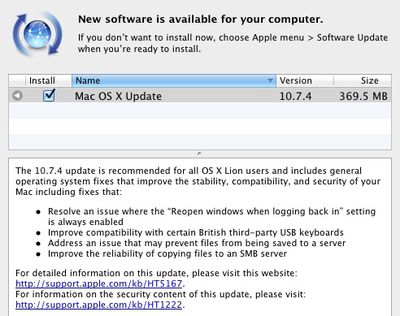
The 10.7.4 update is recommended for all OS X Lion users and includes general operating system fixes that improve the stability, compatibility, and security of your Mac including fixes that:

- Resolve an issue where the “Reopen windows when logging back in” setting is always enabled
- Improve compatibility with certain British third-party USB keyboards
- Address an issue that may prevent files from being saved to a server
- Improve the reliability of copying files to an SMB server

Detailed information is available in the full release notes. Notably, the update also includes a fix for the password security hole detailed earlier this week.

An issue existed in the handling of network account logins. The login process recorded sensitive information in the system log, where other users of the system could read it. The sensitive information may persist in saved logs after installation of this update. See http://support.apple.com/kb/TS4272 for more information about how to securely remove any remaining records. This issue only affects systems running OS X Lion v10.7.3 with users of Legacy File Vault and/or networked home directories.

Available versions include:

- OS X Lion Update 10.7.4 (Client) (692.68 MB)
- OS X Lion Update 10.7.4 (Client Combo) (1.4 GB)

- OS X Lion Update 10.7.4 (Server) Client (738.71 MB)
- OS X Lion Update 10.7.4 (Server) Combo (1.49 GB)
- Server Admin Tools 10.7.4 (212.4 MB)

Apple has also released Security Update 2012-002 to bring security fixes to users running systems with Mac OS X Snow Leopard:

- Security Update 2012-002 (Snow Leopard) (238.73 MB)
- Security Update 2012-001 Server (Snow Leopard) (258.11 MB)

Apple has separately pushed out a Safari 5.1.7 update containing several improvements including disabling out-of-date versions of Adobe Flash Player for security reasons.

Out-of-date versions of Adobe Flash Player do not include the latest security updates and will be disabled to help keep your Mac secure. If Safari 5.1.7 detects an out-of-date version of Flash Player on your system, you will see a dialog informing you that Flash Player has been disabled. The dialog provides the option to go directly to Adobe's website, where you can download and install an updated version of Flash Player.

Finally, Apple has also released Apple Remote Desktop 3.5.3 Client (3.80 MB) to address general compatibility issues.


Popular Stories

iOS 27 on iPhone 17 1

iOS 27 Will Add These New Features to Your iPhone

Saturday May 2, 2026 8:43 am PDT by
Apple is expected to unveil iOS 27 during its WWDC 2026 keynote on June 8, and there are already many rumored features and changes for iPhones. The first developer beta of iOS 27 will likely be available immediately following the keynote, and a public beta typically follows in July. Following beta testing, the software update should be released to all users with a compatible iPhone in...
Apple Event Logo

Apple Just Released a New Accessory

Monday May 4, 2026 8:13 am PDT by
Apple today released a new Pride Edition Sport Loop for the Apple Watch. The band features a rainbow design with 11 colors of woven nylon yarns. The new Pride Edition Sport Loop is available to order now on Apple.com and in the Apple Store app in 40mm, 42mm, and 46mm sizes, and it will be available at Apple Store locations starting later this week. In the U.S., the band costs $49. There...
Apple MacBook Pro M4 hero

Why You Might Want to Wait to Buy a MacBook Pro

Friday May 1, 2026 3:43 pm PDT by
Apple refreshed the 14-inch and 16-inch MacBook Pro with M5 Pro and M5 Max models in March 2026, but depending on your needs and interests, you might want to skip this generation because there's something better in the works. The M5 Pro and M5 Max MacBook Pro models have faster chips, but the same design that Apple has used since 2021. An updated design with new display technology and faster ...

Top Rated Comments

183 months ago
- Resolve an issue where the "Reopen windows when logging back in" setting is always enabled

Score: 105 Votes (Like | Disagree)
Dr McKay Avatar
183 months ago
If anyone says Safari feels snappier, heads will roll :D
Score: 56 Votes (Like | Disagree)
183 months ago
Thank God they fixed the "Reopen windows" checkbox!
Score: 22 Votes (Like | Disagree)
shemp9999 Avatar
183 months ago
This patch improved my computer performance by 17%!

It was probably the reboot that did it. :D
Score: 18 Votes (Like | Disagree)
gr8whtd0pe Avatar
183 months ago
That first fix has been a long time coming!

Thank God they fixed the "Reopen windows" checkbox!

Second. I HATE that "feature". I hate it on the iPhone too. When I restart I want a fresh start.
Score: 17 Votes (Like | Disagree)
s2dio Avatar
183 months ago
I'm "super excited and really thrilled" about this update. Such killer features as unchecking a box to open all apps on login are the ones that make me go to work every day.
Score: 16 Votes (Like | Disagree)
Related Apple News: Entertainment | South Africa | Health | Motoring | Ipad
















