

iDownloadBlog points to a new YouTube concept video showing one user's idea of how Apple could vastly improve the text editing functionality on the iPad and other iOS devices.
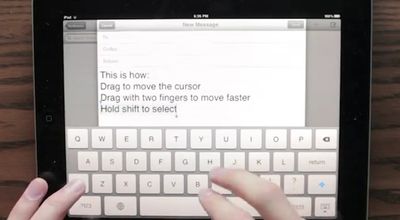
ipad text edit concept
While the current method of text selection involves tapping and dragging around the screen to select cursor position and highlight text, Daniel Hooper suggests that Apple could make use of gestures in the keyboard area of the screen to easily move the cursor in text fields. Simply holding down the keyboard's shift key while gesturing would easily select sections of text for editing.


The suggestion is of course not an official product of Apple's software designers, and so Hooper has also provided instructions on how to use Apple's bug reporting system to suggest the feature to the company's engineers. Apple maintains a policy discouraging users from submitting unsolicited ideas, but notes that it retains the full rights associated with ideas that are submitted to the company.


Top Rated Comments

drummerdude1390 Avatar
180 months ago
Easy Solution

As usual, some people seem to really want this feature, and some people really don't.

There's a nice compromise: be able to turn the feature on or off in the Keyboard settings.


Boom. Everyone wins.
Score: 11 Votes (Like | Disagree)
JS77 Avatar
180 months ago
Apple absolutely HAVE to integrate this into iOS. Editing text in messages/emails is painfully slow, awkward and cumbersome at present.
Score: 6 Votes (Like | Disagree)
MrAppleseed Avatar
180 months ago
This would break the keyboard for many non-English languages.

Really hoping Apple won't implement this. Sorry.

I don’t know why you’re being voted down for this. You’re absolutely right. As a German, I make use of the swiping up gesture on certain lettres to get a special character. This would likely sometimes interfere with the idea to swipe up if you want to go up with the curser.
Score: 4 Votes (Like | Disagree)
fabian9 Avatar
180 months ago
The problem that many of you are describing is easily solved. In fact, the solution is already shown in the video.

As far as I'm aware, no international keyboard at the moment uses a two finger swipe to select any special characters (correct me if I'm wrong). In the video, one finger swipe moves the cursor slowly, two finger swipe moves the cursor quickly.

The solution is simple: only implement the two finger swipe to move the cursor!

It's not intuitive that two fingers should swipe quicker than one finger… the speed of cursor movement should be dependent on the speed of the swipe only, not on the number of fingers being used.

(Queue the "that's what she said" jokes…)

----------

It may be faster to move the cursor by swiping, but what I want is more precision with cursor positioning. It's not clear to me from the video exactly how I would stop the cursor at the exact position I want it.

The cursor moves as you swipe. When you stop swiping, the cursor stops moving… how is that not letting you control the exact position you want?
Score: 3 Votes (Like | Disagree)
Matthew Yohe Avatar
180 months ago
But it isn't a swiping up gesture, is it? It's a hold-for-one-second-then-swipe-up-and-slightly-to-the-right gesture (which btw was way better before iOS4 when it automatically preselected the most likely character (e.g. in German äöüß) from the list).

You don't swipe up, you hold the key for a fraction longer and than the special characters appear. I don't think this system would interfere with it.

Yes, you can hold keys, but on the iPad you can also swipe up. Just try it on the question mark or the comma key.

Keyboards in non-english languages let you do this with letters that have diacritics on top of them. (Umlauts etc...)
Score: 3 Votes (Like | Disagree)
Unggoy Murderer Avatar
180 months ago
That is seriously awesome, kudos to the people that developed that. I hope Apple take a look at the video, I'd love to see that in iOS 6 ;)
Score: 3 Votes (Like | Disagree)

Popular Stories

Aston Martin CarPlay Ultra Screen

Apple's CarPlay Ultra to Expand to These Vehicle Brands Later This Year

Sunday February 1, 2026 10:08 am PST by
Last year, Apple launched CarPlay Ultra, the long-awaited next-generation version of its CarPlay software system for vehicles. Nearly nine months later, CarPlay Ultra is still limited to Aston Martin's latest luxury vehicles, but that should change fairly soon. In May 2025, Apple said many other vehicle brands planned to offer CarPlay Ultra, including Hyundai, Kia, and Genesis. In his Powe...
iOS 26

iOS 26.3 and iOS 26.4 Will Add These New Features to Your iPhone

Tuesday February 3, 2026 7:47 am PST by
We are still waiting for the iOS 26.3 Release Candidate to come out, so the first iOS 26.4 beta is likely still at least a week or two away. Following beta testing, iOS 26.4 will likely be released to the general public in March or April. Below, we have recapped known or rumored iOS 26.3 and iOS 26.4 features so far. iOS 26.3 iPhone to Android Transfer Tool iOS 26.3 makes it easier...
Apple Logo Black

Apple's Next Launch is 'Imminent'

Sunday February 1, 2026 12:31 pm PST by
The calendar has turned to February, and a new report indicates that Apple's next product launch is "imminent," in the form of new MacBook Pro models. "All signs point to an imminent launch of next-generation MacBook Pros that retain the current form factor but deliver faster chips," Bloomberg's Mark Gurman said on Sunday. "I'm told the new models — code-named J714 and J716 — are slated...
Apple MacBook Pro M4 hero

New MacBook Pros Reportedly Launching Alongside macOS 26.3

Sunday February 1, 2026 5:42 am PST by
Apple is planning to launch new MacBook Pro models with M5 Pro and M5 Max chips alongside macOS 26.3, according to Bloomberg's Mark Gurman. "Apple's faster MacBook Pros are planned for the macOS 26.3 release cycle," wrote Gurman, in his Power On newsletter today. "I'm told the new models — code-named J714 and J716 — are slated for the macOS 26.3 software cycle, which runs from...
iOS 26 Home Feature

Apple Gives Final Warning to Home App Users

Tuesday February 3, 2026 8:55 am PST by
In 2022, Apple introduced a new Apple Home architecture that is "more reliable and efficient," and the deadline to upgrade and avoid issues is fast approaching. In an email this week, Apple gave customers a final reminder to upgrade their Home app by February 10, 2026. Apple says users who do not upgrade may experience issues with accessories and automations, or lose access to their smart...
















