

OS X 10.7.2 Build 11C62 Seeded to Developers [Release Notes]

11c62
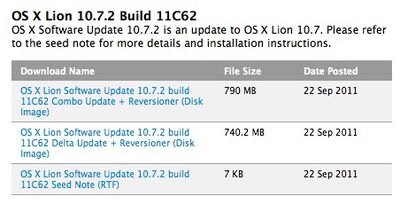
Apple is continuing to press toward an iCloud launch with a new beta seed of OS X 10.7.2 pushed out to developers today. The new seed, known as Build 11C62, comes six days after the previous seed.

Apple continues to list no known issues with the latest build, and has made no changes to its list of focus areas for testing, which include AddressBook, GraphicsDrivers, iCal, iChat, iCloud, Mac App Store, Mail, MobileMe, Safari, Spotlight, and Time Machine. As with the last several developer builds, iCloud functionality is integrated directly into OS X 10.7.2 instead of being offered as a separate download.

Apple is reportedly holding a media event to introduce the next-generation iPhone hardware and officially launch iOS 5 and iCloud. OS X 10.7.2 should arrive as a free update for OS X Lion users right as iCloud and the other hardware and software debut.

Apple has included what appears to be final release notes with this build:

The 10.7.2 update is recommended for all OS X Lion users and includes general operating system fixes that improve the stability, compatibility, and security of your Mac. It also includes support for iCloud, a breakthrough set of free cloud services that automatically and wirelessly store your content on iCloud and push it to all of your devices. iCloud on OS X Lion includes the following features:

• iCloud stores your email, calendars, contacts, Safari bookmarks, and Safari Reading List and automatically pushes them to all your devices.
• Back to My Mac provides remote access to your Mac from another Mac anywhere on the Internet.
• Find My Mac helps find a missing Mac by locating it on a map and allows you to remotely lock the Mac or wipe all its data.

Getting started with iCloud is easy. After installing the update, OS X will automatically present an iCloud setup panel. Simply enter an existing Apple ID or create a new one and then follow the on screen instructions. To learn more about iCloud visit http://www.apple.com/icloud.

The 10.7.2 update also includes Safari 5.1.1 as well as fixes that:

• Allow reordering of desktop spaces and full screen apps in Mission Control.
• Enable dragging files between desktop spaces and full screen apps.
• Address an issue that causes the menu bar to not appear in full screen apps.
• Improve the compatibility of Google contact syncing in Address Book.
• Address an issue that causes Keynote to become temporarily unresponsive.
• Improve VoiceOver compatibility with Launchpad.
• Address an issue that causes a delay in accessing the network after waking from sleep.
• Enable booting in to Lion Recovery from a locally attached Time Machine backup drive.
• Resolve an issue that causes screen zoom to stop working.
• Improve Active Directory integration.

For detailed information about Safari 5.1.1, please visit this website: http://support.apple.com/kb/HT4922.

For detailed information on this update, please visit this website: http://support.apple.com/kb/HT4767.
For information on the security content of this update, please visit: http://support.apple.com/kb/HT1222.

The knowledge base articles listed in the notes are not yet active, but it looks like Apple is putting the finishing touches on 10.7.2 for iCloud support that will be launched alongside iOS 5.


Popular Stories

iOS 26

iOS 26.4 and iOS 27 Features Revealed in New Leak

Friday December 12, 2025 10:56 am PST by
Macworld's Filipe Espósito today revealed a handful of features that Apple is allegedly planning for iOS 26.4, iOS 27, and even iOS 28. The report said the features are referenced within the code for a leaked internal build of iOS 26 that is not meant to be seen by the public. However, it appears that Espósito and/or his sources managed to gain access to it, providing us with a sneak peek...
apple beta 26 lineup

Apple Leak Confirms Work on Foldable iPhone, AirTag 2, and Dozens More Devices

Monday December 15, 2025 2:05 pm PST by
Last week, details about unreleased Apple devices and future iOS features were shared by Macworld. This week, we learned where the information came from, plus we have more findings from the leak. As it turns out, an Apple prototype device running an early build of iOS 26 was sold, and the person who bought it shared the software. The OS has a version number of 23A5234w, and the first...
Apple Logo Top Half

Early iOS 26 Software Leak Uncovers Dozens of Upcoming Apple Features

Monday December 15, 2025 3:05 pm PST by
Software from an iPhone prototype running an early build of iOS 26 leaked last week, giving us a glimpse at future Apple devices and iOS features. We recapped device codenames in our prior article, and now we have a list of some of the most notable feature flags that were found in the software code. In some cases, it's obvious what the feature flags are referring to, while some are more...
Apple Foldable Thumb

Leak Reveals Foldable iPhone Details

Monday December 15, 2025 9:09 am PST by
The first foldable iPhone will feature a series of design and hardware firsts for Apple, according to details shared by the Weibo leaker known as Digital Chat Station. According to a new post, via machine translation, Apple is developing what the leaker describes as a "wide foldable" device, a term used to refer to a horizontally oriented, book-style foldable with a large internal display....
iOS 26

iOS 26.3 Beta 1 Features: What's New So Far

Monday December 15, 2025 4:23 pm PST by
Apple is testing iOS 26.3, the next version of iOS 26 that will launch around January. Since iOS 26.3's testing is happening over the holidays, it is a smaller update with fewer features than we've seen in prior betas. We've rounded up what's new so far, and we'll add to our list with subsequent betas if we come across any other features. Transfer to Android Apple is making it simpler...
iOS 26

Apple Releases iOS 26.2 With Alarms for Reminders, Lock Screen Changes, Enhanced Safety Alerts and More

Friday December 12, 2025 10:10 am PST by
Apple today released iOS 26.2, the second major update to the iOS 26 operating system that came out in September, iOS 26.2 comes a little over a month after iOS 26.1 launched. ‌iOS 26‌.2 is compatible with the ‌iPhone‌ 11 series and later, as well as the second-generation ‌iPhone‌ SE. The new software can be downloaded on eligible iPhones over-the-air by going to Settings >...
iOS 26

iOS 26.2 Coming Soon With These 8 New Features on Your iPhone

Thursday December 11, 2025 8:49 am PST by
Apple seeded the second iOS 26.2 Release Candidate to developers earlier this week, meaning the update will be released to the general public very soon. Apple confirmed iOS 26.2 would be released in December, but it did not provide a specific date. We expect the update to be released by early next week. iOS 26.2 includes a handful of new features and changes on the iPhone, such as a new...
airpods max 2024 colors

AirPods Max 2 Likely to Offer These 10 New Features

Monday December 15, 2025 7:41 am PST by
Apple released the AirPods Max on December 15, 2020, meaning the over-ear headphones launched five years ago today. While the AirPods Max were updated with a USB-C port and new color options last year, followed by support for lossless audio and ultra-low latency audio this year, the headphones lack some of the features that have been introduced for newer generations of the regular AirPods and the ...

Top Rated Comments

MacsRgr8 Avatar
186 months ago
As usual, with every new OS released, lots of people have lots of issues.
The silent majority however has no issues. ;)

10.7.2 has had lots of development time, and presumably it will fix a lot. OTOH, it is THE iCloud release, and as usual, many users will have lots of issues. :p

I have used Lion as my primary OS ever since the GM, and have never looked back at Snow Leopard. It all works great for me. Must admit, that i did not upgrade but wiped the HD, installed the GM (you know, the "ESD"-way) and did a restore of all my data.

I love Lion.

Can't wait for 10.7.2, iOS 5 and iCloud. :cool:

Just a note to Tim Cook:
No pressure, mate. Just the whole world looking at you as you replace the best sole presenter in the world.
But, you'll do fine. We have confidence in you!
Score: 22 Votes (Like | Disagree)
SideStepSociety Avatar
186 months ago
I like it when people down vote posts and fail to explain why they did so.
I down voted this for the irony. Then I realized by posting this, I ruined said irony.

Nope. I'm with you on that one. Cloud computing really only works when all these factors come into play:

a) there is a constant internet connection everywhere you are with your computer, either hardwired broadband or over the air LTE (which LTE or something better would make sense, but it doesnt exist everywhere)
b) the internet connection is fast enough to replace a hard drive's speed or now an SSD, which won't happen in the next 10 years at least and thats being generous.
c) the internet connection is STABLE
d) internet service providers MUST give you unlimited bandwidth to make cloud computing worthwhile
e) internet service providers would need to offer these kinds of services (250mbit, unlimited bandwidth over the air) at a reasonable price, which, if you live in Canada or a country where duopolies or monopolies exist, this will NEVER happen.

Cloud computing? Useless.
Nope. I'm with you on that one. The Ford Model T really only works when all these factors come into play:

a) there is a constant road everywhere you are with your Model T, either gravel or some type of pavement (which brick or something better would make sense, but it doesnt exist everywhere)
b) the vehicle is fast enough to replace a horse's speed or now two horses, which won't happen in the next 10 years at least and thats being generous.
c) the vehicle is STABLE
d) gasoline providers MUST give you unlimited gasoline to make the Ford Model T worthwhile
e) gasoline providers would need to offer these kinds of services (250gal, unlimited gasoline at any station) at a reasonable price, which, if you live in Canada or a country where duopolies or monopolies exist, this will NEVER happen.

Automobiles? Useless.

Progress happens for a reason. Everything sucks at first. Just look at babies.
Score: 16 Votes (Like | Disagree)
seamer Avatar
186 months ago
If this is how "developers" react to beta software, I'd hate to see you guys working on alpha, or pre-alpha, software.
Score: 11 Votes (Like | Disagree)
yinzers87 Avatar
186 months ago
Again? Where's the GM?

There will not be a GM it will just be the version number everyone else gets, this could very well be the GM
Score: 10 Votes (Like | Disagree)
mactmaster Avatar
186 months ago
am i the only person who does not give a damn about all the cloud crap..???:confused::confused::confused:

yup
Score: 9 Votes (Like | Disagree)
coolfactor Avatar
186 months ago
1) Mission Control's horrible execution of Expose. It needs an option to UNGROUP windows when activating Mission Control, as well as an option to turn off spaces and the absolutely useless grey border and the pulling back of the wallpaper. Its the main reason why I upgraded back to Snow Leopard

Sounds like you don't know how to use the new Mission Control interface. By UNGROUP, do you mean the ability to see the individual windows within a group more clearly? Simply swipe up on your trackpad when hovering over a group. They will expand. Or press the Space bar when hovering over a window. You'll get a Quick Look of it.

And the gray border separates the "windows" from the "spaces". The items along the top, in the gray border, are all spaces. The items on top of the wallpaper are application windows.

How would you propose they offer all of this functionality more clearly?
Score: 8 Votes (Like | Disagree)
















