

Restoring Your iOS Device with Folder Organization Intact - MacRumorsOpen MenuShow RoundupsShow Forums menuVisit ForumsOpen Sidebar
Skip to Content

Restoring Your iOS Device with Folder Organization Intact

by

foldersIMG 0975ios4 5Image via ThinkMac

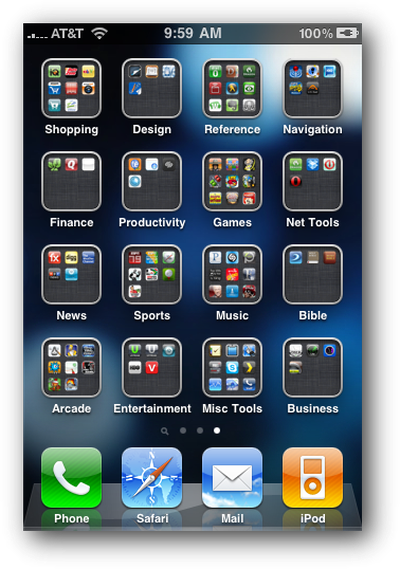
Macworld writer Dan Frakes details his frustration at losing his iPhone's folder organization one night. All his iPhone's organized apps had been strewn about folderless. In his attempt to restore the process, he figured out the right way to restore from iTunes to ensure his folder organization remains intact.

It turns out that iTunes actually offers two kinds of restores. The first is the one described above, accessed by clicking the Restore button in iTunes' Summary view for your iOS device. The other one is less obvious--you access it by right-clicking (Control-clicking) your iOS device in iTunes' sidebar and choosing Restore from Backup. As the dialog that appears explains, the latter procedure restores only your data and settings, not the iPhone’s firmware or OS. What the dialog doesn't note is that your third-party apps apparently remain on the phone, as well. In other words, it gives iTunes that “second pass” at restoring your Home-screen app organization.

Frakes details the multi-step process to avoid losing hours of tidying work.

Top Rated Comments

cleggster83 Avatar
195 months ago
And if you have a jailbroken iphone and have infinifolders installed, When you restore the phone and install all the apps, reinstall infinifolders and when it resprings it will automatic rearrange all the apps back to the original state.
Score: 2 Votes (Like | Disagree)
195 months ago
I've restored probably 4 times and had this problem half the time.

The problem for me was that it would apply firmware, restore the apps, then start syncing all my music/video/photos back on which took forever (or the phone would ring during that time!). So I would cancel it at that stage, and all the apps would be alphabetical all over the place.

If you can make sure you don't touch the phone until it's fully completed it's restore and sync, the apps are fine. It must do that as the very last thing.

Your note though will be very useful next time I stuff up. I can then do this shorter restore like you describe to get the apps back in their right place!
Score: 1 Votes (Like | Disagree)

Popular Stories

iOS 27 on iPhone 17 1

iOS 27 Will Add These New Features to Your iPhone

Saturday May 2, 2026 8:43 am PDT by
Apple is expected to unveil iOS 27 during its WWDC 2026 keynote on June 8, and there are already many rumored features and changes for iPhones. The first developer beta of iOS 27 will likely be available immediately following the keynote, and a public beta typically follows in July. Following beta testing, the software update should be released to all users with a compatible iPhone in...
Apple Event Logo

Apple Just Released a New Accessory

Monday May 4, 2026 8:13 am PDT by
Apple today released a new Pride Edition Sport Loop for the Apple Watch. The band features a rainbow design with 11 colors of woven nylon yarns. The new Pride Edition Sport Loop is available to order now on Apple.com and in the Apple Store app in 40mm, 42mm, and 46mm sizes, and it will be available at Apple Store locations starting later this week. In the U.S., the band costs $49. There...
Apple Announces 2026 Pride Band Watch Face and iPhone Wallpaper Article 2

iOS 26.5 Coming Soon With These New Features

Monday May 4, 2026 8:40 am PDT by
iOS 26.5 is expected to be released next week, following more than a month of beta testing. The update is relatively minor, but there are a couple of new features and changes across the operating system that we have recapped below. iOS 26.5 lays the groundwork for end-to-end encryption for RCS in the Messages app and ads in the Apple Maps app, and it will include a new Pride wallpaper and a...
Related Apple News: Ipad 12 | Macbook Neo | Apple Maps Visited Places Disable | Apple Pay | How To


















