

Apple Tweaks Mac OS X Lion UI In Response to Criticism - MacRumorsOpen MenuShow RoundupsShow Forums menuVisit ForumsOpen Sidebar
Skip to Content

Apple Tweaks Mac OS X Lion UI In Response to Criticism

With Apple having pushed out a new update to the Mac OS X Lion developer preview program, those with access to the new build have been looking for changes in an attempt to see what Apple has been working on over the past few weeks.

One minor point that caught our eye is a change in the user interface elements for selecting subpanes within System Preferences. In this latest build, the active subpane is denoted by a sunken, darker button that appears as if it has been pushed, as shown in the Expos & Spaces preference pane.
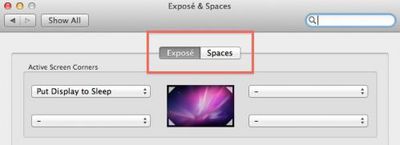
162642 lion subpane button new 500
Current "button" style subpane selector with Expos active

Earlier builds of Mac OS X Lion had used a sort of slider animation where the active subpane was represented by a lighter colored button that confused many users when simply glancing at the pane without attempting to move the slider and thus having the animation to key on.

162642 lion subpane slider old 500
Earlier "slider" style subpane selector with Spaces active

In the face of that criticism, Apple appears to have rethought its mechanism for switching between subpanes and reverted back to a button style that appears more intuitive.

A similar change has been made in iCal, where an earlier slider-style navigator was rolled out to select among day/week/month/year views but has now been replaced by more traditional button-style selectors.

163551 lion ical button style selector
iCal selector buttons in latest Mac OS X Lion build

Popular Stories

iOS 27 on iPhone 17 1

iOS 27 Will Add These New Features to Your iPhone

Saturday May 2, 2026 8:43 am PDT by
Apple is expected to unveil iOS 27 during its WWDC 2026 keynote on June 8, and there are already many rumored features and changes for iPhones. The first developer beta of iOS 27 will likely be available immediately following the keynote, and a public beta typically follows in July. Following beta testing, the software update should be released to all users with a compatible iPhone in...
Apple Event Logo

Apple Just Released a New Accessory

Monday May 4, 2026 8:13 am PDT by
Apple today released a new Pride Edition Sport Loop for the Apple Watch. The band features a rainbow design with 11 colors of woven nylon yarns. The new Pride Edition Sport Loop is available to order now on Apple.com and in the Apple Store app in 40mm, 42mm, and 46mm sizes, and it will be available at Apple Store locations starting later this week. In the U.S., the band costs $49. There...
Apple Announces 2026 Pride Band Watch Face and iPhone Wallpaper Article 2

iOS 26.5 Coming Soon With These New Features

Monday May 4, 2026 8:40 am PDT by
iOS 26.5 is expected to be released next week, following more than a month of beta testing. The update is relatively minor, but there are a couple of new features and changes across the operating system that we have recapped below. iOS 26.5 lays the groundwork for end-to-end encryption for RCS in the Messages app and ads in the Apple Maps app, and it will include a new Pride wallpaper and a...

Top Rated Comments

rorschach Avatar
196 months ago
Actually scrollbars look and behave exactly the same as they did before.

Whether they automatically hide or not is a preference, it has been since the first DP:


Same with reverse scrolling. Nothing at all has changed about scrolling or scrollbars.
Score: 8 Votes (Like | Disagree)
Burgess07 Avatar
196 months ago
1. Dang, I liked the sliders. Wish Apple would set an option in the system preferences to enable/disable them.
2. Scrollbars still disappear for me.
Score: 7 Votes (Like | Disagree)
196 months ago
Bummer, I really liked the iOS-style scrollbars. My favorite thing about Lion is the inverted scrolling. It feels more natural on a touchpad once you get used to it.
Score: 7 Votes (Like | Disagree)
3N16MA Avatar
196 months ago
iCal reminds me of something out of Kirby's Epic Yarn.
Score: 6 Votes (Like | Disagree)
196 months ago
I liked it how it was before.... :(

+1

It was confusing but they could have sorted that out.
Score: 5 Votes (Like | Disagree)
196 months ago

Finally, Apple has made a significant change to one of the first user interface changes observed (https://www.macrumors.com/2010/10/25/mac-os-x-lion-notes-ios-scroll-bars-any-corner-resizing-dock-changes/) way back in October when Apple first demoed Mac OS X Lion: iOS-style scrollbars. Initial builds of Mac OS X Lion had featured scrollbars that overlaid the window's comments, appearing only when necessary and then disappearing after a brief period of time.

Apple has done away with that concept, returning to fixed scrollbars (http://images.macrumors.com/article/2011/04/29/163551-lion_scrollbar_non_overlay.jpg) along the right side of each window, although they do retain the dark iOS-like appearance. The refined scrollbars are present at all times and do not disappear after use.

No they haven't. Fading is now a user preference. You can have them fade automatically, stay all the time, or fade according to your input device.
Score: 5 Votes (Like | Disagree)
Related Apple News: South Africa | News | Technology | World News | Reviews
















