Mac OS X Lion Notes: iOS Scroll Bars, Any Corner Resizing, Dock Changes - MacRumorsOpen MenuShow RoundupsShow Forums menuVisit ForumsOpen Sidebar
Skip to Content

Mac OS X Lion Notes: iOS Scroll Bars, Any Corner Resizing, Dock Changes

During last week's media event, Apple demoed a few early features of Mac OS X Lion which will be released in 2011. While Apple focused on a few particular features (Mac App Store, LaunchPad, and Full Screen Apps), readers have noticed a few other user interface changes coming to Apple's next operating system.
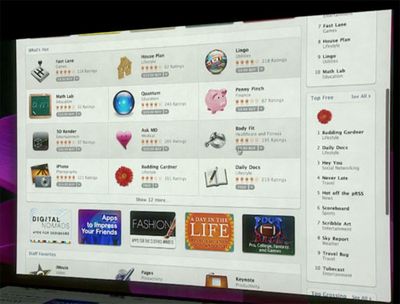
030119 scrollbar

One rumor that was posted ahead of the event predicted that Mac OS X 10.7 would be getting iOS-inspired scroll bars. During the event, Apple showed off new versions of their Apps with these new scroll bars in place. Like iOS, the scroll bars disappear when not in use, but reappear during scrolling or with mouse movement.

Meanwhile, one reader who had accurately predicted these changes also reveals that in Mac OS X 10.7, users will be able to resize windows from any corner.

ALSO you can now resize the windows from any corner, again, works nicely.

Currently, windows are only resizable on the bottom-right corner of the windows.
030726 resume

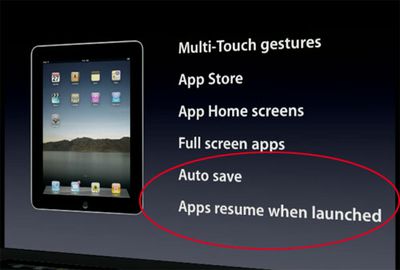
A couple of other new features that Apple glossed over during the presentation was "Auto Save" and "Apps resume when launched". As a result of these new features, it appears that Mac applications are no longer depicted as launched or unlaunched in the Mac OS X Dock:


031902 dock

032509 snow
Top: Lion; Bottom: Snow Leopard

This actually represents a big shift in Mac OS X's representation of apps. The typical "light" indicator under each launched application is gone from the Mac OS X Lion dock. Apple's implementation of instantly resuming applications when launched may blur the lines between launched/unlaunched, though the distinction still remains important when talking about multitasking.


Popular Stories

iOS 27 on iPhone 17 1

iOS 27 Will Add These New Features to Your iPhone

Saturday May 2, 2026 8:43 am PDT by
Apple is expected to unveil iOS 27 during its WWDC 2026 keynote on June 8, and there are already many rumored features and changes for iPhones. The first developer beta of iOS 27 will likely be available immediately following the keynote, and a public beta typically follows in July. Following beta testing, the software update should be released to all users with a compatible iPhone in...
Apple Event Logo

Apple Just Released a New Accessory

Monday May 4, 2026 8:13 am PDT by
Apple today released a new Pride Edition Sport Loop for the Apple Watch. The band features a rainbow design with 11 colors of woven nylon yarns. The new Pride Edition Sport Loop is available to order now on Apple.com and in the Apple Store app in 40mm, 42mm, and 46mm sizes, and it will be available at Apple Store locations starting later this week. In the U.S., the band costs $49. There...
Apple Announces 2026 Pride Band Watch Face and iPhone Wallpaper Article 2

iOS 26.5 Coming Soon With These New Features

Monday May 4, 2026 8:40 am PDT by
iOS 26.5 is expected to be released next week, following more than a month of beta testing. The update is relatively minor, but there are a couple of new features and changes across the operating system that we have recapped below. iOS 26.5 lays the groundwork for end-to-end encryption for RCS in the Messages app and ads in the Apple Maps app, and it will include a new Pride wallpaper and a...

Top Rated Comments

203 months ago
wouldn't that be confusing? Not knowing what's running at a glance?
Score: 2 Votes (Like | Disagree)
KnightWRX Avatar
193 months ago
no.
Historically : yes. Otherwise : Citation needed.
Score: 1 Votes (Like | Disagree)
203 months ago
Removing the light represents a fundamental shift: Apple doesn't want you to think about what's "open" or "closed," just like an application being open or closed shouldn't be an issue on iOS. But honestly it's not the same -- the amount of RAM that, say, Photoshop eats up when in the background is not the same as a piddly iOS app, so unless Apple begins restricting what OS X apps can do in the background I don't see this as exactly a great feature.
Score: 1 Votes (Like | Disagree)
203 months ago
What was wrong with the light indicator? If it ain't broke....
Score: 1 Votes (Like | Disagree)
Related Apple News: Education | Business | Reviews | Buyers Guide | Technology