

Since the iPhone X, 8, and 8 Plus introduced Qi wireless charging into Apple products for the first time last year, more and more users have begun hunting for the best wireless charging pad out there. We've detailed this topic in numerous posts over the past year, and in the end, many buying recommendations for Qi mats come down to support for Apple's 7.5W fast wireless charging and overall design.
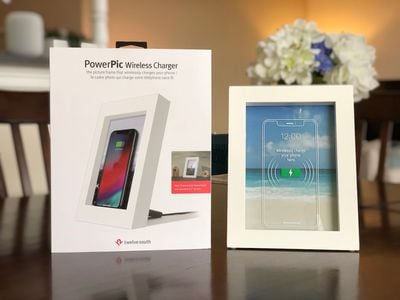
In both categories, Twelve South's all new PowerPic Frame for iPhone excels. The accessory is a wooden picture frame that fits any vertically framed 5"x7" photo, while also charging any Qi-compatible smartphone. In Apple's lineup of devices, that means it supports the iPhone 8, 8 Plus, X, XS, XS Max, and XR, but if you use Google or other Android smartphones that have Qi wireless charging, you can use the PowerPic as well.
Setup
PowerPic essentially comes in three pieces: the wooden picture frame, the back plate that makes up the main charging section of the device, and a small metal support arm. The support arm connects easily into the back of the PowerPic, and a little cutout allows for cable organization.
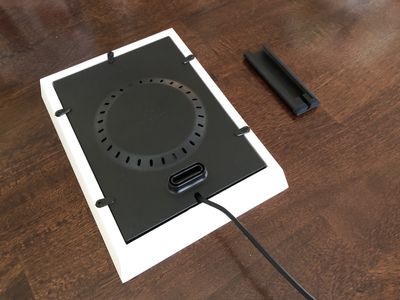
The included cable is a 1.5m USB-C to USB-A cable. PowerPic doesn't come with an AC adapter, so if you want to plug it into a wall then your outlet will need a USB socket, or you can use any traditional wall adapter brick.
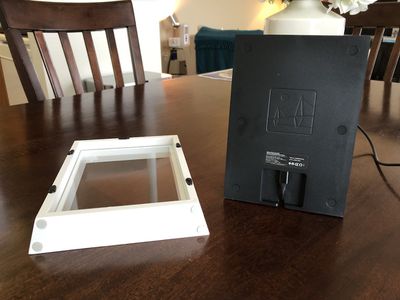
To change the image in the frame, PowerPic is built like a regular picture frame. The back has small clips that hold the charging plate in place, and if you swivel these clips away, the plate will disengage from the wooden frame. Even with the added weight of the charging plate, PowerPic didn't feel particularly heavy to me, and the support arm kept the accessory nice and sturdy wherever I placed it.
Daily Use
When simply sitting on a countertop or bookshelf, the PowerPic is truly deceptive because it looks so similar to a traditional photo frame. It’s only when you look behind it at the large, circular charging plate that things look different. PowerPic comes in both white and black, but I only had the chance to see white in person.
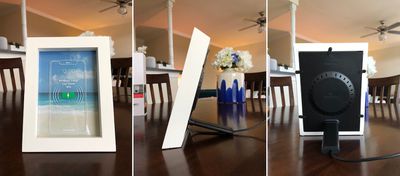
The rear plate is where PowerPic provides a few LED status lights: blue for device charging, green for a full charge, and flashing blue for a foreign object warning. Of course, I tended to simply tap my iPhone to see how far it had progressed with charging, so I didn't rely much on the first two LEDs.
The flashing LED may be useful for those with wallet cases, as the PowerPic can warn you when something like a metallic card is sitting between your iPhone and the PowerPic's charging plate. While this is a helpful addition, in most placement situations you will have to physically pick up the PowerPic to check on the light. However, as far as Qi charger LEDs go, PowerPic's was soft and unobtrusive during the night, so I never minded the rear placement.

For the past few days, I've relied on PowerPic to charge my iPhone X and came away with many of the same statistics as wireless chargers from other companies. PowerPic is great for trickle charging a smartphone over long periods of time, and makes for a quality bedside accessory.
My iPhone was topped off every morning, and I really liked that it decluttered my bedside table since I typically do have one picture frame and one wireless charger, along with a lamp and a few books, occupying the same space. It can be a bit of a fumble to access your iPhone if you need to in the middle of the night, however, particularly if you're used to horizontal chargers.

Additionally, the central placement of the coil in the PowerPic requires the iPhone to be placed in the exact center of the photo. This can be a problem for any time you aren't paying attention to where you set down the iPhone, like in a dark room at night.
Outside of the bedroom, one of my favorite placements for the PowerPic was the kitchen. I always have some kind of vertical wireless charger next to my oven to place my iPhone X on while I cook. This way, I can follow recipes, watch videos, read articles and texts, and activate Face ID, all while my iPhone charges. PowerPic was a great alternative solution for this, although it does not support landscape videos and only charges the iPhone vertically.
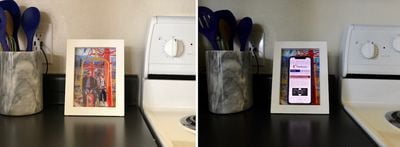
I never thought that any of the wireless chargers I previously had in my kitchen were obtrusive or distracting, but replacing them with a simple picture frame has been more enjoyable than I thought it would be; there's something more attractive about the PowerPic in most situations where you use a Qi mat.
PowerPic supports 10W wireless charging, which means Apple's 7.5W fast charging is supported. In my time with the accessory, I found my iPhone X to fuel up at the same rate as chargers I've recently used by Belkin, Mophie, and ZENS. This means PowerPic is great for a quick top-off (my iPhone X rose from 74 percent to 95 percent in just about one hour), and downtime charging, when you don't really need to physically pick up your iPhone for anything. A longer charge, from 40 percent to 100 percent, took just over two and a half hours.
Twelve South offers some frame and iPhone wallpaper combinations that make for nice visuals on the PowerPic, but in normal use your iPhone will most often be on a black screen when it's charging. Because of this, the novelty of the dual-image idea wears off pretty fast. I tried out a few of Twelve South's downloadable images, but mostly ended up just using PowerPic as any normal frame, filling it with pictures of my niece and nephew, or my family on vacation.
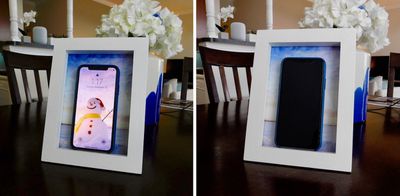
It turns out I have way more horizontal photos than vertical photos, so that was one of the biggest downsides of the PowerPic. Although the frame itself sits well horizontally, your iPhone will not charge in this orientation since it doesn't hit the charging coil's sweet spot when it's horizontal.
Bottom Line
Despite a few negatives, Twelve South's PowerPic is a well-made and distinctive Qi wireless charger that declutters your home or office with a 2-in-1 one charging solution.
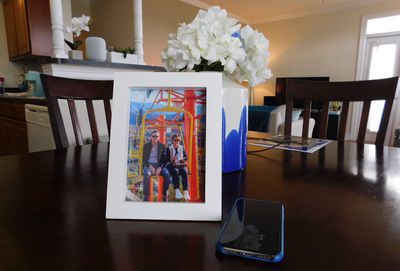
The price is slightly steep for a wireless charger, but Twelve South's quality can be seen in the build of the frame, and the user experience has essentially been frictionless for the past week that I've used it.
How to Buy
You can purchase Twelve South's PowerPic Wireless Charger on the company's website for $79.99.
Twelve South provided MacRumors with one PowerPic Wireless Charger for the purposes of this review. No other compensation was received.


















Top Rated Comments
[doublepost=1542204654][/doublepost]Wireless chargers work best over a long period of time.
Like when you're asleep.
Like when you've got your eyes closed and are not looking at pictures in frames.
So yeah, it works pretty well...
It's a picture when you're awake, and a charger when you're asleep?
What's not to get, and what's not to like about that?
This is such a basically simple but brilliant idea!
If I didn't already have a brand new Logitech upright stand next to my bed, I would buy one of these.
While I do not have a bedside or end table charger, if I did, I would much rather see a picture sitting in its place for most of the day and only cover it up while charging. The other option is to have a visible piece of technology sitting on my table that only gets used a small portion of the day.