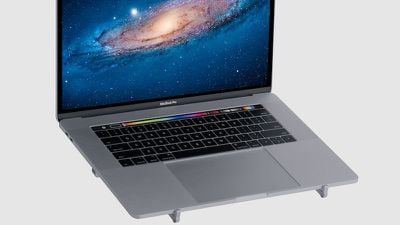
Rain Design, a maker of accessories for Apple products, released three laptop stands made of anodized aluminum to match Apple's MacBook and MacBook Pro models earlier this year: the mBar, mBar Pro, and mBar Pro+. The mBar is a minimalist MacBook stand with fixed arms that's not meant to be portable, and the mBar Pro and Pro+ have folding arms for easy portability.
gallery mbarpro5

A laptop stand can be a critical accessory for a home or office workstation to elevate your laptop to a more comfortable and ergonomic position for extended use. But a portable laptop stand is more of an option than a necessity, and size and weight are crucial factors in determining if it's worthy of adding to your bag.

I received the mBar Pro to review and tested it with a 15-inch MacBook Pro. I've personally owned several Rain Design stands, including the iLap, mStand, and iLevel (which is a permanent fixture at my treadmill desk at home).
mbar pro silver main

Design and Materials

All three mBar models are made of anodized aluminum and come in silver or space gray. All have rubber strips on all contact points to protect your laptop, as well as rubber feet for stability.

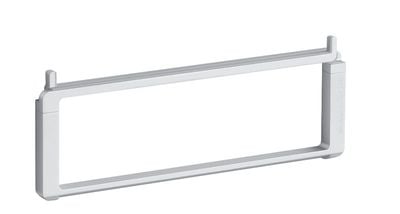
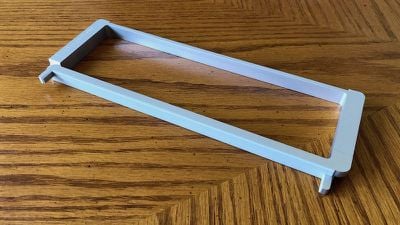
The mBar Pro folds up into a rectangle with two nubs that stick out on one side. It measures 9.6 inches (243 mm) wide, 3.6 inches (91mm) tall, and 1/2 inch (12.4 mm) thick when folded. The nubs are on the extendable legs and prevent your laptop from sliding off. It folds up tightly though it takes a little trial and error to figure out which leg flips out which way to set it up.
mbar pro unfolded
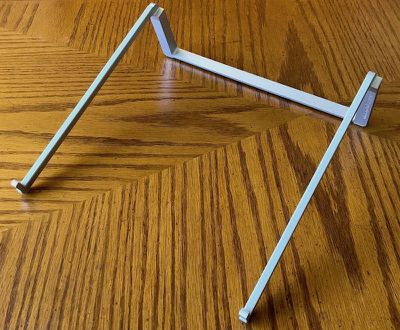
When the legs are extended, it measures 9.6 inches from front to back and it and raises the rear of a MacBook Pro by 3 inches. It feels solid yet light, weighing in at 4.6 ounces (130 grams). I found that my MacBook Pro felt stable and didn't wobble at all while on it.

Overall, the mBar Pro feels solid and well-designed. It's definitely an attractive accessory that complements Apple's laptop line.

Usage

It's compact when folded and is light enough to not be noticeable as extra weight in my laptop bag. The mBar comes with a lightweight microfiber case with a snap closure. While the stand doesn't have any sharp edges, it feels like it could mark my laptop if placed next to it in the laptop bag I use the most. With the included carrying case—or if you use a protective sleeve for your laptop—this won't be an issue for you, of course.
mbar pro folded
I used the mBar while working at coffee shop tables and standing at kitchen counters. General ergonomic principles for laptop use dictate that you should keep your wrists in as neutral a position as possible. Depending on your height or chair position, the height of the table or counter, the mBar may or may not help with that. When standing at a counter, I tend to rest my wrists right on my laptop below the keyboard and have to focus on keeping them neutral while using the mBar Pro.
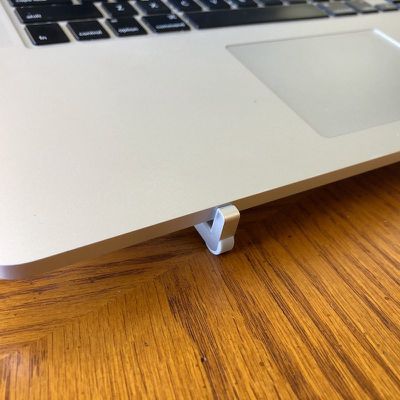
mbar pro foot
When sitting at a table, the mBar Pro raises my MacBook Pro to a level that allows me to keep my neck in a more neutral position. If you've heard about "text neck," which is neck strain that results from looking down at a phone (or your favorite electronic device), the mBar Pro can definitely help avoid this, at least while you're using your laptop. As an avid iPhone user, I definitely want to avoid neck strain as much as possible and I'm all for a product that helps me with that.
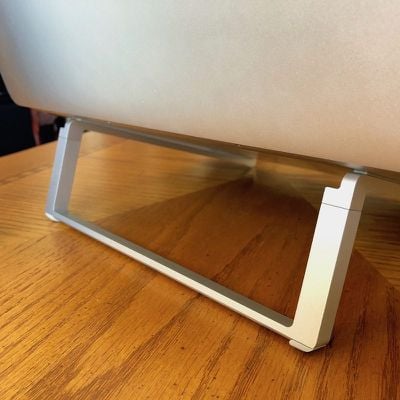
mbar pro rear
The height of the mBar Pro isn't adjustable, so if that's a feature you need, you'll need to look elsewhere (or use magazines, books, or other impromptu items on hand to add some height).

An added benefit of the mBar Pro's minimalist design allows for excellent air flow around your laptop. If you're doing processor-intensive work, it can help keep your MacBook Pro a little cooler since heat can dissipate more quickly.

Bottom Line

The mBar Pro is a lightweight, attractive, and functional portable laptop stand that aesthetically matches Apple's MacBook line. It can help relieve neck strain, though without any height adjustments, its ability to help will vary based on the furniture you use and your own habits.

However, it's not cheap at just under $55. At this price point, I can't recommend it as a must-buy but if you have the cash and need a light, easy solution to elevate your MacBook Pro, it's one of the nicest portable stands I've seen.

How to Buy

The mBar Pro can be purchased directly from Rain Design or from Amazon.

Note: Rain Design provided MacRumors with an mBar Pro for the purpose of this review. No other compensation was received.

Update: This review has been updated to reflect the fact that a carrying sleeve was included with the review unit received.


Top Rated Comments

3329783 Avatar
95 months ago
On what planet is that worth $55?
Score: 11 Votes (Like | Disagree)
keysofanxiety Avatar
95 months ago
On what planet is that worth $55?
Well in its defence, it probably does the same job as a 55-high stack of $1 bills.

So at least it, err, looks nicer I guess?
Score: 5 Votes (Like | Disagree)
sinsin07 Avatar
95 months ago
The Roost Stand:


Can't tell if it's part laptop stand or part walker:

At $75 it probably should do both.:p
Score: 5 Votes (Like | Disagree)
madoka Avatar
95 months ago
I own four Rain design laptop stands. The rubber bumpers fall off over time. Rather than fix this adhesive issue, Rain Design's response is to ask users to BUY more rubber bumpers at $6 a pop. Since when should a laptop stand have a wear item?!?!!?

The laptop stand I switched to for portable use is the Roost Stand. BRILLIANT design and blows away Rain Design's version in every way but price.
Score: 3 Votes (Like | Disagree)
frode Avatar
94 months ago
It looks nice and it's good for the eyes to have the screen up a bit but it's awful ergonomics for the hands. Natural human hand positions are slightly down, not up. It's quite surprising how many products ignore this basic fact of anatomy (yes, I am a certified ergonomist in case someone wants to question that part...). :-)
Score: 2 Votes (Like | Disagree)
PhilMacbook Avatar
95 months ago
'A laptop stand can be a critical accessory for a home or office workstation'

I think that it overstating things a tad. Is this article an advert?

I've used computers for a couple of decades and managed without a stand of any kind.

'I found that my MacBook Pro felt stable and didn't wobble at all while on it.'

You would hope not for $55. It doesn't look great either. They could probably make it out of plastic for $5 and being that your MBP is sat on top of it the whole time it wouldn't make any difference at all.

Good luck to them. If people buy it then it is worth this company making it. If there is a market for this it might be worth someone making a gold stand and calling it MacBar Edition.
Score: 2 Votes (Like | Disagree)

Popular Stories

iOS 26

iOS 26.4 and iOS 27 Features Revealed in New Leak

Friday December 12, 2025 10:56 am PST by
Macworld's Filipe Espósito today revealed a handful of features that Apple is allegedly planning for iOS 26.4, iOS 27, and even iOS 28. The report said the features are referenced within the code for a leaked internal build of iOS 26 that is not meant to be seen by the public. However, it appears that Espósito and/or his sources managed to gain access to it, providing us with a sneak peek...
iOS 26

iOS 26.2 Coming Soon With These 8 New Features on Your iPhone

Thursday December 11, 2025 8:49 am PST by
Apple seeded the second iOS 26.2 Release Candidate to developers earlier this week, meaning the update will be released to the general public very soon. Apple confirmed iOS 26.2 would be released in December, but it did not provide a specific date. We expect the update to be released by early next week. iOS 26.2 includes a handful of new features and changes on the iPhone, such as a new...
iOS 26

Apple Releases iOS 26.2 With Alarms for Reminders, Lock Screen Changes, Enhanced Safety Alerts and More

Friday December 12, 2025 10:10 am PST by
Apple today released iOS 26.2, the second major update to the iOS 26 operating system that came out in September, iOS 26.2 comes a little over a month after iOS 26.1 launched. ‌iOS 26‌.2 is compatible with the ‌iPhone‌ 11 series and later, as well as the second-generation ‌iPhone‌ SE. The new software can be downloaded on eligible iPhones over-the-air by going to Settings >...
AirPods Pro Firmware Feature

Apple Releases New Firmware for AirPods Pro 2 and AirPods Pro 3

Thursday December 11, 2025 11:28 am PST by
Apple today released new firmware designed for the AirPods Pro 3 and the prior-generation AirPods Pro 2. The AirPods Pro 3 firmware is 8B30, up from 8B25, while the AirPods Pro 2 firmware is 8B28, up from 8B21. There's no word on what's include in the updated firmware, but the AirPods Pro 2 and AirPods Pro 3 are getting expanded support for Live Translation in the European Union in iOS...
macOS Tahoe 26 Thumb

Apple Releases macOS Tahoe 26.2 With Edge Light

Friday December 12, 2025 10:08 am PST by
Apple today released macOS Tahoe 26.2, the second major update to the macOS Tahoe operating system that came out in September. macOS Tahoe 26.2 comes five weeks after Apple released macOS Tahoe 26.1. Mac users can download the macOS Tahoe update by using the Software Update section of System Settings. macOS Tahoe 26.2 includes Edge Light, a feature that illuminates your face with soft...
AirTag 2 Mock Feature

Apple AirTag 2: Four New Features Found in iOS 26 Code

Thursday December 11, 2025 10:31 am PST by
The AirTag 2 will include a handful of new features that will improve tracking capabilities, according to a new report from Macworld. The site says that it was able to access an internal build of iOS 26, which includes references to multiple unreleased products. Here's what's supposedly coming: An improved pairing process, though no details were provided. AirTag pairing is already...
ipados 26 1 slide over

Apple Releases iPadOS 26.2 With Multitasking Improvements

Friday December 12, 2025 10:09 am PST by
Apple today released iPadOS 26.2, the second major update to the iPadOS 26 operating system released in September. iPadOS 26.2 comes a month after iPadOS 26.1. The new software can be downloaded on eligible iPads over-the-air by going to Settings > General > Software Update. iPadOS 26.2 continues with the multitasking improvements that were added with iPadOS 26.1. You can now drag and...
bug security vulnerability issue fix larry

Update Now: iOS 26.2 Fixes 20+ Security Vulnerabilities

Friday December 12, 2025 11:11 am PST by
Apple today released iOS 26.2, iPadOS 26.2, and macOS 26.2, all of which introduce new features, bug fixes, and security improvements. Apple says that the updates address over 20 vulnerabilities, including two bugs that are known to have been actively exploited. There are a pair of WebKit vulnerabilities that could allow maliciously crafted web content to execute code or cause memory...