

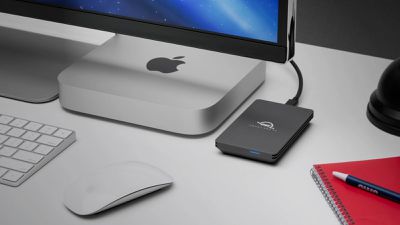
A few months ago, OWC introduced the Envoy Pro FX, a portable SSD storage drive that is described as "the fastest, most compatible drive ever." I take a closer look at the Envoy Pro FX and its capabilities in my review below.
Key Features
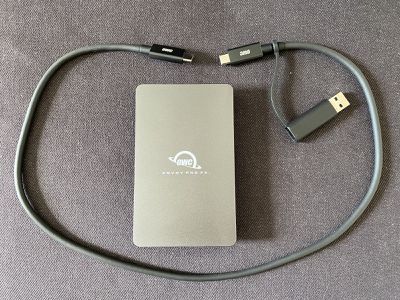
- Wide compatibility: The drive can be connected to a wide range of devices with Thunderbolt 3/4 or USB-C ports, such as the latest Mac, iPad Pro, and iPad Air models, as well as PCs and Microsoft Surface devices. There is also a USB-A adapter attached to the Thunderbolt cable included in the box.
- Very fast speeds: Thunderbolt 3/4 compatibility allows for very fast read/write speeds up to an advertised 2,800 MB/s. I test speeds below.
- Bus-powered: The drive is powered by the device it is connected to, not a power supply.
- Tough design: The drive's aluminum housing has IP67-rated water and dust resistance and military-grade drop protection.
- Storage capacities: 240GB, 480GB, 1TB, and 2TB.
Performance
The Envoy Pro FX enclosure is equipped with OWC's Aura P12 Pro, a high-performance SSD with M.2 NVMe 1.3 technology. With a PCI-Express 3.1 connection via Thunderbolt 3, OWC promises impressive read/write speeds up to 2,800 MB/s.
My test setup consisted of a base model 16-inch MacBook Pro with a 2.6GHz six-core 9th-generation Intel Core i7 processor running macOS Big Sur 11.2, with a 1TB Envoy Pro FX connected directly to the MacBook Pro with a single Thunderbolt 3 cable. The drive was formatted with a single Apple File System (APFS) volume for macOS.
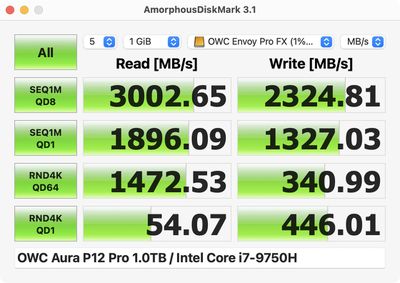
Using the popular AmorphousDiskMark 3.1 storage benchmark app by Katsura Shareware, the Envoy Pro FX achieved sequential read and write speeds of up to 3,002 MB/s and 2,324 MB/s respectively on my Mac. This is a bit above what OWC advertises, but in my actual usage of the drive, data transfer speeds were around the 2,700-2,800 MB/s mark. For example, I was able to transfer a 25GB file in around nine seconds.
By comparison, SanDisk's 1TB Extreme Pro SSD also uses M.2 NVMe 1.3 technology, but without Thunderbolt 3, sequential read performance is limited to up to 2,000 MB/s. And at the low end, external HDDs often top out at read speeds of around 100 MB/s to 150 MB/s. Of course, both of those options are far cheaper than the Envoy Pro FX, with some comparisons included in my pricing section below.
Design
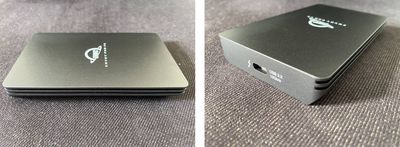
With a sleek aluminum housing, the Envoy Pro FX resembles an Apple product, but the white OWC logo and Envoy Pro FX branding takes away from the aesthetic. The drive's "charcoal gray" color is a bit darker than the Space Gray finish of the MacBook Pro, but they still look nice side by side. Along the left and right sides of the drive are what OWC calls "deeply grooved fins" to help with heat dissipation and ensure sustained performance. The fanless drive never felt overly hot to the touch during some large file transfers in my testing.
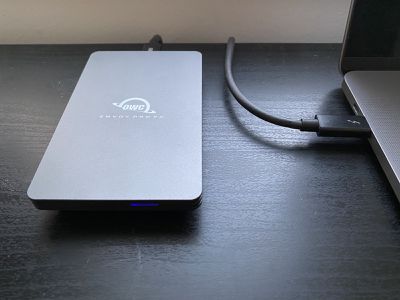
The bottom of the drive has two non-skid rubber feet to prevent it from sliding around on a desk or other surface. On the front of the drive is a slim LED status light that appears blue when the drive is powered on and flashes slowly during file transfers, but the LED isn't very bright, so I found it pretty useless during daylight hours. (I'm no pro photographer, so the picture above makes the LED look brighter than it is.)
The back of the drive has a single USB-C port with support for Thunderbolt 3 and USB 3.2 Gen 2.
With no fan, the Envoy Pro FX has silent operation. As expected, the drive didn't make any noise during my testing, which is certainly pleasant. Unfortunately, the fans in my Intel-based MacBook Pro quickly revved up while completing a Time Machine backup to the drive, but I'll take the blame here for not upgrading to an M1 Mac yet.
As an external drive that fits in the palm of my hand, the Envoy Pro FX can easily be brought on the go, making it a convenient, portable solution for storing files while traveling. With a single Thunderbolt 3 cable that connects to a Mac for data and power, IP67-rated water and dust resistance, and military-grade drop protection, the Envoy Pro FX provides a plug-and-play experience without any worry.
Compatibility
The Envoy Pro FX can be connected to a wide range of devices with Thunderbolt 3/4 or USB-C ports, such as the latest Mac, iPad Pro, and iPad Air models, as well as PCs and Microsoft Surface devices. There is also a USB-A adapter attached to the Thunderbolt cable included in the box that allows the drive to be connected to USB-A devices.
To take advantage of the maximum speeds that the Envoy Pro FX offers, a 2016 or newer Mac with Thunderbolt 3/4 ports running macOS High Sierra or later is needed. OWC lists full system requirements on its website.
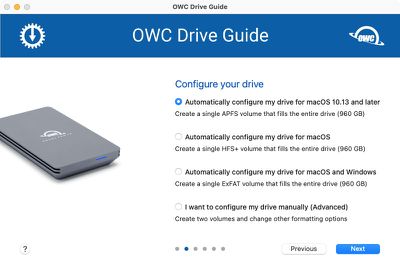
The drive comes preloaded with OWC's Drive Guide formatting utility for configuring the drive, with options to create a single Apple File System (APFS) volume that fills the entire drive for macOS High Sierra and later, a single HFS+ volume that fills the entire drive for older macOS versions, or a single exFAT volume that fills the entire drive for use with both macOS and Windows. The drive can also be configured manually.
Pricing
Given that the Envoy Pro FX is a top-of-the-line portable SSD, it should come as no surprise that the drive isn't cheap. Pricing starts at $199 for 240GB of storage, followed by 480GB for $229, 1TB for $319, and 2TB for $499.
A few comparisons with other 1TB drives compatible with the Mac:
- G-Technology G-DRIVE Portable HDD (up to 140 MB/s): $79.95
- Samsung T7 Portable SSD (up to 1,050 MB/s): $169.99 (on sale for $159)
- SanDisk Extreme Pro Portable SSD (up to 1,050 MB/s): $279.99 (on sale for $179.99)
- SanDisk Extreme Pro Portable SSD V2 (up to 2,000 MB/s): $299.99 (on sale for $229.99)
A black 0.7-meter Thunderbolt 3 cable is included in the box with the Envoy Pro FX.
Final Verdict
The Envoy Pro FX is excellent, but pricey. If you want ultra-fast read/write speeds, this drive has certainly earned my stamp of approval; however, if you are simply looking for a drive to store your Time Machine backups, then it would be more economical to consider a basic 1TB hard drive for around a quarter of the price of the Envoy Pro FX, or a non-Thunderbolt SSD as a good middle ground in terms of price and speed.
The Envoy Pro FX can be ordered on OWC's website.
Note: MacRumors is an affiliate partner with OWC and Amazon. When you click a link and make a purchase, we may receive a small payment, which helps us keep the site running. OWC provided MacRumors with an Envoy Pro FX for this review. No other compensation was received.


















Top Rated Comments