

Griffin's Guide Magnetic Cable Management Set was first announced at CES in January of 2015, but it didn't become available for purchase until September. We went hands-on with the Guide to see if it was worth the wait as a cable management solution.

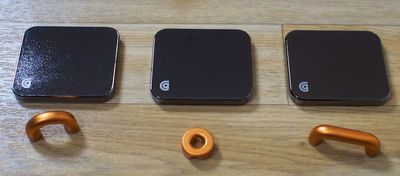
The Guide Cable Management Set is modular and consists of three weighted bases and three magnetic aluminum cable anchors that attach to the bases. Each base is made from a polished stainless steel with a shiny finish while the anchors, available in three sizes from small to large, are made from an anodized copper-colored aluminum.
griffin guide
Together, the Guide system looks great on a desk, but it is only available in the polished steel and copper colorway, which doesn't match any iOS devices and while neutral, may not match all office and room decors. I liked the design of the Guide, but I did wish it was available in a wider selection of colors.

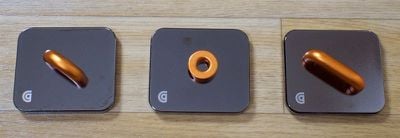
Each of the three bases is the same size, measuring in at 2.28 x 1.98 inches, but the magnetic cable anchors come in a range of sizes to fit different cords. The smallest of the three anchors is sized to fit a single iPhone cable, while the middle one can hold several iPhone-sized cables or a couple of larger cables, and the biggest anchor can hold thicker cables like those for cameras and other electronics. The weight of the Guide bases will keep them in place, but there's also a non-skid material on the bottom to provide even more traction.
griffin guide2
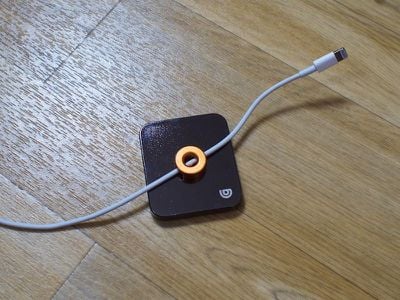
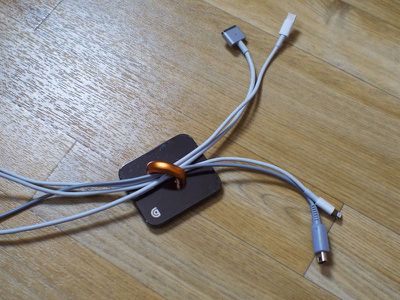
Because the anchors attach to each base using magnets, they can be arranged in multiple ways. One anchor can be used per base or multiple anchors can fit on a single base to meet various cable management needs. For my work space, I used the smaller one to hold an iPhone cable that has a pesky habit of slipping off the edge of the desk, while I used the other two to hold my MacBook cable and cables for other devices in place.
griffinguideonecable
Due to their weight, the Guide bases can't realistically be mounted on walls or on the sides of desks and tables (and the Guide doesn't come with the necessary hardware) so these are going to be limited to on-the-desk organization. For that use case, the Guide is primarily going to keep your cables where you want them to be so they're not sliding all over the desk or slipping off. The Guide isn't going to hide or conceal cables and cords, but it will keep them looking more organized and streamlined.
griffinguidemultiplecables
The large base size means the Guide takes up more room on a desk than simpler cable routing options, but sacrificing the extra space felt worth it to me both for the versatility of being able to rearrange the pieces at will and for the premium aesthetic. If you have multiple cables in different areas, such as on a desk and on a nightstand, the Guide can also be split up across multiple rooms. After some experimentation, I found the Guide to be more useful for me when split up, because a single larger cable anchor can hold multiple cables in place, letting me address several problem areas.
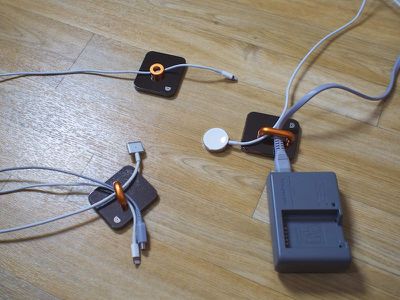
griffinguidecables
Given the usefulness of the Guide's interchangeable pieces, I'm surprised there aren't more magnetic cable management systems on the market. Before the Guide, I hadn't considered magnets as cable organizing solution, but it seems like an ideal way to wrangle cables.

Bottom Line

The magnetic Guide system is a clever way to organize cables on a desk, and because it can be used in so many ways, it's suitable for a range of cable configurations and setups. Since it's magnetic, it's easy to arrange and rearrange cables and the Guide system as necessary, and its industrial look blends in with a lot of decors.
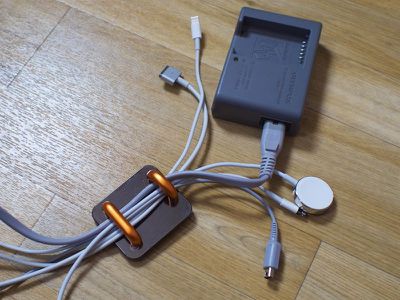
griffinguideevenmorecables
If you've got pesky cables that are continually slipping off of your desk or getting tangled and knocked out of place, the Guide is going to keep them where they belong with no problem.

The only real negative with the Guide is the price. At $40, this is a somewhat expensive solution to manage a handful of cables, and I do wish it was either more reasonably priced or had more pieces. If you don't mind shelling out $40 in the name of desktop organization, the Guide is worth picking up.

How to Buy

Griffin's Guide cable organizers can be purchased from the Griffin website for $39.99 or from Amazon.com for the same price.


Top Rated Comments

Sharewaredemon Avatar
131 months ago
This is how I do mostly. I also like to set up/tear down to have a completely empty desk.
Score: 11 Votes (Like | Disagree)
craig1410 Avatar
131 months ago
Ugh, I prefer my cables under my desk and out of sight! This is hideous!
Score: 3 Votes (Like | Disagree)
6836838 Avatar
131 months ago
Early April fool?
Score: 2 Votes (Like | Disagree)
mgipe Avatar
131 months ago
Two words: Duct Tape
Score: 2 Votes (Like | Disagree)
OldSchoolMacGuy Avatar
131 months ago
Running cabling through big magnets and having big magnets next to sensitive electronics? Sounds like a horrid idea.
Score: 2 Votes (Like | Disagree)
Doc C Avatar
131 months ago
So let me get this straight -
We are being asked to shell out $40 so we can put a hunk of metal on our desk and intentionally then run data cables through a magnetic field that is created by these other (ugly) hunks of metal?

I bought a "Cable Management System" from Staples for $9.99. It had numerous plastic holders that I could hide on the edge of my desk where it didn't get in my way and didn't look ugly. And it has lots of extra parts that I haven't yet used. And I probably still paid too much.
Score: 2 Votes (Like | Disagree)

Popular Stories

iOS 26

iOS 26.4 and iOS 27 Features Revealed in New Leak

Friday December 12, 2025 10:56 am PST by
Macworld's Filipe Espósito today revealed a handful of features that Apple is allegedly planning for iOS 26.4, iOS 27, and even iOS 28. The report said the features are referenced within the code for a leaked internal build of iOS 26 that is not meant to be seen by the public. However, it appears that Espósito and/or his sources managed to gain access to it, providing us with a sneak peek...
apple beta 26 lineup

Apple Leak Confirms Work on Foldable iPhone, AirTag 2, and Dozens More Devices

Monday December 15, 2025 2:05 pm PST by
Last week, details about unreleased Apple devices and future iOS features were shared by Macworld. This week, we learned where the information came from, plus we have more findings from the leak. As it turns out, an Apple prototype device running an early build of iOS 26 was sold, and the person who bought it shared the software. The OS has a version number of 23A5234w, and the first...
Apple Foldable Thumb

Leak Reveals Foldable iPhone Details

Monday December 15, 2025 9:09 am PST by
The first foldable iPhone will feature a series of design and hardware firsts for Apple, according to details shared by the Weibo leaker known as Digital Chat Station. According to a new post, via machine translation, Apple is developing what the leaker describes as a "wide foldable" device, a term used to refer to a horizontally oriented, book-style foldable with a large internal display....
Apple Logo Top Half

Early iOS 26 Software Leak Uncovers Dozens of Upcoming Apple Features

Monday December 15, 2025 3:05 pm PST by
Software from an iPhone prototype running an early build of iOS 26 leaked last week, giving us a glimpse at future Apple devices and iOS features. We recapped device codenames in our prior article, and now we have a list of some of the most notable feature flags that were found in the software code. In some cases, it's obvious what the feature flags are referring to, while some are more...
iOS 26

Apple Releases iOS 26.2 With Alarms for Reminders, Lock Screen Changes, Enhanced Safety Alerts and More

Friday December 12, 2025 10:10 am PST by
Apple today released iOS 26.2, the second major update to the iOS 26 operating system that came out in September, iOS 26.2 comes a little over a month after iOS 26.1 launched. ‌iOS 26‌.2 is compatible with the ‌iPhone‌ 11 series and later, as well as the second-generation ‌iPhone‌ SE. The new software can be downloaded on eligible iPhones over-the-air by going to Settings >...
iOS 26

iOS 26.2 Coming Soon With These 8 New Features on Your iPhone

Thursday December 11, 2025 8:49 am PST by
Apple seeded the second iOS 26.2 Release Candidate to developers earlier this week, meaning the update will be released to the general public very soon. Apple confirmed iOS 26.2 would be released in December, but it did not provide a specific date. We expect the update to be released by early next week. iOS 26.2 includes a handful of new features and changes on the iPhone, such as a new...
macOS Tahoe 26 Thumb

Apple Releases macOS Tahoe 26.2 With Edge Light

Friday December 12, 2025 10:08 am PST by
Apple today released macOS Tahoe 26.2, the second major update to the macOS Tahoe operating system that came out in September. macOS Tahoe 26.2 comes five weeks after Apple released macOS Tahoe 26.1. Mac users can download the macOS Tahoe update by using the Software Update section of System Settings. macOS Tahoe 26.2 includes Edge Light, a feature that illuminates your face with soft...
airpods max 2024 colors

AirPods Max 2 Likely to Offer These 10 New Features

Monday December 15, 2025 7:41 am PST by
Apple released the AirPods Max on December 15, 2020, meaning the over-ear headphones launched five years ago today. While the AirPods Max were updated with a USB-C port and new color options last year, followed by support for lossless audio and ultra-low latency audio this year, the headphones lack some of the features that have been introduced for newer generations of the regular AirPods and the ...














