

With the flood of full-featured Thunderbolt 3 docks about to hit the market, it's time to take a look at Belkin's Thunderbolt 3 Express Dock HD, one of the major contenders users have been waiting for in addition to the OWC Thunderbolt 3 Dock and CalDigit TS3 that we've also recently reviewed. As with the other docks we've looked at, Belkin's offering includes a variety of ports and even charging capabilities all over a single Thunderbolt 3 cable, making it a great option for turning the new MacBook Pro into a robust desktop setup.
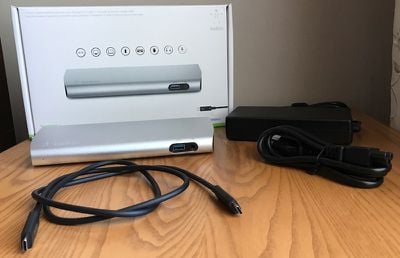
Belkin's Thunderbolt 3 Express Dock HD is launching this Monday, June 5 (exact time still to be determined), and will be available directly from Belkin and through Apple, as well as from other select retailers, but we've already had a chance to spend a little time with it to see how it compares to the competition.
The Belkin Thunderbolt 3 Express Dock HD is fairly stylish, with a horizontal design constructed primarily of aluminum and tapering slightly back to front in both horizontal and vertical dimensions. The sides and rear port panel of the dock are a glossy black plastic that come with a clear plastic protection film that's surprisingly difficult to get a fingernail under to remove.
At 8.17 inches maximum width by 3.4 inches deep by a maximum of 1.2 inches high, it has the same general footprint as OWC's dock and CalDigit's TS3 Lite. The silver aluminum finish complements silver MacBook Pro machines well, and the darker gray Belkin logo and word mark in the front corner of the top are not overly distracting. A small LED near the left side of the front glows orange when there is power to the dock and turns green when the dock is connected to a computer.

As with other docks, Belkin's offering comes with a fairly large external power brick that rivals the dock itself in size, although it can usually be tucked away a bit. Belkin also includes a 1-meter Thunderbolt 3 cable in the box.
Like the CalDigit TS3 and Elgato's upcoming dock, Belkin's dock supports up to 85 watts of charging power over its Thunderbolt 3 cable, enough for not only the 13-inch MacBook Pro but also its larger 15-inch sibling. Docks with lower ratings, such as OWC's at 60 watts, may be unable to keep up sufficiently with a 15-inch MacBook Pro under heavy load.
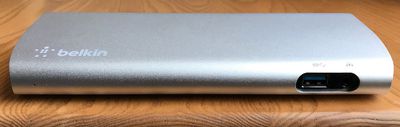
One area where Belkin's dock comes up a bit short is in the array of ports offered. The front of the dock includes a single USB 3.0 (5 Gbps) Type-A port and a combined audio in/out port for easy access. The rear of the dock hosts a Gigabit Ethernet port, an audio port, two more USB 3.0 Type-A ports, a pair of Thunderbolt 3 ports, and a DisplayPort port. It's a basic set of options that may be sufficient for many users, but there aren't any advanced options here as seen on some other docks, and something as simple as a few more USB ports would have been nice to include.
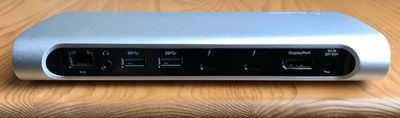
As with other Thunderbolt 3 docks, Belkin's dock can support a single 5K display or dual displays at up to 4K resolution using a combination of one Thunderbolt 3 port, the DisplayPort port, and any necessary adapters.
Priced at $349.99, Belkin's dock is a bit more expensive than most of the other flagship models, which tend to come in at around $300, although Belkin's previous docks have frequently been available at less than list prices through Amazon and other retailers, so we'll have to wait and see whether that premium based on list prices can be overcome once it launches.
At the full $350 list price, it's hard to recommend the Belkin dock over other options though, especially since its array of ports is more on par with the $200 TS3 Lite from CalDigit than the $300-level docks that include additional ports such as an SD card slot, FireWire, eSATA, or extra USB ports.
The full 85-watt charging support is a welcome inclusion, which helps separate the Belkin dock from some other competitors. It's also a pretty good looking dock, with the subtle tapers in multiple dimensions and smooth curved aluminum body offering a sleeker look compared to some other simpler or more industrial looking designs.
Despite its drawbacks, Belkin's dock performs well for the features it has and is likely to be a popular option given the company's reputation for quality and its close relationship with Apple that should see prominent placement in Apple retail stores and at Apple.com.
Update: This review has been updated to remove a comment about the USB ports supporting stand alone charging even when there is no data connection to a computer. After additional testing, it appears this is not the case.
Note: Belkin provided the Thunderbolt 3 Express Dock HD to MacRumors free of charge for the purposes of this review. No other compensation was received.






















Top Rated Comments
Whereas a USB hub just splits a USB "input" between several outputs, a Thunderbolt dock contains a Thunderbolt controller to extract PCIe and DisplayPort signals, and an internal PCIe bus to which are attached USB controllers, SATA controllers (in some docks) and maybe Ethernet and Sound controllers (I dunno if those are driven from PCIe or hang off an internal USB port - if you have one you could probably tell from System Report).
Unless you really need the full bandwidth of Thunderbolt 3, most users would probably be better off going with cheaper USB-C stuff, especially if you primarily want more USB ports. The wheels come off USB-C if you want to run a 4k display at 60Hz - which, on a single USB-C connection, only leaves enough bandwidth for USB 2. Still, if you've got 4 TB3/USB-C ports on your MBP you could always run your displays direct from the machine and use a USB-C dock for charge, USB and ethernet.
My 2011 MBP is dying and I am finding it very, very hard to justify the price of a new MPB when it has less options than my current 6 year old computer. . .
Far from it. DisplayPort is the preferred protocol for computer monitors. The reason they are better on docks is that it's easier to go from Displayport to HDMI than HDMI to Displayport with adapters. HDMI 1.4 also doesn't support 4K @ 60.
The executives we've been testing this with don't have 4K monitors as far as I know. But I believe one of them is using it just fine with a 27" Thunderbolt display.
I am using a 4K monitor at home at 60hz and am using a 2016 MBPro USBC-HDMI adapter. It works fine.
They have lower wattage output maybe than the more expensive docks, though. So maybe that means that they won't charge the battery as fast?