

Smart home accessory maker Aqara today launched the Doorbell Camera Hub G410, which integrates with HomeKit and offers HomeKit Secure Video Support.
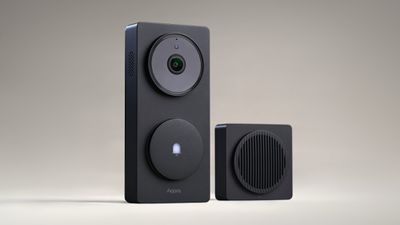
I was able to test the Doorbell Camera Hub G410 ahead of launch, and it's a solid doorbell camera, and even better if you have an Aqara setup or plan to get more Aqara products. The G410 includes a Matter controller and it is able to serve as a hub for other Aqara Zigbee devices, like Aqara's door locks, so you don't need a standalone hub that doesn't serve another purpose. For Thread-based devices, it's also a Thread border router that can improve connectivity.
Aqara's camera has a unique look that sets it apart from other cameras like Ring. It has a simple, sleek look with a large main camera and a button that can be pressed to ring the doorbell below. If you have the wiring for a doorbell set up, you can use that to power it, or you can use 6 AA batteries that come with it. There are also multiple options for mounting, including a sticky backing or screws. Aqara includes a wedge plate that can be used to angle the doorbell out from the wall if needed. I don't know the IP rating of the G410, but it has survived rain and heat with no issue.
6AA batteries is a lot of batteries, so a wired connection might be the best option. I haven't had the doorbell long enough to get a good feel for how long the battery lasts, but Aqara says the batteries should be good for up to five months. Other camera systems like Ring include a rechargeable battery, but with the Aqara doorbell, you'll need to keep standard AA batteries on hand. That can be a good thing or a bad thing depending on whether you prefer standard batteries or a proprietary battery pack. To get to the batteries, you need to unscrew the backing from the side, which is an extra step during replacement that's inconvenient.
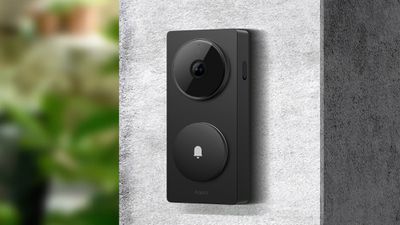
Setup requires connecting the Chime to the Aqara app, then following the steps to pair the doorbell. From there, it can be added to HomeKit through the Aqara app's settings. This is a HomeKit Secure Video camera when linked to HomeKit, so it respects those settings. You can choose different recording modes for when people are home and when people are away, turning off video recording entirely if you want. Facial recognition is also supported, and it can detect people who are stored in the People album of your Photo Library.
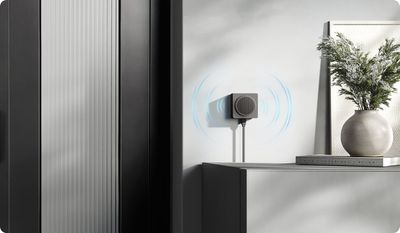
There's a Chime that is included with the G410, and that's the hub component. It needs to be plugged in all the time, and you need to supply your own power adapter. Unlike the accompanying chime from Ring, Aqara's model attaches to a surface using mounting tape that's included. The Chime and the G410 both play a sound when the doorbell is pressed, so you can position the Chime anywhere inside to be able to hear the doorbell.
The video feed is wide-angle with a 176 degree field of view that captures most of what's around it. It's 2K video, and it's fairly crisp in good lighting, but it's nothing outstanding. It's comparable to Ring video footage. When the doorbell is on and recording, the light on it turns red. When it's off, there's no light. The light can be turned off in the settings.
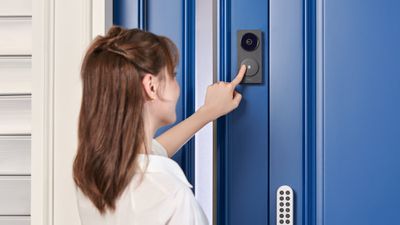
The button to sound the doorbell is satisfying to press, and it's larger and easier to press than buttons on Ring doorbell cameras. Volume and tone of the doorbell can be customized, and you can even upload your own MP3 sound.
There's a motion detection option that can be paired with other devices, as well as alarms that will sound if it's over or under operating temperature outside (-4 to 122 degrees Fahrenheit). You can also set up automations with other HomeKit devices in the Home app, or in the Aqara app with Aqara devices. If you have an Aqara lock, for example, the doorbell camera can be set to start recording when the lock is accessed.
At night, there's an infrared night vision option. It's not the clearest video ever, but it's adequate to see what's going on around your home if someone is close. I appreciate that there are two versions of night vision, one that's the standard black and white and a second that turns on a light to capture color. Select areas can be excluded either in the Home app or the Aqara app, and audio recording can be turned off if desired.
Face detection, lingerer detection (for when someone is approaching), doorbell ringing, and tamper detection are all Aqara app settings that the doorbell can detect. Facial recognition is done on device with no data uploaded to Aqara or Apple, though there is an option to save recorded videos to the cloud when a face is detected. For when you don't want the doorbell to ring, there is a do not disturb option. If you're in an area that your doorbell is at risk of being stolen, there's a tamper alarm and a setting that prevents it from being reset without the Aqara app.
Aqara says there's a mmWave sensor that can better detect people while filtering out other movement, and I haven't seen it struggle, but my Ring cameras also don't have a problem with person detection so I'm not sure how to judge the sensor. There is a built-in microphone and sensor so you can converse with someone that comes to the door. There are also robot, clown, and anonymous voice options if you want to disguise your voice for some reason. Video recording seems to start when motion is detected, and the live view loads within a couple of seconds when you open up the app.
While Aqara supports cloud-based storage, both through HomeKit Secure Video and through the Aqara HomeGuardian service, local storage is also an option. The doorbell takes a microSD card (up to 512GB) and video can be saved locally. The microSD card is in the Chime that's inside the house, so it can't be tampered with. Having Aqara's paid cloud service and HomeKit Secure Video is confusing, but if you want to use the G410 with HomeKit and have a paid iCloud plan for HomeKit Secure Video, you don't need HomeGuardian. If you don't use HomeKit or have HomeKit Secure Video, you can only use local storage unless you pay for HomeGuardian.
Aqara provides a free 30-day trial, but it does cost $4.99 per month for one camera or $9.99 for multiple cameras, with yearly purchase options also available. With HomeGuardian, there's continuous recording and 90-day storage for footage, but that footage is stored on Aqara's servers rather than in iCloud or locally. I don't think HomeGuardian is absurdly priced or anything, but I do think it's confusing for consumers in conjunction with HomeKit Secure Video. Aqara doesn't do much to explain HomeKit Secure Video in the Aqara app, or how it can be used as an alternative to HomeGuardian.
Given that this is an Apple-focused site, most people here are probably going to want to use the G410 with HomeKit and the HomeKit Secure Video functionality rather than Aqara's paid solution. Almost all HomeKit Secure Video cameras have a wired connection, but the G410 can be battery operated, and as far as I know, there aren't many HSV cameras that are able to do that.
The timeline for events in the Aqara app is easy to use to find what you're looking for, with multiple view options and filters. It doesn't have alerts for animals, vehicles, or package deliveries, but HomeKit Secure Video does that if you're looking for that functionality.
Bottom Line
Aqara's Camera Hub G410 is an affordable video doorbell, with an option to use HomeKit Secure Video or local storage. If you have other Aqara products, want a HomeKit Secure Video doorbell, or if you're just looking for a reasonably priced video doorbell, the G410 is worth considering.
How to Buy
The Aqara Doorbell Camera Hub G410 in black or gray can be purchased from the Aqara website for $130 with a 1-month HomeGuardian plan included. There's also a G410 Select model that's available for $135, and it includes a 3-month HomeGuardian free trial. The Select model comes in black or white.





















Top Rated Comments